
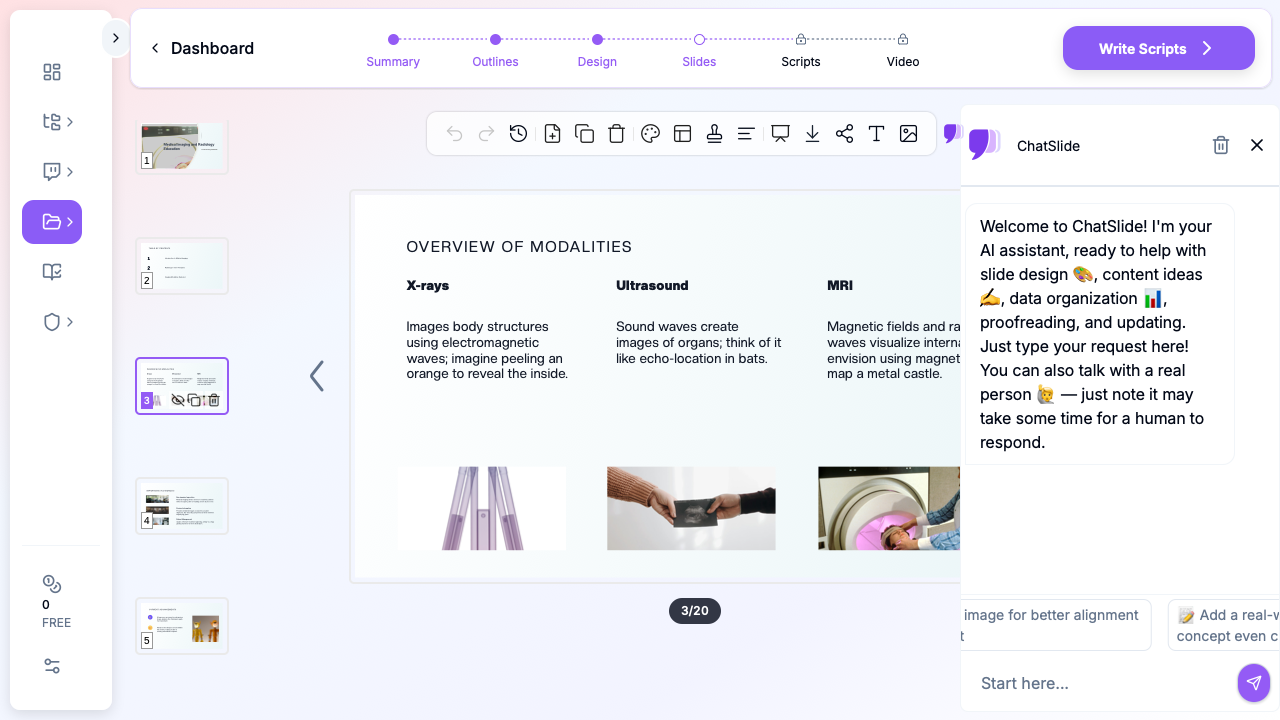
Quick Answer: Radiology decks should be case-driven, not paragraph-driven. Use a 5-block layout: (1) Clinical context (patient demographics, indication), (2) Imaging technique (modality, protocol, contrast), (3) Findings — annotated images with arrows/measurements, (4) Differential diagnosis + final read, (5) Teaching pearl + references. Limit text to <30 words per slide so the image dominates. ChatSlide accepts DICOM-exported PNGs and PubMed papers, auto-generates the case-review layout, and supports side-by-side modality comparisons (MRI vs CT, etc.).
Why Radiology Presentations Need Better Tools
Radiologists and imaging specialists live in a visual world, yet their presentation workflows remain surprisingly manual. Whether you're presenting a mammography technique update at a breast imaging conference, leading a radiology teaching file session, or preparing a medical imaging lecture for residents, you need slides that organize complex visual and technical information clearly.
The radiology presentation challenge is distinct from other medical specialties. Imaging presentations rely heavily on case-based teaching, modality comparisons, and protocol explanations that require careful visual layout. A presentation on contrast-enhanced mammography, for instance, needs to explain the physics of dual-energy acquisition, present clinical indications, and showcase diagnostic examples — all structured for a time-limited conference slot.
Where Radiology Presentations Are Used
Conference and Society Presentations
Radiologists present at RSNA, ECR, ARRS, and subspecialty meetings covering topics from AI-assisted diagnostics to novel imaging techniques. Scientific presentations require structured slides that move from clinical question through methodology to imaging findings, with space for representative case images.
Subspecialty conferences — breast imaging, neuroradiology, musculoskeletal radiology, interventional radiology — demand even more focused presentations where the audience expects deep technical knowledge and state-of-the-art protocol details.
Teaching File and Case Review Sessions
Radiology residency programs hold daily readout sessions and weekly teaching conferences where attendees review imaging cases. These presentations organize cases by pathology or imaging finding, with structured differential diagnoses and teaching points for each case.
Teaching file presentations follow a pattern: clinical history, imaging findings on sequential modalities, differential diagnosis, final diagnosis, and key learning points. This format repeats across multiple cases within a single session.
Technique and Protocol Education
When a department adopts new imaging protocols — a new MRI sequence, an updated CT dose reduction technique, or a novel contrast agent — someone needs to create a training presentation. These slides cover technical parameters, clinical applications, workflow changes, and quality assurance metrics.
Protocol comparison presentations help clinicians understand when to order one imaging study versus another, covering sensitivity, specificity, radiation dose, cost, and patient factors for each modality option.
Quality Assurance and Accreditation
Radiology departments maintain accreditation through organizations like the ACR. QA presentations track metrics like report turnaround times, critical findings communication rates, peer review concordance, and dose index tracking — all requiring clear data visualization and trend analysis.
Creating Radiology Presentations with ChatSlide
Step 1: Define Your Imaging Topic
Enter your specific radiology topic with clinical context. Instead of "mammography," try "Contrast-enhanced spectral mammography: technique, clinical indications, and diagnostic performance compared to conventional mammography and MRI." Include your audience — conference attendees expect different depth than medical students.
Step 2: Structure the Presentation
ChatSlide generates an outline appropriate for medical imaging content. For a technique presentation, expect sections covering: clinical rationale, physics and technical principles, acquisition protocol, interpretation approach, clinical applications, and limitations.
Adjust the structure based on your presentation type. A case-based teaching session needs more slots for individual cases, while a research presentation follows the standard introduction-methods-results-discussion format.
Step 3: Import Research with Built-In PubMed Search
ChatSlide includes integrated PubMed search, so you can find and import radiology literature directly inside the platform. Preparing a talk on contrast-enhanced mammography outcomes? Search PubMed within ChatSlide, select the relevant studies, and the AI pulls key findings, sensitivity/specificity data, and citations into your presentation.

The platform also connects to Google Scholar and ClinicalTrials.gov — useful for imaging trials comparing modality performance or evaluating new contrast agents. You can also upload PDFs of research papers, ACR practice parameters, imaging protocol documents, or scanned journal articles (OCR is included for printed materials).
This is especially valuable for radiology, where presentations often synthesize findings from multiple imaging studies. Instead of manually extracting data from each paper, the AI handles the synthesis while preserving technical imaging terminology.
Step 4: Generate Clinical Content
The AI creates structured slide content for each section. For radiology topics, this includes relevant imaging physics, diagnostic criteria, and clinical decision frameworks. The content provides a strong foundation that you'll enhance with your own case images and institutional data.
Verify technical details — imaging parameters, sensitivity/specificity values, and ACR appropriateness criteria — against current guidelines and your department's protocols.
Step 5: Plan Image Integration
Radiology presentations are inherently visual. ChatSlide provides the structural framework and stock medical imagery, but you'll want to add your own de-identified case images, annotated findings, and protocol screenshots. The generated slides create placeholder spaces where clinical images naturally fit.
For technique presentations, plan slides that show step-by-step acquisition setup, post-processing workflows, and side-by-side modality comparisons with your department's actual cases.
Step 6: Export and Customize
Export to PowerPoint to insert your DICOM-derived images, add institutional branding, and apply conference-specific templates. Most radiology conferences have strict formatting requirements for scientific presentations — handle these in the final PowerPoint edit.
Direct Research Database Access
ChatSlide's Research tab connects to the databases physicians use daily:
- PubMed: Search by keyword, PMID, or DOI. Find the landmark trials, recent publications, and clinical guidelines relevant to your case. The AI reads abstracts and incorporates key findings into your slides with citations.
- Google Scholar: When your topic spans disciplines — say, the intersection of genetics and oncology — Scholar captures the broader academic literature that PubMed alone might miss.
- Clinical Trials (NCT): Presenting on a treatment where pivotal trials are ongoing? Search by NCT number or condition to pull trial design, endpoints, and status into your slides.
Tips for Radiology Presentations
Optimize images for projection. Radiology images often have subtle contrast differences that disappear on conference projectors. Increase window width and adjust brightness for the presentation environment. Dark room viewing at a workstation is very different from a lit conference hall.
Annotate consistently. Use arrows, circles, or measurement calipers consistently throughout your presentation. Pick one annotation style and color scheme and stick with it so your audience learns your visual language.
Compare modalities side by side. When discussing diagnostic performance, show the same pathology on different imaging modalities (e.g., mammography vs. ultrasound vs. MRI) on a single slide. This visual comparison is more impactful than listing sensitivity numbers.
Include key protocol parameters. For technique presentations, include a summary slide with specific acquisition parameters (kVp, mAs, slice thickness, TR/TE, b-values) that attendees can photograph and reference later.
Keep text minimal on case slides. For case-based presentations, let the images speak. A case slide should have the clinical history, the image, and minimal annotation. Save the teaching points for the follow-up discussion slide.
Better Presentations, Better Education
Radiology education depends on clear, well-organized presentations that convey complex imaging concepts effectively. Whether you're a breast imaging specialist presenting mammography advances at a national conference, a radiology resident preparing your first teaching file session, or a department chair creating protocol training for a new imaging technique, AI-powered presentation tools help you build the structural foundation faster.
The time saved on slide organization is time you can spend curating the perfect case images, refining your teaching points, and practicing your delivery.
Create your radiology presentation with ChatSlide today.
A note on patient data and HIPAA. ChatSlide's standard plans are not a HIPAA-covered service — keep PHI out of slide content, prompts, and uploads. For hospital systems, group practices, and clinics that need a Business Associate Agreement, our Enterprise plan offers HIPAA-compliant deployment options — contact us to discuss BAA terms, SSO, and private-cloud or on-prem hosting.