
Quick Answer: ChatSlide is the AI presentation maker workforce boards, job training providers and social service agencies use to turn a policy manual into case manager training. Upload your policy, guidance letter or monitoring report, set the audience, and get one deck per topic: eligibility documentation, employment plans, case notes, follow-up, on-the-job training and responding to findings, with speaker notes. It is used by teams at 750+ universities and by 300,000+ professionals, respects an exact slide count, and exports to PowerPoint, PDF or a narrated video. Free to start, no card required.
The Case Manager Training Problem
New case managers inherit a stack of rules: a federal regulation, a state policy, a local procedure, and a monitoring report that says what went wrong last year. The rules change, staff turn over, and the training deck is usually one long file somebody built three program years ago.
Most of what goes wrong in a file is ordinary. A date of birth was checked but not recorded. A service was delivered but the note does not say why. A follow-up contact happened and nobody wrote it down. Those are training problems, and they are best taught one topic at a time, with an example of a weak record next to a strong one.
That means a series, not a single deck: short modules a new hire can finish in order and a supervisor can reassign after a finding. Building a series by hand is why the old deck never gets replaced.

What Makes ChatSlide Powerful for Case Manager Training
Your policy is the source
Upload the state policy, the local procedure, the guidance letter or last year's monitoring report. The deck is built from those files, so the terms and the steps follow your program. A deck made from a topic alone is generic, as our demo below shows.
One module per topic, in the same shape
Give the same section order for every module (the rule, what counts as documentation, a weak and a strong example, common findings, self-check). Eligibility, case notes and budget modifications then read like one course.
The audience field sets the depth
Write "new case managers, first week" and the deck explains why each record exists. Write "experienced staff, annual refresher" and it moves to what changed and what monitors keep finding. Same source, one regeneration.
Exact slide count, outline first
"Twelve slides for a 20-minute module" is followed as written. You review and reorder the outline before any slide is drawn, so every required point has a home.
Speaker notes and a narrated version
Every slide gets speaker notes, and the finished deck exports as a narrated video. Staff in different offices can watch the same module, and a supervisor can reassign it after a finding without scheduling a session.
Files your agency can keep editing
Export to PowerPoint when the policy changes and edit the one slide affected, or export to PDF for the training record.
How ChatSlide Builds Your Training Series
- Upload what governs the topic. The policy section, the local procedure and any finding you want to address.
- Say who it is for and how long you have. "20-minute module for new case managers on writing case notes, with one weak and one strong example per rule" is a usable instruction.
- Review the outline. Check that each required element in your policy has a section, and add your local forms.
- Generate, then check it against the policy. Slides, images and speaker notes come back together. Compare every age limit, percentage and deadline with your source, then export to PowerPoint, PDF or a narrated video.
What Our Demo Deck Got Right and Wrong
We built the deck in the screenshot above from a topic alone, with no uploaded policy: six sections, 20 slides. The case note comparison is the strongest slide. "Participant is unreliable and does not care about work" sits next to a note saying the participant missed a lab, reported a childcare cancellation and chose a new date. That is the lesson, in one view.
Three things needed a human:
- No rule citations. With no source uploaded, the deck never named a regulation or a program. It teaches good habits, not your rules. Upload the policy if the module has to be compliance training.
- Invented people. The examples used made-up participants (Maya, Jordan, Rafael). Fine for a demo. Before you use them, confirm none matches someone in your caseload, and never replace them with real participants.
- Weak stock images. The slide on monitoring findings came back with a photo of an empty office. It does no harm and teaches nothing, so swap it for your own form or a screenshot of your case management system with the data blanked.
Use Cases for Case Manager Training Presentations
New hire onboarding. Challenge: weeks of policy before a first caseload. Split the manual into short modules and assign them in order. For the general structure see the employee onboarding guide.
Workforce program staff. Challenge: eligibility, employment plans, training approval and follow-up all have their own rules. One module per rule, from your state and local policy.
Responding to a monitoring finding. Challenge: corrective action often requires retraining, and it has to be done quickly. Upload the finding and the policy, and ask for one short module on what the record should have shown.
Fiscal and provider oversight. Challenge: program staff and finance staff read budget modifications and allowable costs differently. One shared deck per topic for both teams. For mandatory annual courses see the compliance training guide.
Social service and nonprofit case management. Challenge: part-time staff and volunteers need the same basics on documentation and boundaries. Set the audience to match. For volunteers see the volunteer training guide.
Hospital and health plan case managers. Challenge: care coordination, discharge planning and utilization review have their own language, and patient data must stay out of the deck. See the nursing leadership guide and the research and patient data notes below.
Building by Hand vs. Building With ChatSlide
| Blank PowerPoint | ChatSlide | |
|---|---|---|
Start from your policy file | Copy and paste | Upload it |
Same structure across modules | Rebuild each time | Ask for the section order, or reuse an outline |
Speaker notes | Write each one | Generated for every slide, then edited |
Narrated video for other offices | Record it yourself | Export from the deck |
Update after a policy change | Find and edit | Edit the slide, or regenerate the module |
Checking every rule against the source | Your job | Still your job |
What Strong Workforce Program Training Covers
If your program runs on the federal Workforce Innovation and Opportunity Act (WIOA), these are the rules most modules point back to. They are the federal baseline as of November 2026. State and local policy adds to them, so train from your own policy and use these as the citations to check.
Youth eligibility. An out-of-school youth is 16 to 24 at enrollment, not attending school, and meets at least one listed condition. An in-school youth is 14 to 21 at enrollment (with an exception for some individuals with disabilities), attending school, low-income, and meets at least one listed condition. Age is judged at enrollment, so a participant can keep receiving services after passing the limit. Teach staff to record the document that proves each element, plus the date it was checked.
Selective Service. The enforcement requirement sits in WIOA sec. 189(h), by way of 20 CFR 683.225. Use your state's policy for who must show what.
Assessment and the plan. For adults and dislocated workers, individualized career services include an individual employment plan that sets goals, achievement objectives and the combination of services. For youth, the program builds and updates an individual service strategy from an objective assessment. The training point: every service in the file should trace back to a line in that plan.
Case notes. Date, contact method, what was observed or reported, what was offered, and the next step with a name and a date. A label such as "unmotivated" records an opinion, not an event. The weak and strong pair above works as a whole module.
On-the-job training. Employers may be reimbursed up to 50 percent of the participant's wage rate for the extra cost of training and supervision, and do not have to document those costs. The rate can rise to 75 percent when the Governor or Local Board applies the listed factors, including participant barriers and employer size.
Youth incentives. Incentive payments are allowed for recognition and achievement tied directly to training and work experience. They need written local policies, must be tied to program goals, and must be set out in writing before the program starts. This one fits on a single slide and prevents an easy finding.
Follow-up. For adults and dislocated workers placed in unsubsidized employment, follow-up services must be made available, as the Local Board determines appropriate, for at least 12 months from the first day of employment. For youth, follow-up must be provided for at least 12 months unless the participant declines or cannot be located. Teach staff to record failed contact attempts too, because that is the evidence for "cannot be located."
Performance and data quality. Show staff how their entries feed the primary indicators of performance: employment in the second and fourth quarters after exit, median earnings, credential attainment and measurable skill gains (for youth, education or training also counts toward the quarterly measures). States must also keep procedures that make reported data valid and reliable. A wrong exit date is not just a typo once staff see where it goes.
Monitoring and records. Pass-through entities assess each subrecipient's risk and monitor accordingly. Federal award records are kept for three years from the final financial report, and longer while litigation, claims or audit findings remain open. Check whether your state sets its own schedule for participant files.
Research for Health and Social Service Case Management
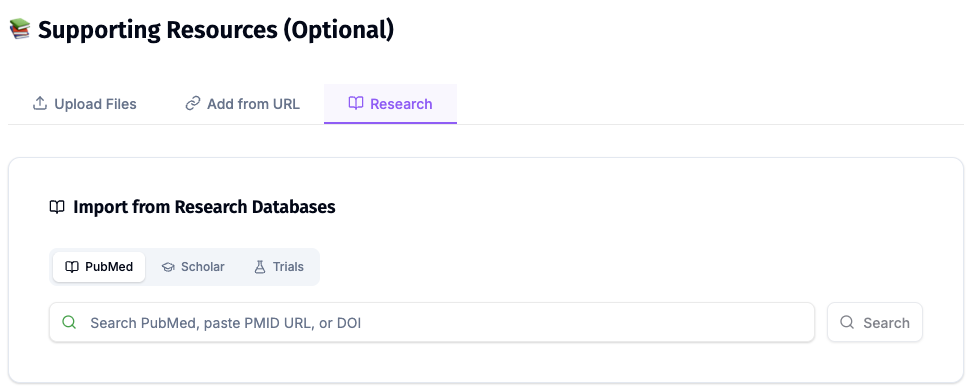
ChatSlide's Research tab searches PubMed and Google Scholar from inside the editor, so a slide on care transitions or case management outcomes can carry the citation behind it. Search by keyword, PMID or DOI and keep each reference on the slide that uses it.
Best Practices
Do:
- Upload the current policy, and put its effective date on the first slide.
- Keep each module to one topic and one time slot.
- Show a weak record and a strong record for every rule.
- Add a short self-check at the end of each module.
- Have a policy lead sign off each module before staff see it.
Don't:
- Do not upload real participant files, Social Security numbers, wage records or case notes. Write fictional examples.
- Do not treat a generated age limit, percentage or deadline as correct until you have compared it with the source.
- Do not train from federal rules alone when your state or local policy is stricter.
- Do not leave an old module live after a policy change. Replace the file everyone is linked to.
Case Manager Training Across an Agency
Workforce boards, state agencies and multi-site providers train the same rules across offices and contractors, often from decks that have drifted apart. ChatSlide Enterprise adds SSO, centralized team billing, shared brand templates and team collaboration on one deck library, so the eligibility module one office teaches is the one the next office teaches. Contact us to set it up.
Note on patient data: ChatSlide's standard plans are not a HIPAA-covered service, so keep PHI out of slide content and uploads. For hospital systems, health plans and clinics that need a Business Associate Agreement, our Enterprise plan offers HIPAA-compliant deployment options, contact us to discuss BAA terms, SSO, and on-prem or private-cloud hosting.
Frequently Asked Questions
Can it make a WIOA case manager training presentation? Yes. Upload your state or local WIOA policy and name the topic, such as youth eligibility or case notes, and the deck follows that document. Check every rule against the source before you train from it.
Is the content in the generated slides compliant? No tool can promise that. In our demo, built from a topic alone, the deck cited no rules at all. Upload your policy, compare the draft with it, and have your policy lead sign off.
Can I make a whole training series with the same layout? Yes. Give the same section order in each prompt, or reuse the outline from your first module, and apply the same design.
Can staff watch the training without a live session? Yes. Export the deck as a narrated video and share it, or export to PowerPoint or PDF for your own training system.
Can I upload participant case files to make examples? Do not. Write fictional examples, and keep names, Social Security numbers, wage records and case notes out of prompts and uploads.
Does it work for hospital or nonprofit case management? Yes. The same method works from your own policies. Keep patient and client information out of the slides, and talk to us about Enterprise if you need a Business Associate Agreement.
Is it free? Yes, free to start with no card required. Paid plans add higher limits and more export options.
What languages does it support? The interface runs in 30+ languages, and decks can be generated in the language your staff or participants speak.
Get Started
Upload one section of your policy, name the audience and the time slot, and let ChatSlide build the first module while you spend your time checking it against the rule.
Make your case manager training presentation with ChatSlide →: free to start, no credit card required.