
Quick Answer: ChatSlide is the fastest way for CDL instructors, trucking schools, and CTE programs to build entry-level driver training (ELDT) theory slides. Drop in your FMCSA ELDT curriculum, a state CDL manual PDF, or just a topic — "Air brake systems for Class A applicants" — and the AI generates a structured, image-rich deck in under two minutes. Covers the full ELDT theory sequence (pre-trip inspection, basic control, air brakes, hours-of-service, cargo securement, endorsements), exports to PowerPoint and Google Slides, and rebuilds instantly when FMCSA rules change. Used across schools, community-college CTE programs, and fleet driver academies. Free to start, no card required.
The CDL Instructor's Problem
Teaching someone to earn a commercial driver's license is high-stakes, heavily regulated, and repetitive to prepare for. Since FMCSA's Entry-Level Driver Training (ELDT) rule took effect, the theory portion of every Class A and Class B program — and every hazmat, passenger, and school-bus endorsement — has to be delivered by a registered Training Provider Registry (TPR) provider and must cover a defined list of topics. That means instructors rebuild the same lecture decks over and over: vehicle inspection, basic control, shifting, backing, space management, air brakes, hours-of-service, cargo, hazard perception, and the endorsement modules.
The content rarely changes fast, but the audience does. A new Class A applicant needs the fundamentals from zero. A driver upgrading from Class B needs a targeted subset. A hazmat endorsement class needs an entirely different module. And when a state manual updates or FMCSA revises a rule, every affected slide has to be found and fixed.
ChatSlide collapses that prep. Give it your existing manual, an outline, or a topic, and it builds a training-ready, visual deck you can teach from or hand to students — then re-spins it the moment something changes.
Building ongoing fleet safety refreshers instead? If your audience is already-licensed drivers and you need defensive-driving, DOT, or insurance-mandated safety training rather than entry-level CDL licensing curriculum, see our companion guide: AI Driver Safety Training Slides: Fleet & DOT. This page is about the get-your-CDL pathway; that one is about keeping licensed drivers safe on the road.
What Makes ChatSlide Powerful for CDL Training
Turn your existing manual into slides
Most instructors already have the content — a state CDL handbook, an ELDT curriculum binder, or a stack of old PowerPoints. Upload a PDF, DOCX, or slide file and ChatSlide reads it, extracts the structure, and rebuilds it as clean, teachable slides. No retyping the air-brake checklist for the tenth year.
Three input modes
Start from a topic ("Pre-trip inspection: the three-part method"), from an uploaded document (your ELDT theory outline), or from a longer prompt describing exactly the module and applicant class you're teaching. The AI adapts the depth and vocabulary to entry-level learners.
Visual, low-text slides for the classroom
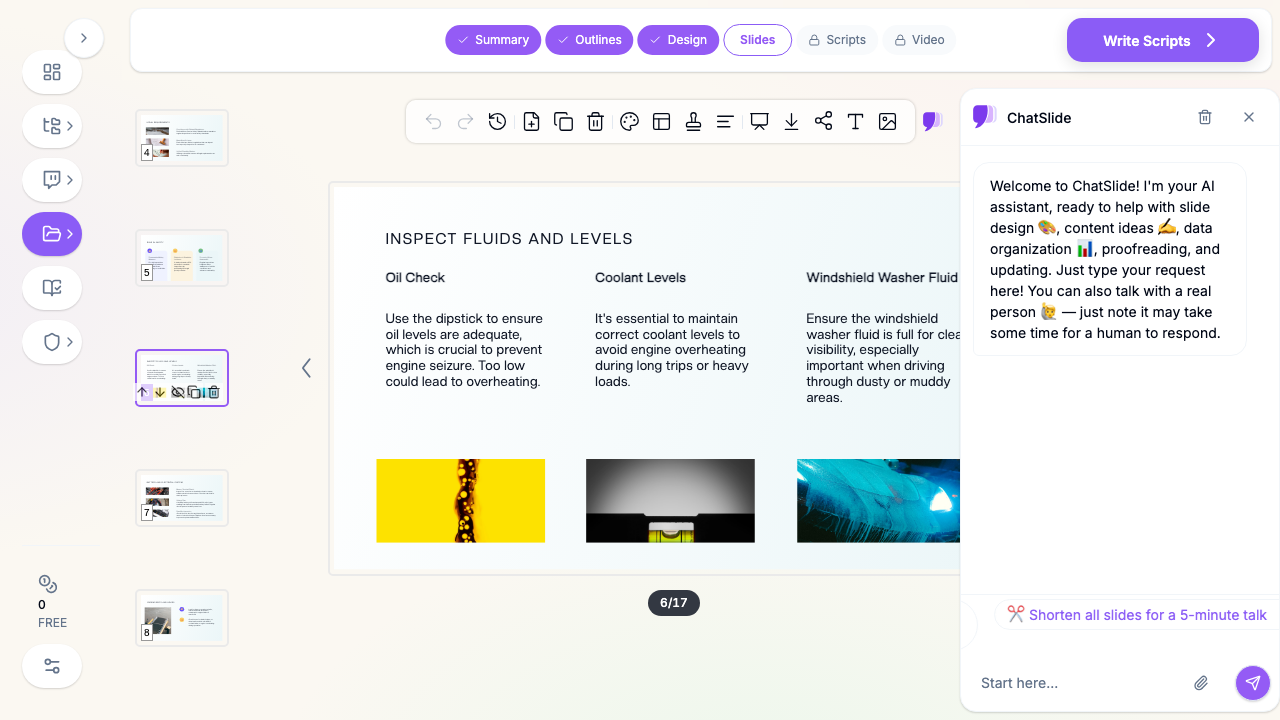
CDL students learn on tablets, in break rooms, and in noisy training bays. ChatSlide auto-lays out big diagrams, real photos (engine compartment, air-brake components, trailer coupling), and short bullets instead of dense paragraphs — so a slide reads at a glance from across the room.
Speaker notes for consistent delivery
Every slide can carry instructor notes, so a second trainer or a substitute delivers the same accurate lesson. Useful when a school runs multiple cohorts with different instructors and needs the theory portion taught identically for compliance.
Endorsement-specific modules on demand
Hazmat, passenger (P), school bus (S), tanker (N), and doubles/triples (T) each need their own theory content. Ask for the endorsement module you're teaching and ChatSlide generates just that unit — no wrestling one giant deck.
Rebuild instantly when rules change
State manuals and FMCSA guidance update. Rather than hunting through 30 slides, re-generate the affected section with the new rule and re-export. The deck stays current without a full rebuild.
How ChatSlide Builds Your CDL Training Deck
- Upload or describe. Drop in your ELDT theory outline, a state CDL manual PDF, or type the module topic and applicant class.
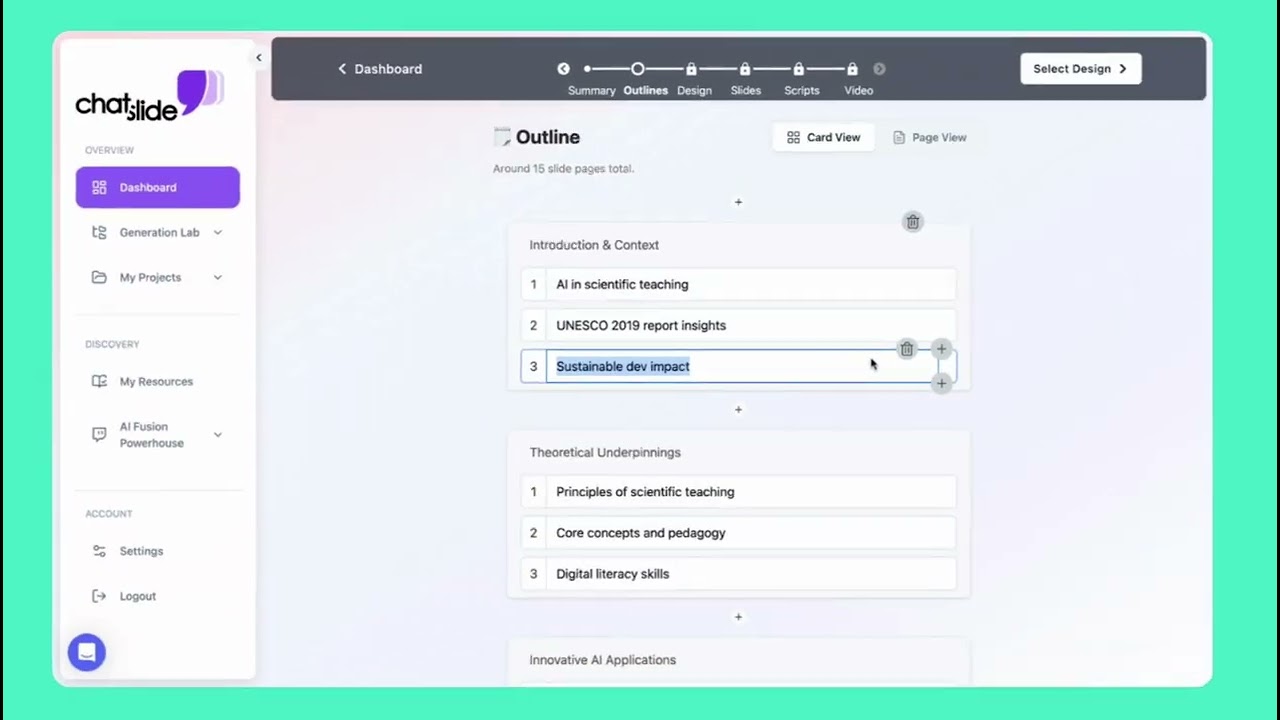
- Review the outline. ChatSlide proposes a section structure (e.g., Inspection → Basic Control → Air Brakes → Space Management → Endorsements). Reorder, add, or cut sections before generating.
- Generate slides + visuals. The AI writes each slide, adds relevant photos and diagrams, and drafts speaker notes.
- Edit and export. Tweak wording with the AI editing tools, then export to PowerPoint, Google Slides, or PDF for the classroom or the TPR record.
Use Cases for CDL Programs
Trucking school (Class A entry-level). Challenge: a rolling admissions model means a new cohort starts every few weeks and the full theory sequence must be taught each time. How it helps: one master deck per module, re-exported per cohort, taught identically by any instructor. Time saved: ~8 hours of deck prep per cohort.
High-school / community-college CTE program. Challenge: a career-and-technical-education CDL pathway needs semester-long, standards-aligned lecture slides that hold teenage and adult learners' attention. How it helps: image-heavy, low-text slides plus speaker notes for classroom pacing. Time saved: a semester's worth of lecture-building compressed into an afternoon.
Endorsement upgrade class (hazmat / passenger / school bus). Challenge: each endorsement has distinct theory requirements and a smaller audience, so building dedicated decks feels uneconomical. How it helps: generate a focused endorsement module in minutes instead of hours. Time saved: ~3–4 hours per endorsement.
Fleet driver academy / in-house onboarding. Challenge: a carrier training new hires toward a CDL needs consistent, brand-able onboarding theory across terminals. How it helps: a standardized deck set, exportable and shareable across locations. Time saved: eliminates per-terminal deck drift.
Refresher / remedial theory. Challenge: a student who failed the general-knowledge or air-brakes portion needs targeted re-teaching. How it helps: pull just the weak module and re-teach from a focused deck. Time saved: no rebuilding a full course to re-cover one topic.
CDL Training Tools Compared (2026)
| ChatSlide | Generic AI slide makers | Manual PowerPoint | Static PDF manuals | |
|---|---|---|---|---|
Build a full module from your manual | Minutes, reads your PDF | Topic-only, ignores your source | 6–10 hours | N/A (already static) |
Real photos & diagrams auto-added | Yes | Sometimes, generic | Manual sourcing | Fixed images |
Instructor speaker notes | Auto-drafted | Rare | Manual | No |
Re-spin when a rule changes | Regenerate a section | Rebuild prompt | Manual edit hunt | Reprint |
Endorsement-specific modules | On demand | Generic | Manual | Bundled |
Export to PPTX / Google Slides / PDF | Yes | Varies | Native / N/A | PDF only |
Time Comparison: Manual vs. AI-Assisted
| Task | Manual build | With ChatSlide |
|---|---|---|
Outline a theory module | 1–2 hours | 2 minutes |
Draft 20 slides | 4–6 hours | Under 2 minutes |
Source photos & diagrams | 1–2 hours | Included |
Write instructor notes | 1–2 hours | Auto-drafted |
Update after a rule change | 1–2 hours | Regenerate section |
Total per module | 8–13 hours | Well under 1 hour |
What a Strong CDL Training Presentation Includes
Keep the theory portion anchored to what students must actually do on inspection day and on the road:
- Pre-trip inspection, taught as a repeatable method. The three-part inspection, engine-compartment checks, in-cab checks, air-brake check, and the walk-around — framed as a memorizable routine, not a list to cram.
- Basic vehicle control and space management. Backing, turning, following distance, and hazard perception, illustrated with scenarios rather than abstract rules.
- Air brake systems. Components, the air-brake check sequence, low-air warnings, and safe stopping — one of the most-failed knowledge areas, so it deserves its own visual module.
- Hours-of-Service and logbook basics. The core limits new drivers must understand before they ever run a route.
- Cargo securement and weight. Loading, weight distribution, and securement fundamentals.
- Endorsement theory as needed. Hazmat, passenger, school bus, tanker, doubles/triples — taught as separate focused units.
Every slide should point to a decision the driver will make: what to check, when to stop, how much space to leave.
Best Practices
Do:
- Teach inspection and air brakes as routines, with photos of the actual components.
- Use one idea per slide — students are learning from scratch.
- Keep speaker notes on every slide so any instructor delivers it the same way.
- Align section titles to your ELDT theory topic list so the deck doubles as coverage evidence.
Don't:
- Cram a full state manual page onto one slide.
- Mix multiple endorsement modules into a single deck.
- Rely on stock clip-art where a real photo of the equipment teaches better.
- Let a deck go stale after a rule update — regenerate the affected section.
For Schools and Programs at Scale
Running CDL training across multiple campuses, cohorts, or terminals? ChatSlide's team features help programs standardize: shared brand templates so every instructor's deck looks consistent, team collaboration so a curriculum lead can maintain the master modules, centralized billing, and SSO for larger institutions. For district CTE programs and multi-terminal carriers that need org-level controls, contact us to talk through team and admin options.
Frequently Asked Questions
Does ChatSlide make my program ELDT-compliant? No — compliance comes from being a registered Training Provider Registry (TPR) provider and covering FMCSA's required theory and behind-the-wheel content. ChatSlide is a tool for building the theory slides you deliver; it doesn't register you or certify your curriculum. Always align your content to the current FMCSA ELDT requirements and your state's rules.
Can it read our existing state CDL manual or ELDT binder? Yes. Upload a PDF, DOCX, or PowerPoint and ChatSlide extracts the structure and rebuilds it as editable slides.
Can I build endorsement modules (hazmat, passenger, school bus)? Yes. Ask for the specific endorsement and it generates a focused module rather than one oversized deck.
What can I export to? PowerPoint (PPTX), Google Slides, and PDF — so you can teach from it, share it, or keep it in your training records.
Is this different from driver safety training slides? Yes. This guide covers entry-level CDL licensing theory (getting the license). For ongoing defensive-driving and fleet/DOT safety training for already-licensed drivers, see AI Driver Safety Training Slides: Fleet & DOT.
Is it free? You can start for free with no credit card. Paid plans add more generations, exports, and team features.
Get Started
Stop rebuilding the same CDL theory decks every cohort. Upload your ELDT curriculum or type a module topic, and let ChatSlide generate a visual, teachable presentation in minutes — then re-spin it whenever the rules change.
Make your CDL training slides with ChatSlide — free to start, no card required.