
Quick Answer: ChatSlide runs the GPT-5.6 family directly in the slide editor, in three variants you can switch between per deck. Luna is free for everyone and generates a six-section deck in about 13 seconds. Terra is available on every paid plan for denser, more analytical decks. Sol is the Ultimate-tier reasoning model for the hardest material. You pick the model before you generate, and the same deck can be regenerated on a different one if the first pass is not right. It is free to start, and every deck exports to PowerPoint, PDF, and Keynote.
Picking a Model Should Not Be a Research Project
Most AI slide tools hide the model. You get whatever the vendor picked, and if the output is thin you have no lever except rewriting the prompt.
The opposite failure is just as common: a menu of eight model names with no guidance, where the only signal is that one of them sounds more expensive. So people reach for the biggest model every time, wait three times as long, and get a deck that is no better — because for most presentations the bottleneck was never raw reasoning.
ChatSlide takes the middle path. Three GPT-5.6 variants, one clear rule for when each is worth it, and the fast one available to everyone for free.
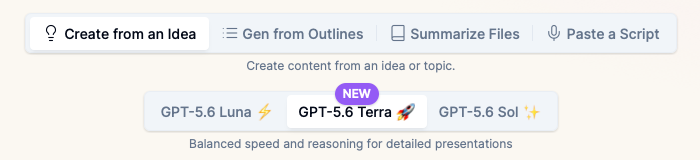
Which GPT-5.6 Variant Should You Use?
| **Luna** | **Terra** | **Sol** | |
|---|---|---|---|
Plan | Free, all tiers | All paid plans | Ultimate |
Speed | Fastest | Fast | Slowest |
Best for | Everyday decks, first drafts, iterating on structure | Analytical decks, dense source material, client-facing work | Technical depth, research, layered arguments |
Typical use | Class talk, team update, pitch outline | Quarterly review, market analysis, grant summary | Literature synthesis, technical design review |
The honest guidance: start on Luna. Generate, look at the outline, and only move up if the reasoning is genuinely too shallow for the material. Most decks never need to move. The variants are a dial for how hard the thinking is, not how good the slides look — layout, design, charts, and export are identical across all three.
When you do move up, the reason is usually one of these:
- The source material is long or technical, and the outline is flattening distinct ideas into one bullet.
- The deck has to hold an argument across sections rather than list topics.
- You are synthesizing several documents that disagree with each other.
What Makes ChatSlide Powerful with GPT-5.6
Switch models without starting over. The model is a per-deck choice, not an account setting. Generate on Luna, and if a section needs more depth, regenerate that deck on Terra or Sol. Your outline, uploads, and brand settings carry over.
The brief drives the model, not just a topic string. ChatSlide asks what the presentation should accomplish, who the audience is, and what they should decide or do. A stronger model only helps if it knows what it is arguing for — a one-line topic wastes Sol entirely.
Real charts from your own numbers. Upload a spreadsheet or paste figures and ChatSlide builds real charts with real axes, rather than decorative shapes with invented proportions. This is independent of the model you choose.
Document and OCR input. Upload a PDF, a scanned report, or a slide deck and ChatSlide extracts the text and tables so the model reasons over your material instead of general knowledge.
Per-slide speaker notes. Every generated deck can carry notes sized to the slot you have, which is where a stronger model earns its keep — it knows which sentence on the slide actually matters.
19 AI editing tools. Compress an overloaded slide, rewrite a finding as a recommendation, generate a diagram, or restyle to your brand, all inside the editor after generation.
Export as narrated video. Turn the finished deck into a narrated video for people who will not attend the meeting.
How ChatSlide Builds Your Deck with GPT-5.6
1. Choose your model. The picker sits at the top of the Summary step. Free accounts start on Luna; paid plans start on Terra and can drop back to Luna for speed; Ultimate unlocks Sol on top of both.
2. Write a real brief. Say what the deck must accomplish, who is in the room, and what they should decide. Add what must be included and what to avoid. This is the single highest-leverage input, and it matters more than the model.
3. Add source material, if you have it. A spreadsheet, a report, a research paper, last quarter's deck. ChatSlide reads it and grounds the outline in it.
4. Fix the argument at the outline stage. ChatSlide generates a section outline before it generates slides. Reordering sections here takes seconds; reordering thirty finished slides does not.
5. Generate the slides. On Luna, a six-section deck comes back in roughly the time it takes to read this paragraph. Terra takes a little longer, Sol longer still.
6. Edit, brand, and export. Adjust with the AI tools, apply your template, and export to PowerPoint, PDF, or Keynote — or publish as a share link or narrated video.
What People Build This Way
Students and teachers. A lecture deck, a seminar talk, a capstone defense. Luna covers nearly all of it, which is why it is free.
Analysts and consultants. A quarterly review or market analysis where the material is dense and the audience will interrogate the numbers. This is Terra's case: the reasoning has to survive questions.
Researchers and engineers. A literature synthesis, a technical design review, a methods walkthrough where several sources have to be reconciled. Sol exists for this.
Founders. A pitch narrative drafted on Luna in minutes, then tightened by hand. Speed matters more than depth when the story is still changing.
The Time Difference
The realistic comparison is not model-versus-model, it is ChatSlide versus building the deck yourself.
| Task | By hand | With ChatSlide |
|---|---|---|
First structured draft | 2-4 hours | Under a minute |
Rebuilding a recurring deck on new data | 1-3 hours | Minutes |
Producing speaker notes | 30-60 minutes | Included |
Converting to a narrated video | Half a day | Minutes |
The model choice moves the generation step by seconds. The structure, notes, charts, and export are what remove the hours.
For Teams and Enterprise
Organizations standardizing on ChatSlide can put every team on the same model tier and the same templates, so decks arriving from different departments read as one document. Enterprise adds SSO, team billing, shared brand templates, and deployment options for regulated environments. If you are rolling this out across a department or company, contact us and we will help you set up the model access and templates your teams need.
Frequently Asked Questions
Is GPT-5.6 free in ChatSlide? Yes. GPT-5.6 Luna is available on the free plan with no trial period. Terra requires any paid plan, and Sol requires Ultimate.
What is the difference between Luna, Terra, and Sol? They are the same model family at different reasoning depths. Luna is fastest and handles most presentations. Terra is stronger on dense, analytical material. Sol is the deepest and slowest, for genuinely hard technical or research content. Design, charts, and export are identical across all three.
Which one makes the best-looking slides? All three, equally. Layout and design are handled by ChatSlide's templates, not the model. The variants change how well the deck reasons, not how it looks — so if your slides look wrong, change the template, not the model.
Can I change the model after generating? Yes. Pick a different variant and regenerate. Your brief, uploads, and outline carry over, so you are not starting from scratch.
Do I need to write a long prompt to use Sol well? You need a clear brief, not a long one. State the goal, the audience, and the decision you want. A stronger model with a vague brief produces a more elaborate version of the wrong deck.
Does it export to PowerPoint? Yes — PowerPoint, PDF, and Keynote, on every model, including the free tier.
How does GPT-5.6 compare to other models for slides? We benchmarked frontier models on 128 real decks and published the results, including the finding that agentic self-refinement loops did not improve slide quality. See the best AI model for making slides.
Start With Luna
You do not need to decide up front. Open ChatSlide, write a real brief, and generate on Luna — it costs nothing and takes seconds. If the deck is not deep enough, move up a variant and regenerate.