
Quick Answer: Muse cannot make a presentation. Meta's Muse agent produces what it calls Artifacts — dashboards, trackers, guides, web pages, and PDFs — and neither Meta's launch announcement nor its product pages list slides, decks, or PowerPoint among them. What Muse is genuinely good at is the part before the deck: researching a topic, browsing on your behalf, gathering scattered material, and drafting structured text. The working pattern is a handoff — let Muse produce the thinking, then paste that output into a presentation tool that builds the actual slides. ChatSlide accepts a pasted outline, a pasted script, or the PDF Muse exported, and returns an editable deck with layouts, charts, and speaker notes. Free to generate; PowerPoint, PDF, and Keynote export on a paid plan.
First: Which "Muse AI" Do You Mean?
This query got noticeably more popular in late September 2026, and part of the reason is that the name now points at two different things. Both send people looking for slides, so it is worth separating them before going further.
Meta Muse is the one driving the current surge. Meta announced it as a personal AI agent, built on a model it calls Muse Spark, and positioned it around doing work rather than answering questions. Per Meta's own material it can send emails, book travel, fill out forms, operate a browser, and negotiate on your behalf. It keeps running after you close the app and comes back when something changes or when it needs approval. It remembers details you mentioned once, makes unprompted suggestions, and can turn something you saved — a recipe reel, say — into a grocery list. Checkout runs through Link, with Shop Pay announced as coming and 1Password supported for existing logins. It ships on iOS, Android, and the web at muse.ai, with AI glasses flagged as coming, and it is free for most uses with paid plans for expanded functionality.
Sources: Meta's Introducing Muse announcement and the introducing.muse.ai product site.
The older muse.ai was a video hosting and video search product — ad-free hosting with deep in-video search. You will still find it described that way in third-party tool directories, which is a common source of confusion right now. If you landed here from one of those listings, the answer is the same either way: neither product generates slide decks.
What Muse Actually Produces
Meta's product site describes Muse's rich outputs as Artifacts, and gives examples: trackers, dashboards, guides, web pages, PDFs. It has its own virtual computer and terminal, and it holds persistent memory across conversations.
Read that list carefully, because the gap is the point. A PDF is a finished, flat document. A dashboard is an interactive web output. Neither is an editable deck — and an editable deck is what you need when a colleague wants slide 7 reworded, when your brand template has to be applied, or when you have to stand up and present from it.
That is not a criticism of Muse. It is a scope observation. Muse is an agent for doing tasks in the world; a presentation is a specific document format with layout, typography, and export requirements that a general agent does not attempt.
So the honest answer to "how do I make a presentation with Muse AI" is: you don't — you make the content with Muse, and the deck somewhere else. The rest of this guide is that handoff, concretely.
The Handoff: Muse Drafts, ChatSlide Builds
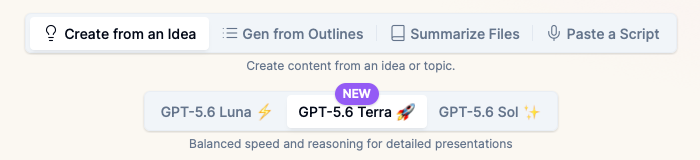
Those four tabs across the top are the whole reason this handoff is painless. Whatever shape Muse hands you, one of them takes it directly:
| What Muse gave you | Which input mode to use |
|---|---|
A structured outline or section list | Gen from Outlines |
A narrative write-up or talk script | Paste a Script |
A PDF or exported document | Summarize Files |
Just a topic and some notes | Create from an Idea |
There is no conversion step, no reformatting, no "export as" dance. You paste, or you upload, and the deck gets built from your material rather than from a model's general knowledge of the subject.
Step by step
- Ask Muse for the content, not the deck. Prompt it for a structured outline with section headings and the key points under each, or for the underlying research. Asking it for "a presentation" will get you prose or a PDF, which still works — it just goes through Summarize Files instead.
- Take the output as-is. Copy the text, or download the PDF Muse produced. No cleanup needed.
- Open ChatSlide and pick the matching input mode from the table above.
- Review the outline before generating. This is the highest-leverage moment in the whole process. Fixing structure here costs seconds; fixing it after generation costs a rebuild.
- Generate. Slides, layouts, charts, and speaker notes are produced together.
- Edit and export. Per-slide AI tools for the rough edges, then export to PowerPoint, PDF, or Keynote.
One thing worth doing differently
When you prompt Muse, ask it for more sections than you need and fewer words per section. Agents tend to write in paragraphs, and paragraphs become overloaded slides. A tight outline of twelve short sections converts into a clean deck far more reliably than four dense ones, and it is much easier to cut a section than to split one.
What Makes ChatSlide Powerful
Four input modes. Start from a prompt, an outline, a pasted script, uploaded documents (PDF, Word, PowerPoint, Excel), or a YouTube URL. The deck is built from your material.
OCR on scanned material. Scanned PDFs and image-only slides get read rather than skipped, which is usually where "upload your document" tools quietly fail.
Real data charts. Numbers from your spreadsheet render as actual charts, not as a model's prose description of a trend.
Research import. Pull sources directly into the deck with citations attached, rather than pasting them in and losing provenance.
19 AI editing tools. Shorten, expand, rewrite for a different audience, fix tone — applied per slide, after generation, when you can actually see what is wrong.
Speaker notes and export. Every deck exports to PowerPoint, PDF, and Keynote on a paid plan, with speaker notes generated alongside the slides.
Model choice per deck. Generate on the fast free model, and if one deck needs more depth, regenerate that one on a stronger model. Your brief, uploads, outline, and brand settings carry over.
Where This Workflow Fits
Research-heavy talks. Muse browses and gathers; you get sourced material instead of a model's recollection. This is the case where the handoff earns the most — the agent is doing something a presentation tool genuinely cannot.
Recurring internal updates. Muse's persistent memory means it can carry context between weeks. Have it assemble the update, then run the same deck template over it each time.
Turning a saved pile into something presentable. Muse is built around acting on things you saved. A folder of links and notes becomes an outline; the outline becomes a deck.
Client-facing material. Do the drafting wherever you like, but the deck needs your brand template, real charts, and a clean PowerPoint export — that is the half Muse does not do.
Honest Limits
Muse's output is a starting point, not a final deck. Anything an agent drafts still needs a human pass for accuracy, especially anything it browsed for. Read it before you present it.
A better agent does not make better-looking slides. Layout, typography, chart rendering, and export fidelity are the presentation tool's job. If your slides look wrong, no amount of upgrading the drafting model fixes them. The template will.
A vague ask produces an elaborate wrong deck. "Make me something about Q3" gets you a more polished version of the wrong thing on any model. The brief is the highest-leverage input, and it always will be.
Availability. Muse's rollout started in the US. If it is not available to you yet, every input mode above still works — you just draft the outline yourself, or in whatever assistant you already have.
Muse vs a Presentation Tool: What Each One Is For
| Meta Muse | ChatSlide | |
|---|---|---|
Research and browsing | Yes — operates a browser, gathers sources | Research import with citations |
Drafting structured text | Yes | Yes, from a prompt or your files |
Editable slide deck | No | Yes |
Layouts and templates | No | Yes |
Charts from your data | No | Yes |
Speaker notes | No | Yes |
PowerPoint / Keynote export | No — PDFs and web artifacts | Yes, on a paid plan |
Booking travel, sending email | Yes | No |
Neither list is a knock on the other product. They are different tools, and the table is the argument for using both rather than forcing either one to do the other's job.
Time Comparison
| Approach | Realistic time to a presentable deck |
|---|---|
Muse outline → manual slide building in PowerPoint | 2–4 hours |
Muse outline → ChatSlide → edit and export | Under 15 minutes |
Writing the outline and the deck by hand | Half a day |
The saving is not in the drafting — Muse already compressed that. It is in never manually laying out a slide again.
ChatSlide for Teams
Departments standardizing on one deck pipeline get SSO, centralized team billing, shared brand templates, and team collaboration on the Enterprise plan. If several people are running the same draft-then-build workflow, a shared template is what keeps the output consistent. Contact us and we will scope it.
Frequently Asked Questions
Can Muse AI make a PowerPoint presentation? No. Meta's Muse produces Artifacts — dashboards, trackers, guides, web pages, and PDFs. Slides and PowerPoint files are not among the outputs Meta lists. Use Muse for the content and a presentation tool for the deck.
Can Muse make slides if I ask it to? You will most likely get prose, a PDF, or a web artifact rather than an editable slide file. That output is still usable — upload the PDF through Summarize Files and the deck gets built from it.
Is muse.ai the same as Meta's Muse? The muse.ai domain now serves Meta's Muse agent. The name was previously associated with a video hosting and in-video search product, which is why some tool directories still describe "Muse AI" that way.
What is the fastest way to get from a Muse outline to a finished deck? Copy the outline, open ChatSlide, choose Gen from Outlines, review the structure before generating, then export. Under 15 minutes for a typical deck.
Do I need to reformat Muse's output first? No. Paste it as-is. If it is a narrative rather than an outline, use Paste a Script instead of Gen from Outlines.
Is ChatSlide free? Generating decks is free. PowerPoint, PDF, and Keynote export are on paid plans.
Can I use a different AI assistant instead of Muse? Yes. The handoff is format-based, not vendor-based — an outline is an outline. Anything that gives you text or a PDF works the same way.
Get Started
Bring whatever Muse gave you — an outline, a script, or a PDF — and build the deck free at ChatSlide. No card required. See also the AI presentation maker for the full feature set, or the AI slide generator if you are starting from a topic rather than a draft.