
Quick Answer: Oilfield toolbox talks and HSE training decks follow a 5-block structure: (1) Hazard of the day (stuck pipe, H₂S, well control, dropped object, etc.), (2) Recent incident summary — what happened, who was affected, root cause, (3) Standard operating procedure with step diagram, (4) PPE & control measures, (5) Crew quiz / acknowledgement signature. Target 10–15 slides for a 15-min shift handover. ChatSlide ingests your 40-page incident report or HSE policy PDF and produces the talk in 17 languages — useful for multilingual offshore crews.
The Challenge Every Oil & Gas Trainer Knows
An offshore platform has a shift handover in 90 minutes. A drilling supervisor needs a 20-slide toolbox talk on stuck pipe prevention. The last incident report is 40 pages. The regional HSE policy just changed. The contractor crew rotating in doesn't speak English as a first language.
The choice is usually between shipping a rushed deck that looks like a blurry PDF paste, or skipping the formal slides entirely and hoping a whiteboard session will stick.
Neither is acceptable on a rig where a single missed procedure can cost lives, millions of dollars of non-productive time (NPT), or a lost well. But generic slide builders don't know what bottom-hole assembly looks like, can't tell a BOP stack from a Christmas tree, and certainly can't draft a JSA for tripping out of the hole. So trainers keep reaching for tired PowerPoint templates that nobody reads.
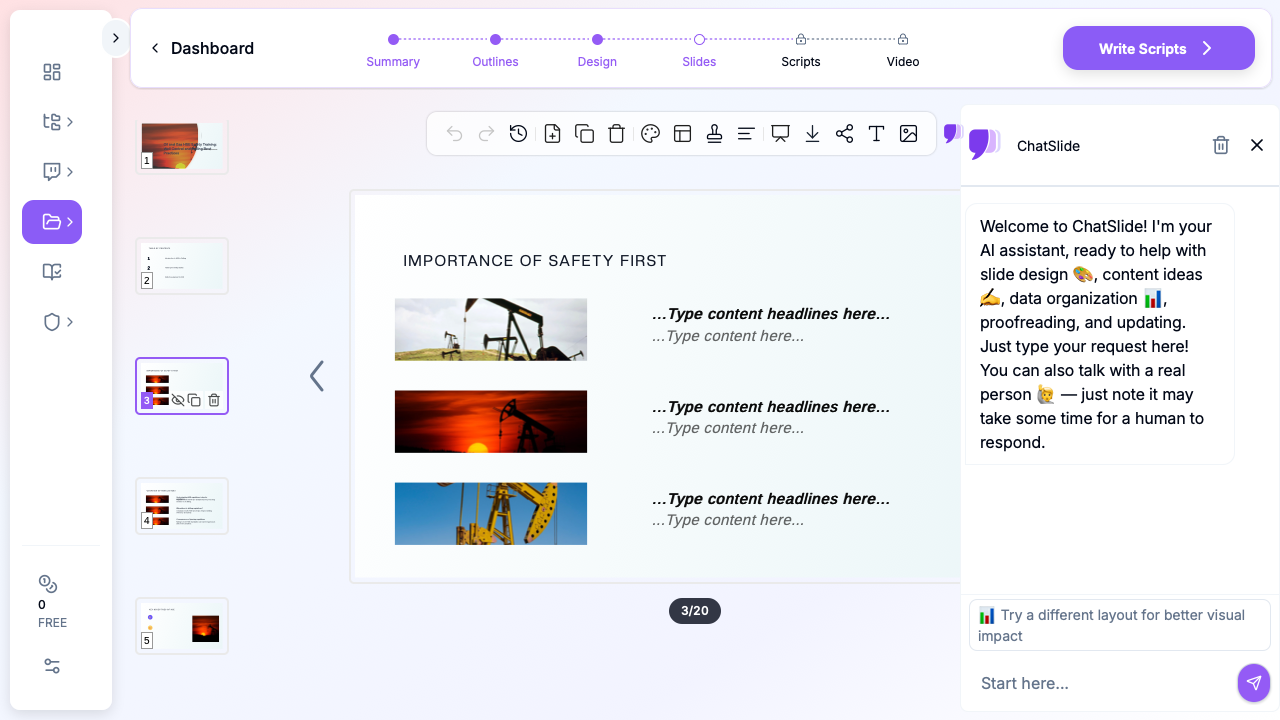
This guide shows how oil and gas professionals — drilling supervisors, completions engineers, HSE managers, training coordinators, and technical trainers — can use AI to turn incident reports, procedure manuals, and engineering specs into presentation-ready decks in minutes, without losing the technical rigor the industry demands.
What Makes a Strong Oil & Gas Presentation
Oil and gas audiences are the toughest crowd in corporate training. They sit through mandatory HSE briefings every rotation, they know when a slide was copy-pasted from a 2014 binder, and they switch off the moment the content drifts into fluff.
A strong upstream, midstream, or downstream deck has six things:
- A specific scenario, not a category. "Well Control" is a category. "Loss of Primary Barrier During Tripping on the Deepwater Horizon 2A Well" is a scenario. Scenarios drive retention.
- Field-accurate terminology. Your crew knows the difference between MAASP and MAWP. If the deck uses them interchangeably, credibility is gone in slide three.
- Real visuals of real equipment. Stock photos of people in clean coveralls looking at iPads don't teach anyone what a crown saver does. Mud pumps, BOP rams, tong assemblies, and choke manifolds beat generic photography every time.
- Decision points, not information dumps. A roughneck in an emergency doesn't need to remember twenty paragraphs. They need to remember "shut-in, circulate, kill" — and the three things that can go wrong between them.
- Regulatory alignment. IADC, API RP-49, OSHA 29 CFR 1910, BSEE NTL, IOGP Life-Saving Rules — every regional audience expects a different framework. Mix them up and nothing lands.
- A clear handoff to the worksite. Every HSE slide should end with a behavior the attendee can do tomorrow on the floor, not an abstract principle to "keep in mind."
Use Cases Across the Oil & Gas Value Chain
Upstream (Exploration & Production)
- Well control drills and kick-detection refreshers before every hitch
- Stuck pipe prevention — one of the highest-NPT causes on modern rigs
- Cementing and completions procedure walkthroughs for new crew
- Hydrogen sulfide (H₂S) awareness and escape procedures
- Drilling engineering shift briefings, bit performance reviews, and hydraulics updates
Midstream (Pipelines & Processing)
- Pipeline integrity management presentations for ILI results and anomaly response
- Pigging operations technical briefings
- Compressor station HSE and maintenance reviews
- ESG and methane reduction stakeholder updates
Downstream (Refining & Petrochemicals)
- Refinery turnaround planning and contractor onboarding
- Process safety management (PSM) — 14-element training slides under OSHA 29 CFR 1910.119
- Fire and gas system familiarization for operations staff
- Permit-to-work training and JSA walkthroughs
Service Companies & Consulting
- Client technical presentations explaining tool technology, job performance, and cost-per-foot analysis
- Post-job reviews with KPIs, issues, and lessons learned
- Regulatory update briefings for HSE, SEMS, and BSEE changes
If you're creating any of these, an AI presentation maker that understands technical content — and pulls real industrial imagery — gives you back hours per week.
Step-by-Step: Creating an Oil & Gas Presentation with ChatSlide
1. Start with the source, not a blank slide
Most oil and gas decks are repackaging existing material: an incident report, a procedure manual, a toolbox talk PDF, an engineering spec, a JSA, or a PowerPoint from last year's safety stand-down. Upload the source document to ChatSlide — the AI will read the full context (not just the filename) and generate an outline that follows the document's logic.
For a stuck pipe training deck, you might upload the rig's latest pull-through analysis, a recent industry paper from SPE, and the company's standard trip sheet. The outline will pull structure from all three.
2. Pick a scenario, not just a topic
When ChatSlide asks for a topic, be specific. Instead of "Well Control Training," use "Well Control Refresher: Detecting and Responding to Kicks During Tripping on Directional Wells." The specificity drives slide content quality — the AI writes better when the scenario is narrow.
Set the scenario type to Training → Skills for toolbox talks and competency modules, or Conference → Case for post-incident reviews and technical papers.
3. Let the AI draft the structure, then tune it
Oil and gas training decks usually follow one of a few patterns:
- Hazard → Cause → Control → Verify (for HSE modules)
- Background → Event → Analysis → Lessons Learned (for incident reviews)
- Objective → Procedure → Checkpoints → Handover (for operational briefings)
- Theory → Equipment → Operation → Troubleshooting (for technical training)
The AI will pick one based on your scenario type. If it picks the wrong pattern, tell it to restructure — don't rewrite section by section.
4. Add real equipment imagery
Stock imagery of rigs, pump jacks, offshore platforms, pipelines, and refineries makes decks feel field-authentic instead of corporate-generic. ChatSlide's image search is trained to match industrial imagery to technical terms — searching "stuck pipe" returns drill pipe shots, not literal "stuck" metaphor images. If you upload a photo of your specific equipment, it will use that instead.
5. Keep decision slides uncluttered
For emergency-response content, use ChatSlide's clean comparison layouts (two-column, step-by-step, decision tree) rather than dense text slides. A "Recognize → Act → Verify" structure on a single slide is worth ten paragraphs on three slides.
6. Export to the format your site uses
Some rig sites are still PowerPoint-only. Others use Google Slides synced to SharePoint. Offshore platforms often need offline-capable video. ChatSlide exports to PPTX, PDF, Google Slides, and rendered MP4 video — useful when a toolbox talk needs to reach night-shift crew who weren't at the briefing.
Tips for Oil & Gas Presentations That Land
Lead with the consequence, not the procedure. "Last year in this basin, a kick that wasn't shut in within two minutes led to a $47M well abandonment" beats "Proper kick response procedures require immediate shut-in." The crew remembers the dollar figure and the basin.
Name the equipment your crew actually uses. If your rig has Cameron T-BOPs and M/D Totco drillers, put those exact names in the deck. Generic "BOP stack" slides feel like outsider content.
Use the right units for the audience. Metric for international crews, imperial for US Gulf Coast. Mixing them looks careless, and on a drill floor, careless kills.
Put the JSA reference on every procedure slide. It takes ten extra seconds to add the JSA number and it signals the deck is grounded in the site's safety management system rather than floating in the abstract.
Include a "what changed" slide for refresher training. Experienced crews stop listening once they recognize a refresher. A slide titled "What's Different Since Your Last Rotation" wakes the room up.
End with a competency check, not a thank-you slide. Three scenario questions — "What would you do if..." — reinforce the deck more than any summary slide. ChatSlide's quiz generator builds these from the deck content automatically.
Why Generic AI Tools Fall Short for Oil & Gas
Most AI slide builders were trained on marketing decks and business school case studies. Drop a well-control SOP into them and they'll hallucinate procedures, invent regulatory citations, and cheerfully replace "MAASP" with "MASSP" because it sounds more common. On a drill floor, that kind of error is unacceptable.
ChatSlide was built to read dense technical documents and keep domain terminology intact. When you upload a 120-page IOGP report or a regional BSEE Notice to Lessees, it preserves the specifics — including unit designations, equipment model numbers, and regulatory references — rather than softening them into generic "safety best practices."
For a full comparison of how different AI slide builders handle technical content, see ChatSlide vs Gamma vs Beautiful.ai.
Related Workflows
If your oil and gas role also involves broader workplace safety training, the OSHA safety training presentation guide covers toolbox talks, hazard identification, and incident investigation formats that carry over well to upstream operations.
For technical research and conference presentations — SPE, OTC, IADC, IPTC — the research conference presentation guide covers poster sessions, technical papers, and keynote slides.
For broader corporate training decks like onboarding, leadership, and contractor orientation, the corporate training presentation guide covers the adjacent L&D use cases most operators and service companies run.
Get Started
A rig supervisor shouldn't have to choose between a rushed deck and a skipped toolbox talk. With ChatSlide, the gap between "I need slides by 06:00" and "here's a professional 20-slide deck with real imagery" shrinks from hours to minutes — without sacrificing the technical fidelity oil and gas training requires.
Upload your source document — an incident report, a procedure, a JSA, a regulatory update, or just a rough outline of what tomorrow's briefing should cover — and create your first oil and gas presentation at chatslide.ai. The first deck is free. If it saves the time of one rig-up, it's already paid for itself.