
Quick Answer: ChatSlide is an AI presentation maker for parenting coaches, school counselors, and family-education facilitators, used by 300,000+ people. It turns a session outline, a program handbook PDF, or a single prompt into a structured workshop deck in under two minutes — with drafted speaker notes for the facilitator, narrated-video export for parents who cannot attend live, and PowerPoint or PDF download. Free to start, no credit card.
The Parenting Workshop Problem
A parenting workshop lives or dies on the room. You are talking to tired adults, often defensive, usually arriving straight from the exact conflict you are about to discuss. The content has to be concrete enough that someone can use a sentence from it that same evening, and gentle enough that nobody feels accused of failing their own child.
That makes the slides unusually hard. A parenting deck cannot be a wall of theory, and it cannot be a wall of platitudes either. What works is a short principle, a scripted line a parent can actually say, and a scenario where you can see the difference between the version that escalates and the version that does not. Building that, module by module, is slow work — and most facilitators are running a program of six or eight sessions, not one.
Then it has to be reused. Same program, different school, different cohort, different language level, sometimes a recorded version for parents who work nights. Rebuilding by hand every time is the reason so many good programs run on a deck that has not been touched in three years.

This guide covers parenting and family-education workshops specifically — parent-teen communication, program modules, and school parent evenings. For classroom social-emotional teaching with students, our life skills education guide is the closer fit; for workplace facilitation skills, see the corporate training guide.
What Makes ChatSlide Powerful for Parenting Workshops
Three Input Modes That Match How Programs Already Exist
Most facilitators are sitting on material already — a handbook, a curriculum, a set of session notes. ChatSlide takes content three ways, and they combine:
- File upload — the program handbook, a session plan, a worksheet, a scanned handout, or the PowerPoint you inherited from the previous facilitator. Scanned pages and images are read with OCR.
- Web and video URLs — link a published framework, a program page, or a recorded session and ChatSlide extracts the content.
- Text prompt — "session 3: talking to a teenager about curfew without a fight, 15 slides, for a parent evening" is enough for a full first draft.
Outline-First, Because Session Flow Is the Design
ChatSlide drafts the outline before rendering slides. For a workshop that matters more than usual: the arc — hook, normalize, principle, script, practice, take-home — is the thing that makes a room open up. Reorder it while it is still a list, then generate.
Scripts and Scenarios, Not Just Bullet Points
The useful unit in a parenting deck is a sentence a parent can borrow. Ask for it directly — "give the observation-first version and the accusation version of the same line", "add a scenario where the teen shuts down and show the recovery" — and edit the wording in plain language until it sounds like something a real person would say out loud.
Speaker Notes Drafted for Every Slide
Parenting programs are usually delivered by more than one facilitator, often volunteers. ChatSlide drafts per-slide notes, so the deck carries its own facilitation guidance instead of living in the head of whoever designed it.
Narrated Video Export for Parents Who Cannot Attend
The same project exports as a narrated video with an AI voice or an avatar presenter. That covers the parent working a night shift, the co-parent who was not in the room, and the school that wants the session available on its portal afterwards.
Editing in Plain Language
Refine with instructions rather than formatting: "make the tone warmer and less clinical", "rewrite this at a plainer reading level", "cut this to a 45-minute session", "add a slide on what to do when the conversation has already gone wrong". Batch edits apply across the whole deck.
One Look Across a Whole Program
Sessions built weeks apart drift. Applying one design across the deck and reusing it for the next module keeps an eight-week program feeling like a program, which matters for how seriously a cohort takes it.
How ChatSlide Builds Your Parenting Workshop Deck
1. Bring your material or your topic. Upload the handbook or session plan, or describe the session and the parents in the room.
2. Shape the outline. Put the session in facilitation order before anything renders.
3. Generate slides with imagery and notes. Each slide arrives laid out, with supporting visuals and drafted facilitation notes.
4. Export the way the session needs it. PowerPoint for the projector, PDF for the take-home handout, narrated video for parents who missed it.
Use Cases for Parenting Coaches and Family Educators
1. Parent-Teen Communication Sessions
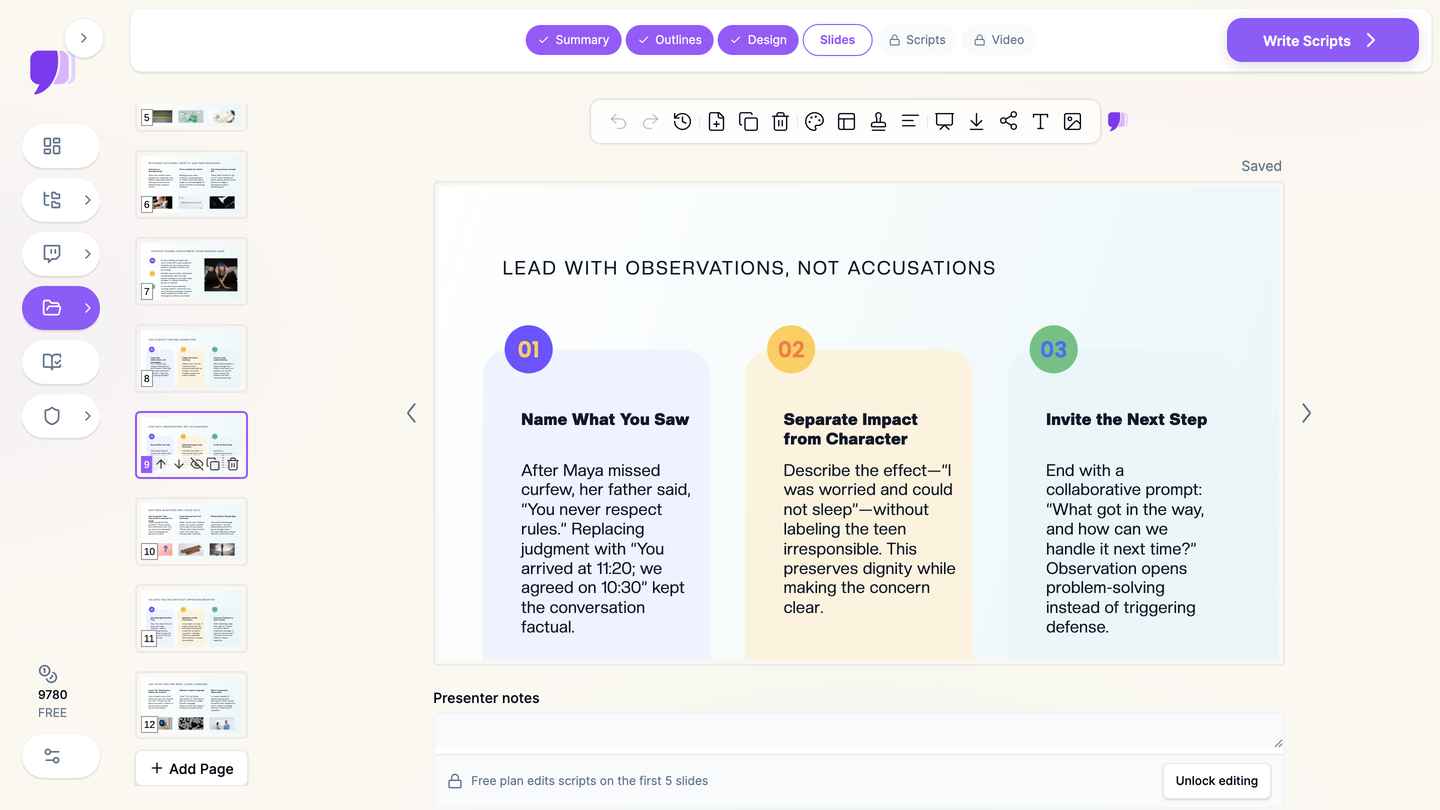
The challenge: Teaching a parent to lead with an observation instead of an accusation is simple to say and hard to demonstrate in slides.
How ChatSlide helps: Build the deck around paired examples — the line that escalates next to the line that opens the conversation — and tune the wording until it sounds natural.
Time saved: From 3-4 hours to about twenty minutes.
2. Multi-Week Program Modules
The challenge: A six- or eight-session program means six or eight decks that have to feel like one course.
How ChatSlide helps: Generate each module from its section of the handbook and reuse one design across all of them.
Time saved: From a weekend to an afternoon.
3. School Parent Evenings
The challenge: One shot, a mixed audience, forty-five minutes, and a topic — screens, exam pressure, boundaries — that people already have strong opinions about.
How ChatSlide helps: Draft the session from a prompt describing the school and the concern, then cut it to the actual time slot with a single instruction.
Time saved: From 3 hours to under half an hour.
4. Coaching Programs and Digital Courses
The challenge: A parenting coach selling a course needs modules that look professional and can be delivered asynchronously.
How ChatSlide helps: Build the module deck, then export it as a narrated video for the course platform without a recording session.
5. Facilitator Training and Volunteer Onboarding
The challenge: Programs scale by training other people to run them, and a deck that only its author can present does not scale.
How ChatSlide helps: Drafted speaker notes on every slide let a new facilitator deliver the same session with the same intent.
6. Parenting Programs for Schools and Organizations
For a school district, family services organization, or coaching business running a program across several facilitators, ChatSlide's Enterprise plan adds SSO, centralized team billing, shared brand templates, and team collaboration so every site delivers the same program — contact us.
Parenting Workshop Tools Compared (2026)
| Feature | ChatSlide | Gamma | Tome | Beautiful.ai |
|---|---|---|---|---|
Input modes | 3 (file, URL, prompt) | Text prompt | Text prompt | Text prompt |
Upload a program handbook or old PPTX | Yes | Limited | Limited | No |
OCR for scanned worksheets | Yes | No | No | No |
Editable outline before generation | Yes | Limited | Limited | Template-based |
Speaker / facilitation notes drafted | Yes | Limited | Limited | Limited |
Narrated video export for absent parents | Yes | No | No | No |
Plain-language tone rewrites | Yes | Limited | Limited | Limited |
PowerPoint export | Yes | Yes | Limited | Yes |
Team templates and SSO | Enterprise | Limited | Limited | Limited |
Free tier | Yes | Yes | Yes | Yes |
Time Comparison: Manual vs. AI-Assisted
| Task | Manual | With ChatSlide |
|---|---|---|
Structuring a 15-slide session deck | 45 minutes | 5 minutes |
Drafting slide content and scripts | 2-3 hours | 2 minutes |
Sourcing and placing visuals | 1 hour | Included in generation |
Writing facilitation notes | 1 hour | Drafted automatically |
Producing a recorded version | 2-3 hours | Minutes via video export |
Adapting the session for a new cohort | 1-2 hours | Minutes of plain-language edits |
What a Strong Parenting Workshop Presentation Includes
A normalizing opening. Parents arrive braced for judgment. Naming the conflict as ordinary — most households with a teenager have this argument — is what makes the rest of the session usable.
One principle per slide, in plain words. "Lead with what you saw, not what it means about them" survives the drive home. A four-part framework does not.
A borrowable script. Give the actual sentence. "You got in at 11:20; we agreed on 10:30" does work that "communicate clearly" never will.
The contrast made visible. Put the escalating version next to the de-escalating version of the same moment. Most of the learning happens in the gap between them.
A recovery slide. Parents need to know what to do after they have already shouted, because they will have already shouted. A repair script does more good than another prevention framework.
Developmental context, briefly. A short, honest note on why autonomy-seeking is expected at this age reframes the behaviour from defiance to development — without excusing everything.
Something to practise in the room. A two-minute pair exercise turns a lecture into a workshop.
One take-home action. Not eight. The measure of the session is what one parent tries this week.
Best Practices
Do's
- Open by normalizing before you teach anything.
- Write scripts, not principles — the sentence is the deliverable.
- Show the contrasting version of every conversation you teach.
- Include a repair path for conversations that have already gone badly.
- Keep facilitation guidance in the speaker notes so volunteers can deliver the session.
- Offer the recorded version so the parent who could not attend still gets it.
Don'ts
- Don't build the deck around theory the room cannot use tonight.
- Don't imply there is one correct family; leave room for different structures, cultures, and constraints.
- Don't use a real family's story, photo, or case detail as an example — write composite scenarios instead, and never upload identifiable information about a child or family to any cloud tool.
- Don't present clinical claims. A parenting workshop is education, not therapy or diagnosis; where a family needs clinical support, say so and refer.
Frequently Asked Questions
Can I build a workshop deck from just a prompt?
Yes. Naming the session, the audience, and the length produces a structured draft. Uploading your program handbook or session plan makes the draft much closer to the program you actually run.
Can I upload an existing parenting program and refresh it?
Yes. Upload the PowerPoint or handbook and ChatSlide reads it as source material, so you can restructure and modernize a program rather than rebuild it.
Can it write the actual sentences a parent should say?
Yes. Ask for scripted lines and paired examples directly, then edit the wording in plain language until it sounds like you.
Does it produce speaker notes for volunteer facilitators?
Yes, notes are drafted per slide, which is what makes a session deliverable by someone who did not design it.
Can I record the session for parents who cannot attend?
Yes. The same project exports as a narrated video with an AI voice or avatar presenter — useful for shift workers, co-parents, and school portals.
Can I run the same program in another language?
Yes. Generate the deck in the language of the cohort, which matters for parent evenings in multilingual communities.
Can our organization share templates across facilitators?
Yes. Enterprise adds shared brand templates, SSO, team billing, and collaboration so every site delivers the same program — contact us.
Is it free?
There is a free tier with no credit card required. Paid plans start at $14.90/month for higher limits and additional export options.
Get Started
A parenting workshop is the work of giving an exhausted adult one usable sentence for a conversation they are dreading. Formatting slides is not that work.
With ChatSlide, turn a session plan, a program handbook, or a one-line brief into a structured workshop deck in minutes — with facilitation notes written and a recorded version one export away.
Start building your parenting workshop presentation with ChatSlide. Free to start, no credit card required.