
Quick Answer: ChatSlide is an AI presentation maker for psychosocial risk and workplace mental health training — built for HR business partners, EHS and occupational health teams, works councils, and the people leaders they train. It turns a risk assessment, a survey export, or a policy PDF into a structured deck: hazard categories, risk-rating tables, survey charts, control measures, escalation routes, and speaker notes for manager sessions. Exports to PowerPoint, PDF, or Google Slides, and generates in 30+ languages for multi-site rollouts. Trusted across 750+ universities and training programs, it drafts a full awareness module in under 2 minutes. Free to start, no card required.
The Psychosocial Risk Training Problem
Psychosocial risk stopped being a wellbeing nice-to-have and became a documented safety obligation. ISO 45003 gives organizations guidance on managing psychological health and safety at work, and in Brazil the updated NR-1 brings psychosocial risk factors into the employer's occupational risk management programme (PGR), with the education period ending and enforcement beginning on 26 May 2026. Whatever the jurisdiction, the direction is the same: workload, harassment, autonomy, and support are now hazards you are expected to identify, assess, control, and evidence.
That lands on teams who already have full calendars. The assessment gets done, the survey data comes back, the action plan is drafted — and then someone has to build the slides that explain all of it to a works council, a leadership team, a school staff room, or three shifts of line managers. Each audience needs the same facts at a different altitude, and the deck is usually the last thing built and the first thing that looks rushed.
ChatSlide keeps the risk judgment with you and removes the assembly work.
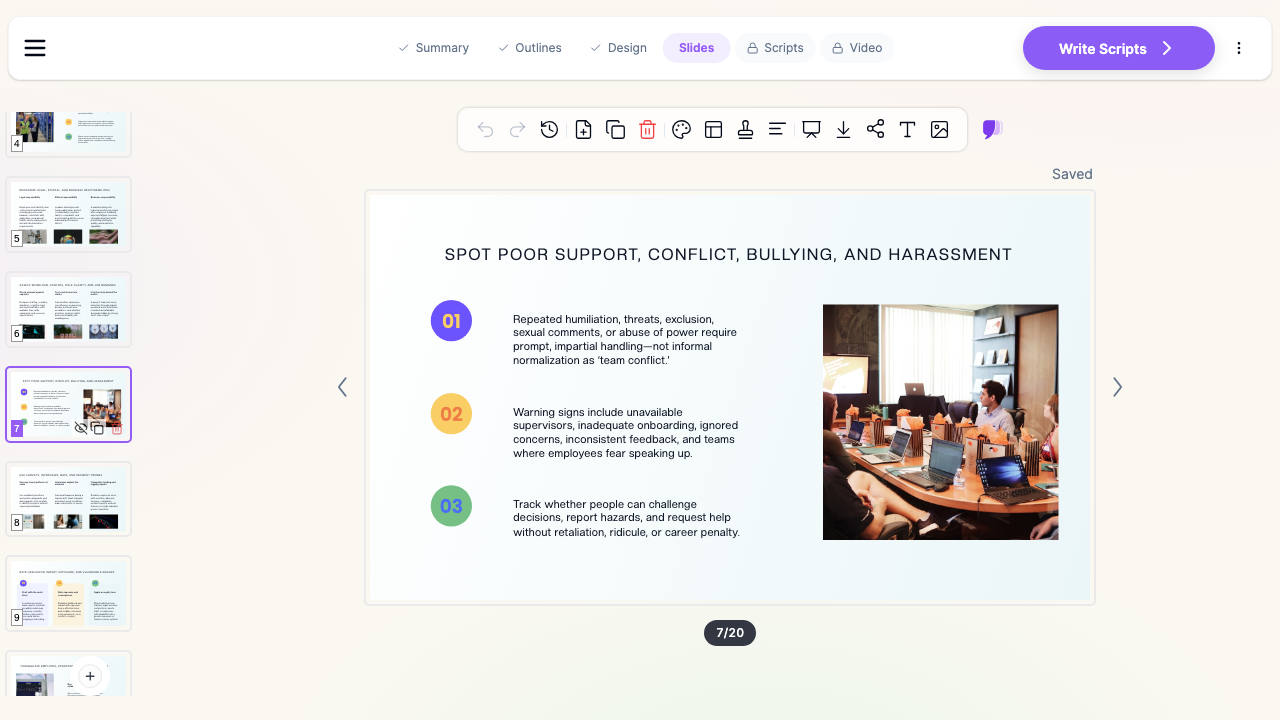

What Makes ChatSlide Powerful for Psychosocial Risk Training
Builds the deck around a hazard framework, not a mood board
Start from a prompt such as "Psychosocial risk awareness for line managers, 45 minutes, manufacturing site" or "NR-1 psychosocial risk factors for a school leadership team." ChatSlide structures the deck the way the standards do — demands and workload, control and autonomy, support and relationships, role clarity and change, then assessment, controls, and escalation — instead of producing a generic wellness talk.
Reads your policy, assessment, and survey documents
Upload the risk assessment, the anti-harassment policy, the PGR inventory, a works council report, or last year's training pack. ChatSlide extracts the categories, thresholds, and commitments into editable slides, so the training reflects your actual programme rather than a template someone downloaded.
Turns survey data into real charts
Paste engagement or psychosocial survey results — scores by team, workload distribution, absence trends, overtime hours — and ChatSlide can build real charts from the numbers. Aggregated data is what makes a psychosocial session credible; it moves the conversation from "people seem stressed" to a pattern the room can see.
Builds risk-rating and control tables
The highest-value slide in this training is a grid: hazard down the side, exposure, severity, current control, and owner across the top. ChatSlide assembles those tables so an assessment is readable at a glance rather than buried in a spreadsheet nobody opens.
OCR for scanned forms and paper returns
If your input is a photographed assessment form, a scanned inspection report, or a printed policy annex, ChatSlide's OCR reads the text and numbers so you can edit the content instead of pasting an unreadable screenshot.
Speaker notes for very different rooms
The same material has to serve an executive briefing, a manager workshop, and an all-staff awareness session. The notes carry the depth each audience needs — legal duty and resourcing for one, conversation scripts and escalation routes for another — without rebuilding the slides.
30+ languages for multi-site rollouts
Psychosocial risk obligations often land across several countries at once. Generate the same module in the languages your sites actually work in, and keep the structure and risk-rating logic identical across versions.
19 AI editing tools
Cut a 60-minute workshop to 20, expand the escalation section, rewrite for frontline staff instead of directors, add speaker notes, restyle to your brand template, or split a dense assessment table into two readable slides.
How ChatSlide Builds Your Psychosocial Risk Deck
1. Name the audience and the duty. Precision helps: "Psychosocial hazard awareness for shift supervisors, 30 minutes, focus on workload and harassment reporting" beats "mental health training."
2. Bring your sources. Upload the assessment, the policy, the survey summary, and any regulator or standard text you are working to. Use aggregated results and keep individual employees unidentifiable.
3. Generate the outline. ChatSlide proposes the flow — why it is a safety issue, hazard categories, how risk is assessed here, controls, what a manager does in the moment, escalation and support routes — and you edit the sections before any slides are built.
4. Generate, review, and export. Check the facts, the legal framing, and the support contacts, adjust depth for the room, then export to PowerPoint, PDF, or Google Slides.
Use Cases for HR, EHS, and People Leaders
- Manager capability workshops: Teach supervisors to recognize workload, conflict, and support failures early, and give them a script for the conversation and a route to escalate.
- Works council and leadership briefings: Present the assessment findings, the risk ratings, and the action plan with the survey charts attached, so the decision has evidence behind it.
- NR-1 and ISO 45003 programme rollouts: Explain how psychosocial factors entered the risk management programme, what was assessed, which controls were chosen, and how they will be reviewed.
- Schools and public-sector staff: Teacher and frontline workloads have their own hazard profile — pupil behaviour, parental contact, isolated working, term-time peaks — and the same deck structure adapts to it.
- Onboarding and annual refreshers: Fold psychosocial hazards into the existing safety induction instead of running an unrelated wellbeing hour nobody links to risk.
- Teams and multi-site organizations: Standardize the module across sites and languages with shared templates, SSO, centralized billing, and team collaboration.
Psychosocial Risk Training AI Tools Compared (2026)
| Capability | ChatSlide | Gamma | Beautiful.ai |
|---|---|---|---|
Reads policy and assessment PDFs | Yes | Limited | No |
Real charts from pasted survey data | Yes | Partial | Templates only |
Builds risk-rating and control tables | Yes | Manual | Manual |
OCR for scanned forms | Yes | No | No |
Research search for occupational-health evidence | Yes | No | No |
Speaker notes per audience | Yes | Basic | Basic |
30+ output languages for multi-site rollout | Yes | Partial | Limited |
PowerPoint and Google Slides export | Yes | Yes | Yes |
Time Comparison: Manual vs. AI-Assisted
| Task | Manual | With ChatSlide |
|---|---|---|
Outline a 30-slide awareness module | 2-3 hrs | 2 min |
Build a hazard and control grid | 45-90 min | minutes |
Summarize a policy or standard | 1-2 hrs | minutes |
Chart survey results by team | 1 hr | minutes |
Write speaker notes for managers | 1 hr | auto-generated |
Produce a second language version | half a day | minutes |
Direct Research Database Access
ChatSlide's Research tab connects to the databases physicians use daily:
- PubMed: Search by keyword, PMID, or DOI. Find the landmark trials, recent publications, and clinical guidelines relevant to your case. The AI reads abstracts and incorporates key findings into your slides with citations.
- Google Scholar: When your topic spans disciplines — say, the intersection of genetics and oncology — Scholar captures the broader academic literature that PubMed alone might miss.
- Clinical Trials (NCT): Presenting on a treatment where pivotal trials are ongoing? Search by NCT number or condition to pull trial design, endpoints, and status into your slides.

For this topic, PubMed carries the occupational and public-health literature on work stress, burnout, and psychosocial exposure, while Google Scholar reaches the organizational-psychology and ergonomics journals that sit outside it. Cite the evidence rather than a statistic you cannot source — an unattributed percentage is the fastest way to lose a works council.
What a Strong Psychosocial Risk Presentation Includes
The duty, stated plainly. Open with why this is being managed as a workplace risk — the standard or regulation that applies to your sites, and what the organization has committed to. Training that starts with breathing exercises and never names the obligation reads as decoration.
Hazards in categories, not adjectives. Workload and pace, control and autonomy, support from managers and colleagues, role clarity, change and job insecurity, and interpersonal conduct including bullying and harassment. Categories make a hazard reportable; "stress" does not.
Assessment method and its limits. Say how risk was measured here — survey, interviews, absence and turnover data, walkthroughs — and be honest that no single method is mandated and none of them is complete on its own.
Aggregated data, never a named person. Show scores by team or site, workload distribution, overtime patterns. Group sizes small enough to identify an individual do not belong on a slide.
Controls at the source first. Rostering, workload caps, clearer roles, manager span of control, and a functioning complaints route come before resilience sessions. An awareness deck that offers only individual coping puts the burden in the wrong place.
What a manager does in the moment. A short script for the concern conversation, what to document, what not to promise, and the exact escalation path.
Support routes and boundaries. Occupational health, employee assistance, HR, union or works council, and external emergency contacts — with a clear statement that the session is training, not treatment.
A review commitment. Which indicators will be re-measured, at what interval, and who owns the action. This is also the part an inspector will ask for.
Related ChatSlide guides: For physical hazards, toolbox talks, and OSHA-style modules, see the safety training guide. For policy attestation and regulatory modules, see the compliance training guide. For respect-at-work and inclusion sessions that sit alongside this one, see the DEI training guide. This guide covers psychosocial hazards and workplace mental health specifically.
Best Practices
- Do name the standard or regulation your sites are working to, and what was assessed.
- Do lead with organizational controls before individual coping strategies.
- Do show aggregated survey data and cite the evidence behind any claim.
- Do give managers a script and a documented escalation route, not just encouragement.
- Do localize the module for each site rather than presenting in a second language by default.
- Don't put identifiable employee health information, case details, or small-group results on a slide.
- Don't present a percentage you cannot attribute to a named source.
- Don't frame the session as therapy, diagnosis, or a substitute for clinical support.
Enterprise for HR and EHS Teams
For multi-site employers, school groups, and health systems that need the same module across countries and business units, ChatSlide Enterprise adds SSO, centralized/team billing, shared brand templates, and team collaboration. Contact us to discuss an organization-wide setup.
Note on employee health data: ChatSlide's standard plans are not a HIPAA-covered service — keep identifiable employee health information, occupational health case notes, and individual survey responses out of slide content and uploads. For organizations that need a Business Associate Agreement, our Enterprise plan offers HIPAA-compliant deployment options — contact us to discuss BAA terms, SSO, and on-prem / private-cloud hosting.
Frequently Asked Questions
Can ChatSlide build a full psychosocial risk awareness module? Yes. Give it the audience, the duration, and your assessment or policy documents, and it builds the outline, slides, tables, charts, and speaker notes, which you then edit.
Does it know ISO 45003 or NR-1? It can structure a deck around the hazard categories and management steps those frameworks describe, and it will read the standard or regulatory text you upload. Verify the legal specifics for your jurisdiction before delivering the session.
Can it chart our survey results? Yes. Paste aggregated results and it builds real charts. Keep group sizes large enough that no individual is identifiable.
Can I train managers and all staff from the same deck? Yes. Generate once, then use the editing tools and speaker notes to produce a manager version and an all-staff version from the same source material.
Does it handle other languages? Yes. ChatSlide generates in 30+ languages, which matters when the same obligation lands across several countries at once.
Is this a substitute for occupational health advice? No. It builds the training materials. Risk decisions, clinical referrals, and legal interpretation stay with your occupational health, HR, and legal advisers.
Can it export to PowerPoint? Yes. Export to PowerPoint, PDF, or Google Slides and finish in your organization's required template.
Is it free? Yes. ChatSlide is free to start with no card required. Enterprise is available for organizations that need SSO, shared templates, centralized billing, and HIPAA-compliant deployment options.
Get Started
Build your next psychosocial risk assessment briefing, manager capability workshop, or all-staff awareness session with ChatSlide. Upload the assessment, paste the survey results, review the evidence, and export a deck your works council will accept. Start free at ChatSlide, no card required.