
Quick Answer: ChatSlide turns a module handbook, a set of journal articles, or an existing teaching deck into a full social work lecture — learning outcomes mapped to your programme's capability framework, anonymised case material, discussion slides, and a properly formatted reference slide. Upload a PDF or start from a topic, get a 20-40 slide session in under two minutes, then export to PowerPoint, PDF, or a narrated video for asynchronous students. Used by educators at 750+ universities. Free to start, no card required. Try it free.
The Social Work Educator's Slide Problem
A two-hour BA social work session is not one thing. It is a legal framework, a theory, a practice skill, a service user perspective, a seminar activity, and a reference list that a second-year student will actually be marked against. Build that in PowerPoint and you spend the evening on formatting rather than on the teaching.
Then the constraints stack up. Slides have to be readable on a lecture-theatre screen and accessible to students with dyslexia, which means a genuine minimum font size rather than 11-point text squeezed into a box. Language has to be current — "person" or "individual" rather than "client", "people with lived experience" rather than "service users" where the programme has moved on. References have to be Harvard, complete, and hyperlinked. And when the module is validated again, half the deck needs rewriting against a new set of outcomes.
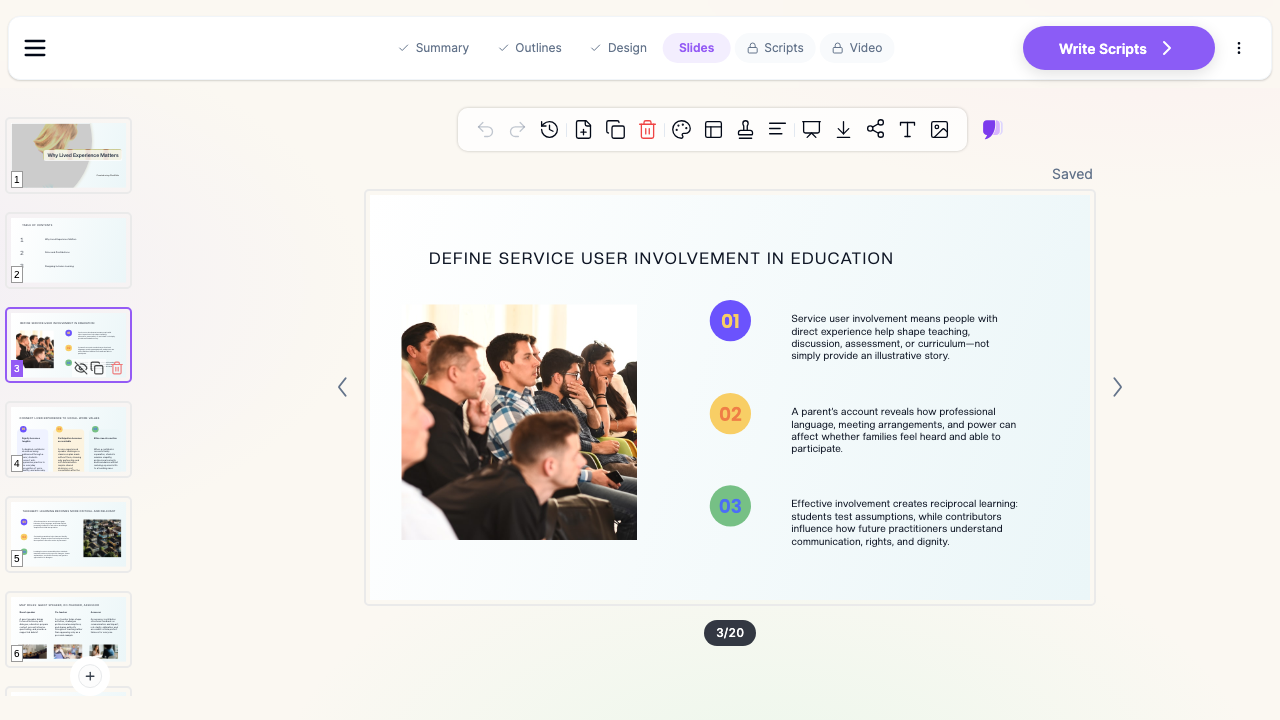
What Makes ChatSlide Powerful for Social Work Teaching
Three Ways to Start a Session
Start from a topic prompt ("two-hour BA year-two session on the Care Act 2014 and strengths-based assessment"), from an uploaded file — a module definition form, a chapter PDF, last year's deck, a practice guidance document — or from a URL such as a BASW or Social Work England page. Most educators start from what they already have, so the existing deck becomes the source rather than something to retype.
Scanned Handbooks and Practice Documents Read Correctly
Module handbooks, placement paperwork, and older practice guidance circulate as scans. ChatSlide runs OCR on uploads, so a photocopied assessment framework or a scanned local safeguarding procedure becomes usable source material instead of an unreadable image.
Outcomes-Driven Outlines
The outline appears before any slides are written, and you can reorder, split, merge, or delete sections in it. This is where you force the session to match the learning outcomes on the module definition form — the capability domains, the professional standards, the assessment criteria — rather than discovering the mismatch at slide 40.
Full-Length Teaching Decks, Not Ten-Slide Summaries
Set the section count to the blocks in your two-hour session and each becomes a teachable unit with its own transition: framework, theory, case, activity, debrief. A single pass gives you the whole session.
Discussion and Case Slides
Social work teaching runs on cases and on disagreement. Ask for discussion prompts and you get slides that pose a situation and stop — a capacity question where the person is making an unwise decision, a child-in-need referral where the family declines involvement, a placement dilemma where policy and relationship pull apart — so the seminar has something to argue about rather than something to copy down.
Accessible Formatting You Set Once
Type size, contrast, and slide density are design-level settings, not a slide-by-slide fight. Set a readable minimum and apply it to the deck, which matters when the same slides go on a smart screen, a lecture-theatre projector, and a student's laptop.
Reference Slides in Your Programme's Style
Paste in your reading list and the deck gets a proper reference slide with live hyperlinks rather than a half-remembered citation. Because students are marked on referencing, showing it correctly in the teaching material is part of the teaching.
Per-Slide Speaker Notes and Narrated Export
Every slide gets notes you can teach from, adapt, or hand to a visiting practice educator covering your session. For distance and part-time cohorts, export the same deck as a narrated video with an AI voice or your own, so the Friday-evening students get the session rather than a transcript.
How ChatSlide Builds Your Social Work Lecture
- Upload or describe. Drop in the module definition form, chapter PDF, or last year's deck — or type the session topic, year group, and length.
- Check the outline. Confirm the sections map to the module's learning outcomes before a single slide exists. Reorder or cut here; it costs nothing.
- Generate the deck. Slides, images, tables, and speaker notes are produced in one pass.
- Edit and export. Refine wording with the editing tools, then export to PowerPoint, Google Slides, PDF, or a narrated video.
Use Cases in Social Work Education
Qualifying Programme Lectures
A year-one session on values and ethics, a year-two session on risk and safeguarding, a year-three session on evidence-informed practice. Each needs framework, theory, application, and activity in one deck. Time saved: an evening of formatting per session.
Service User and Carer Involvement Sessions
Teaching alongside people with lived experience means the slides have to leave room for a contribution rather than talk over it. Build the framing, the definitions, and the reflection prompts, and leave the account itself to the person giving it. Time saved: the deck becomes a scaffold you can co-produce and revise together in one sitting.
Practice Educator and Placement Teaching
Practice educators teach on top of a full caseload. A reusable deck on supervision, direct observation, or the placement portfolio is the difference between preparing a session and cancelling it. Time saved: a shared deck each educator adapts rather than builds.
Post-Qualifying and CPD Workshops
Short, focused sessions on the Mental Capacity Act, professional curiosity, or recording and reporting, delivered to practitioners who will notice immediately if the content is dated. Time saved: refresh the source document and regenerate rather than rewriting.
Social Work Departments and Teaching Teams
Where several tutors deliver the same module across sites, a shared brand template and a common deck keep the content consistent while each tutor keeps their own examples. Teams can standardise the accessibility settings, the reference style, and the outcome framing once.
Direct Research Database Access
ChatSlide's Research tab connects to the databases physicians use daily:
- PubMed: Search by keyword, PMID, or DOI. Find the landmark trials, recent publications, and clinical guidelines relevant to your case. The AI reads abstracts and incorporates key findings into your slides with citations.
- Google Scholar: When your topic spans disciplines — say, the intersection of genetics and oncology — Scholar captures the broader academic literature that PubMed alone might miss.
- Clinical Trials (NCT): Presenting on a treatment where pivotal trials are ongoing? Search by NCT number or condition to pull trial design, endpoints, and status into your slides.

For social work specifically, Google Scholar carries most of what you need — the British Journal of Social Work, Social Work Education, and the qualitative and practice-research literature that PubMed indexes only partially. PubMed is still the right tool for the health-facing parts of the curriculum: mental health, substance use, safeguarding in health settings, and integrated care.
Social Work Presentation Tools Compared (2026)
| ChatSlide | Gamma | Tome | Beautiful.ai | |
|---|---|---|---|---|
Upload a module handbook or chapter PDF as the source | Yes | Yes | Limited | No |
OCR on scanned practice documents | Yes | No | No | No |
Academic literature search built in | Yes | No | No | No |
Editable outline before slides are generated | Yes | Limited | Limited | No |
Full-length two-hour session in one pass | Yes | Short decks | Short decks | Short decks |
Per-slide speaker notes | Yes | Limited | Limited | Limited |
Narrated video export for distance cohorts | Yes | No | No | No |
PowerPoint export that keeps its formatting | Yes | Yes | Limited | Yes |
Time Comparison: Manual vs. AI-Assisted
| Task | Manual | With ChatSlide |
|---|---|---|
Structuring a two-hour session against learning outcomes | 60-90 min | 5 min (edit the outline) |
Writing and formatting 30 slides | 3-4 hours | Under 2 min to generate |
Sourcing and placing images | 45 min | Included |
Building a reference slide | 30 min | Paste the reading list |
Writing speaker notes | 60 min | Generated per slide |
Producing a narrated version for distance students | 2-3 hours | One export |
What a Strong Social Work Teaching Deck Includes
- Learning outcomes on slide two, phrased the way the module definition form phrases them, and mapped to the capability or competency framework your programme is validated against.
- The legal and policy anchor for the session, cited properly — the statute, the code of practice, the professional standards — with the date, because students will quote what is on the slide.
- One theory, applied. A session that names six theories teaches none. Take one framework and run a case through it.
- Anonymised, composite case material. Never a real case with the details lightly changed. Build composites, say on the slide that they are composites, and keep identifying detail out entirely.
- A named service user or carer perspective, contributed rather than ventriloquised, with space in the running order for it.
- A genuine activity slide — a question that can be answered differently by different students, not a prompt with one correct response.
- Person-first, non-stigmatising language throughout, matching the terminology your programme currently teaches.
- A complete reference slide in the programme's referencing style, with working links.
- Accessible formatting: readable type size, strong contrast, no dense paragraphs, and alternative text where an image carries meaning.
Best Practices
Do:
- Write the outcomes first and generate against them.
- Use composite cases and label them as such.
- Set the accessibility baseline at the design level so every slide inherits it.
- Give the reference slide the same care you expect from students.
- Keep a version of each deck as a narrated video for students who miss the session.
Don't:
- Paste real case notes, referrals, or placement paperwork into any AI tool.
- Use a stock photo that implies a stereotype about the people being discussed.
- Let a validated module's slides drift from the current outcome wording.
- Present a lived-experience account without the person's involvement and consent.
Frequently Asked Questions
Can I upload my module handbook and have the deck built from it? Yes. Upload the module definition form, handbook, or chapter PDF and the slides are generated from that content. Scanned documents are handled with OCR.
Will it handle Harvard referencing? Paste your reading list and the deck includes a reference slide with hyperlinks. Check the final formatting against your programme's guide before teaching — referencing conventions vary between institutions.
Can I set a minimum font size for accessibility? Yes. Type size, contrast, and density are set at the design level and applied across the deck, rather than adjusted slide by slide.
Is it suitable for MSW as well as BA programmes? Yes. Specify the year group and level in the prompt and the depth and terminology adjust — a first-year values session and a post-qualifying Mental Capacity Act workshop produce very different decks.
Can I use it to build placement and practice educator materials? Yes. Supervision, direct observation, and portfolio sessions follow the same pattern: upload the framework or handbook, generate, adapt.
Can students use it for their own presentations? Yes, and the free tier covers a student's normal use. The same caution applies: no real case material.
What about teaching in languages other than English? Decks can be generated in a wide range of languages, which matters for programmes teaching across sites or in bilingual contexts.
Can I export to PowerPoint so I can keep editing offline? Yes — PowerPoint, Google Slides, and PDF, plus narrated video.
A Note on Confidentiality and Case Material
Social work teaching material sits close to sensitive personal data. Keep real case notes, referrals, placement paperwork, and anything identifying a service user out of slide content and uploads entirely — use composites built for teaching instead. ChatSlide's standard plans are not a HIPAA-covered service; for university departments, local authorities, and health and care organisations that need a Business Associate Agreement, our Enterprise plan offers HIPAA-compliant deployment options — contact us to discuss BAA terms, SSO, and on-prem / private-cloud hosting.
For Departments and Teaching Teams
If a whole social work department or a local authority workforce development team is producing teaching material, Enterprise adds SSO, centralised team billing, shared brand templates, and team collaboration on decks, so every tutor and practice educator works from the same accessible, correctly referenced base. Contact us to talk through a department-wide setup.
Get Started
Bring your module handbook, a chapter, or last year's deck, and have the session built while you think about how you want to teach it.
Make your social work lecture with ChatSlide — free to start, no card required.
Related guides: AI Nursing Education Slides Maker, AI Psychotherapy Presentation Maker, Cultural Competency in Healthcare Presentation Maker, AI Teacher Lecture Presentation Maker.