
Quick Answer: ChatSlide is a superintelligence presentation maker — it runs frontier reasoning models (GPT-5.5 on paid plans, the GPT-5.6-sol reasoning model on Ultimate, DeepSeek V4 free) over your full source material and returns a structured deck, speaker notes, charts from your real data, and a narration script in under two minutes. Used by 280,000+ people and teams at 750+ universities. Export to PPTX, PDF, Keynote, or video. Free to start, no card.
The Part of a Deck That Was Never About Slides
Nobody struggles to type a bullet. The hours go somewhere else: reading the 60-page report, deciding what the argument actually is, working out which number deserves a chart, and writing the words you will say out loud.
That is analyst work, and until recently no tool touched it. The first generation of "AI presentation" tools rephrased bullets you had already written and applied a theme. The reading, the judgement, and the narrative stayed yours.
Frontier reasoning models changed where the line sits. A model that can hold a whole document in context and reason across it can do the pre-slide work — then hand you a draft to argue with instead of a blank canvas.
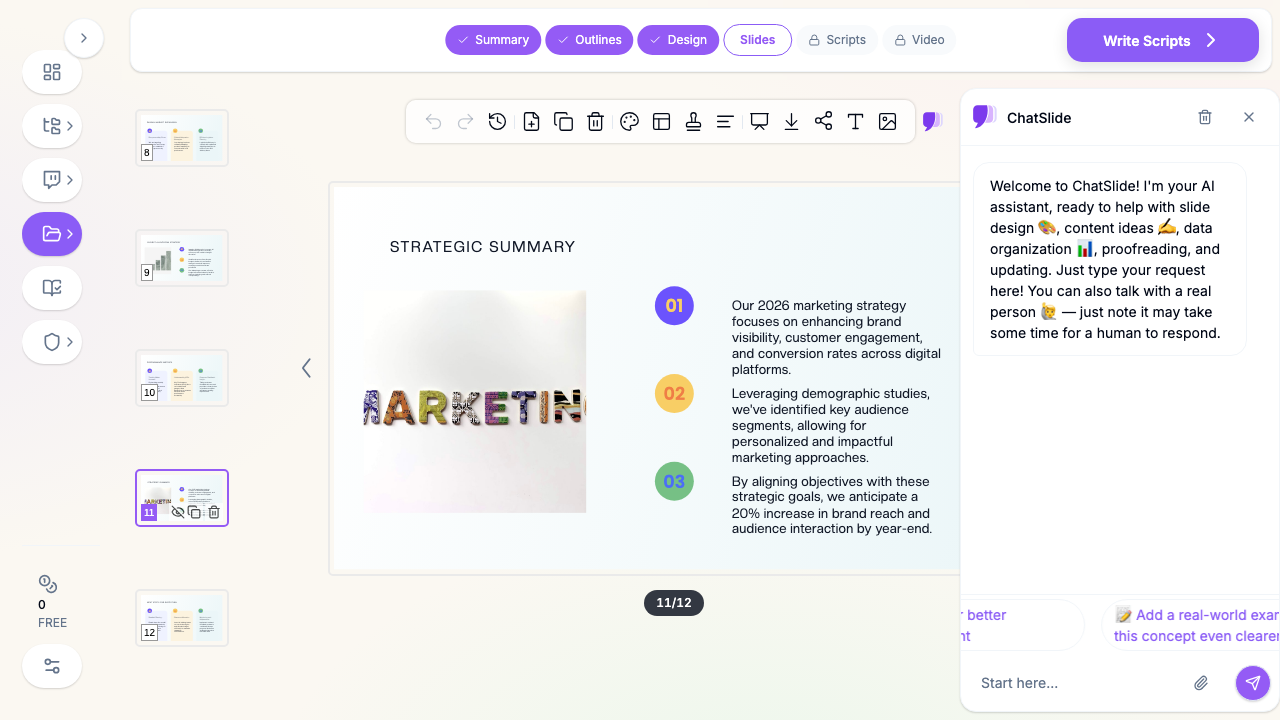
What Makes ChatSlide Powerful for Superintelligence Workflows
You Pick the Model, and You Can See Which One Ran
There is no mystery "proprietary AI" here. The free plan runs DeepSeek V4, Plus and Pro run GPT-5.5, and Ultimate adds the GPT-5.6-sol reasoning model for long or technical source material. You choose per generation, and you can change your mind on the next one. The full stack is laid out on the superintelligence page.
It Reads the Whole Source, Not a Sample
Upload a 100-page PDF, a spreadsheet, a scanned document, a Word file, a web URL, or a YouTube link — or several at once. The model builds the narrative from the complete material rather than keyword-matching a summary, which is the difference between a deck that follows your argument and one that lists your headings.
Charts From Your Real Numbers
Data visualization comes from the figures in your file, not from decorative stock charts. If your spreadsheet has quarterly revenue, you get the quarterly revenue chart, with the values intact.
Speaker Notes and Narration in the Same Pass
The script is generated with the slides, so what you say matches what is on screen. Voice cloning and AI avatars turn that script into a finished video without a second tool and without rewriting the narration to fit.
19 Editing Tools for the Argument You Disagree With
A reasoning model gets you a defensible draft; it does not get you your opinion. Every slide, note, and chart stays editable, and the AI assistant can rewrite, condense, split, or restructure any slide on request.
Research Import for Source-Backed Decks
Pull material in from PubMed, Google Scholar, and clinical trial registries when the deck has to cite something, and the model incorporates findings with citations rather than paraphrasing from memory.
How to Create Slides With Superintelligence: 4 Steps
- Give it the real material. Upload the source document, paste the URL, or describe the topic. More source is better here — a reasoning model is wasted on three bullet points, and shines on a dense report nobody wants to read twice.
- State the audience and the job. "Twelve slides for a board that has not seen this project, decision-oriented, no background section" beats "make a presentation about Q3". The audience is the single most useful thing you can tell it, because it is the one thing the document does not contain.
- Pick the model. GPT-5.5 for most decks. Switch to the GPT-5.6-sol reasoning model when the source is long, technical, or has caveats you cannot afford to lose.
- Review the outline before the slides. ChatSlide shows the outline first. Fixing the structure here takes thirty seconds; fixing it after forty slides are designed does not. Then generate, edit, and export to PPTX, PDF, Keynote, or video.
Use Cases
Research paper to conference deck. Challenge: condensing twenty pages of method and results into twelve slides without dropping the limitations. Reasoning handles the compression; you keep the caveats. Saves 3-4 hours.
Quarterly business review. Challenge: three spreadsheets, one narrative, and a CFO who reads charts first. Charts come from the real numbers, and the model proposes the order. Saves 2-3 hours.
Technical training material. Challenge: turning documentation into something a room can follow at speaking pace. Speaker notes are generated with the slides, so the pacing is built in. Saves 4-5 hours.
Client proposal from a discovery call. Challenge: a recorded call, scattered notes, and a deadline. Drop in the transcript and the notes together. Saves 2 hours.
ChatSlide for teams. Challenge: fifteen people producing decks that look like fifteen companies. Shared brand templates, team billing, SSO, and collaboration keep output consistent across a department — contact us for Enterprise deployment, SSO, and centralized billing.
Superintelligence Slide Tools Compared (2026)
| ChatSlide | Gamma | Tome | Beautiful.ai | |
|---|---|---|---|---|
Model disclosed | Yes — DeepSeek V4 / GPT-5.5 / GPT-5.6-sol | Not stated | Not stated | Not stated |
Choose the model per deck | Yes | No | No | No |
Reasoning model available | Yes (Ultimate) | No | No | Not stated |
Full-document input | PDF, DOCX, XLSX, PPTX, images, URL, YouTube | Limited | Limited | Limited |
Charts from your data | Yes | Partial | Partial | Template charts |
Speaker notes + narration | Yes, same pass | Notes only | Notes only | Notes only |
Export to video | Yes, with voice clone or avatar | No | No | No |
Free tier | Yes | Yes | Yes | Trial |
Time Comparison: Manual vs. Superintelligence-Assisted
| Task | Manual | With ChatSlide |
|---|---|---|
Reading and digesting the source | 60-90 min | 2 min |
Deciding the structure | 30-45 min | 2 min (review the outline) |
Writing slide copy | 60-120 min | included |
Building charts | 30-60 min | included |
Writing speaker notes | 30-45 min | included |
Editing and polish | 30 min | 20-30 min |
Total | 4-6.5 hours | ~30 minutes |
What Superintelligence Actually Changes — and What It Doesn't
We benchmarked this rather than assuming it. Across 128 generated decks — four frontier models, two strategies, sixteen topics, scored by a three-judge ensemble — the model you pick moves quality materially: GPT-5.6 scored 4.64/5 and Claude Opus 4.8 scored 4.59/5 on single-shot deck quality, against 3.96 for the older GPT-4o.
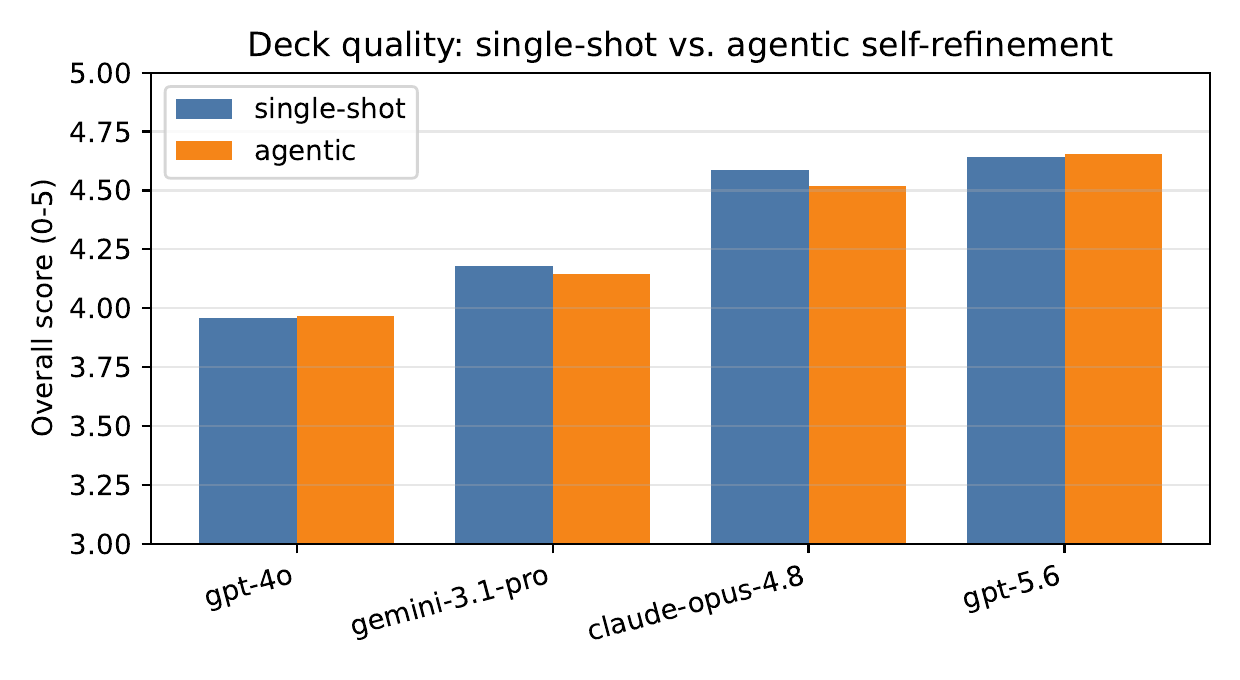
The counterintuitive half: bolting an "agentic" self-critique loop on top produced no statistically significant gain for any model (all p > 0.17), while costing up to 5x more and running up to 3.5x slower. On frontier models the first draft is already near the ceiling. More intelligence helps. More orchestration around the same intelligence mostly does not.
What it still does not do: verify that your source is correct, know your audience, or decide what to leave out. A confident deck built on a wrong input is a confident wrong deck.
Best Practices
Do:
- Give it the whole document. Truncating the source to "save tokens" is the most common way to get a shallow deck.
- Name the audience and the decision you want from them.
- Fix the outline before generating slides.
- Switch to the reasoning model when the material is dense, long, or full of caveats.
- Read the numbers on every chart against your source once, before anyone else does.
Don't:
- Paste three bullets and expect reasoning to invent substance — it will, and it will be generic.
- Ship the first draft unread because it reads well. Fluency is not accuracy.
- Put confidential or regulated material into standard plans; use Enterprise for controlled deployment.
- Ask for "a presentation about X" when you mean "twelve slides that get X approved".
Frequently Asked Questions
What is a superintelligence presentation maker? A tool where a frontier reasoning model does the pre-slide work — reading the source end to end, deciding the argument, choosing what becomes a chart, and writing the script — instead of only styling text you already wrote. In ChatSlide that means DeepSeek V4 on the free plan, GPT-5.5 on paid plans, and the GPT-5.6-sol reasoning model on Ultimate.
How do I create slides with superintelligence? Upload your source material, state the audience and the length, pick the model, review the generated outline, then generate. Editing and export to PPTX, PDF, Keynote, or video happen in the same place.
Is a reasoning model worth it for a normal deck? Usually not. For a short topic deck GPT-5.5 is already past the point where the model is the bottleneck. Reasoning earns its cost on long technical sources, dense appendices, and decks that have to survive expert questioning.
Does it invent data? Charts and figures come from the file you provide. The model does not fabricate your numbers, but it does interpret them, so the reading of the data is yours to approve before you present it.
Can it produce the video too? Yes. The same generation produces slides, speaker notes, and a narration script, and voice cloning or an AI avatar turns that into a finished video.
Which model is best for slides? In our benchmark, GPT-5.6 and Claude Opus 4.8 were statistically tied at the top, well ahead of GPT-4o. The full method and results are in the AI slide model benchmark.
Is my material private? Private projects are available on Pro and above. For organizations that need SSO, centralized billing, and controlled deployment, contact us about Enterprise.
What does it cost? The free plan generates decks with DeepSeek V4. Paid plans start at $14.90/month for GPT-5.5; the GPT-5.6-sol reasoning model is on the Ultimate plan.
Get Started
Point it at the document you have been avoiding. Make your deck with ChatSlide — free to start, no card, and you keep every slide editable.