
Quick Answer: ChatSlide is the AI presentation software life science and biotech teams use to turn their own material (a target product profile, a preclinical study report, a pipeline table, a paper or a data-room memo) into a platform, partnering, scientific or internal review deck in minutes. It is used by teams at 750+ universities and by 290,000+ professionals, builds slides from the files you upload rather than from generic web text, searches PubMed, Google Scholar and ClinicalTrials.gov from inside the editor, respects an exact slide count, and exports to editable PowerPoint, PDF, Google Slides or a narrated video. Free to start, no card required.
The Life Sciences Deck Problem
A biotech company tells the same science to five different rooms. Scientists need the mechanism and the assay data. A pharma business development team wants the differentiation, the stage and the deal shape. Investors want the pipeline, the milestones and the cash runway. The board wants the decisions. A conference audience wants the data and nothing that sounds like a pitch.
The material for all five decks already exists: study reports, figures from the lab, a pipeline spreadsheet, a target product profile, published papers. What takes the time is rebuilding the narrative for each audience, keeping the numbers consistent across versions, and making slides that a scientist and a deal lead can both read.
General AI slide tools make that worse, because they write confident filler. In life sciences every efficacy claim, n and p-value has to be traceable to a study. A tool that invents a number is a liability.

What Makes ChatSlide Powerful for Life Science Teams
Your study reports and data are the source
Upload the preclinical report, the target product profile, the pipeline table, the paper or the internal memo. The deck is built from those files. When a slide needs a number the source does not contain, the draft is instructed to leave a visible placeholder (for example "[n=PLACEHOLDER]" or "[DATA-ROOM REF]") instead of inventing one. The slide in the screenshot above came out of a demo exactly that way: mechanism points written from the brief, efficacy values left for the team to fill from the data room.
One source, several audiences
Generate the scientific version first, then change the audience field to "pharma business development team, first partnering meeting" or "Series B investors" and regenerate. Same science, different altitude and order: mechanism and data first for scientists, differentiation and deal terms first for partners.
PubMed, Google Scholar and trial registry search inside the editor
Pull the literature behind a mechanism, the competitor's published trial or the standard-of-care guideline by keyword, PMID, DOI or NCT number, and keep each citation on the slide that makes the claim. Landscape and competitive slides stop depending on someone's memory of a paper.
Tables and charts from your numbers
Paste the pipeline table or the assay results and they come back as table or chart slides. A pipeline slide with program, modality, indication, stage and next milestone is built as a table, not a paragraph.
Exact slide count and section order
"Twelve slides for a 20-minute partnering meeting: unmet need, platform, mechanism, preclinical data, pipeline, differentiation, partnering model, next steps" is followed as written. Review and reorder the outline before a single slide is drawn.
Speaker notes and narrated video
Every slide gets speaker notes sized to your slot. A finished deck exports as a narrated video, which is useful for a non-confidential overview you send ahead of a meeting.
How ChatSlide Builds Your Life Sciences Deck
- Upload what you already have. Study reports, figures, the pipeline table, the target product profile, papers, or a previous deck you want rebuilt.
- Name the room and the time. "20-minute partnering meeting with a pharma BD team, non-confidential, focus on platform differentiation and the lead program" is a usable instruction.
- Review the outline. Check that every claim you need to make has a section, and that nothing confidential is in a non-confidential version.
- Generate, then verify. Slides, images and speaker notes come back together. Check every number against the source study, fill every placeholder from the data room, then export to PowerPoint, PDF, Google Slides or a narrated video.
Use Cases for Biotech and Life Science Teams
Partnering and business development decks. Challenge: a non-confidential deck for a first meeting, then a confidential version after the CDA. Build both from one outline and keep the confidential slides out of the first.
Platform and mechanism presentations. Challenge: explaining a modality (an antibody format, a gene therapy vector, a cell therapy process, a small-molecule series) to people outside your specialty. Ask for one concept per slide with a diagram.
Preclinical data reviews. Challenge: many studies, many models, one decision. Put each study on a slide with model, n, endpoint and result, then a summary slide that states what the data does and does not show.
Investor updates and board decks. Challenge: milestones, pipeline, runway and decisions in the same deck every quarter. Keep one section order and regenerate each quarter from the new numbers.
Scientific conference talks. Challenge: data without promotion. Generate the talk from the abstract and the figures, set the audience to "scientific audience at a disease-area meeting", and keep the business slides out.
Internal scientific and portfolio reviews. Challenge: a go or no-go discussion where every program team presents in a different format. Give every team the same outline so the committee compares like with like.
Life Sciences Presentation Tools Compared (2026)
| ChatSlide | Gamma | Beautiful.ai | Canva | |
|---|---|---|---|---|
Build the deck from uploaded study reports and papers | Yes | Yes | Limited | Yes |
PubMed / Google Scholar / trial registry search built in | Yes | No | No | No |
Exact slide count and section order respected | Yes | Yes | Approximate | Approximate |
Audience field changes the altitude of the same source | Yes | Approximate | Approximate | Approximate |
Speaker notes for every slide | Yes | Basic | Basic | Basic |
PowerPoint export that stays editable | Yes | Yes | Yes | Yes |
Time Comparison: Manual vs. AI-Assisted
Typical estimates for one 15 to 20 slide partnering or platform deck:
| Task | Manual | With ChatSlide |
|---|---|---|
Turn study reports into a slide sequence | 2–4 h | 10 min |
Build pipeline and data tables | 1–2 h | 10 min |
Find and cite the literature for mechanism and landscape slides | 2–3 h | 20 min |
Source diagrams and images | 1–2 h | 10 min |
Rebuild the deck for a second audience | 2–4 h | 10 min |
Total | 8–15 h | ~60 min |
Direct Research Database Access
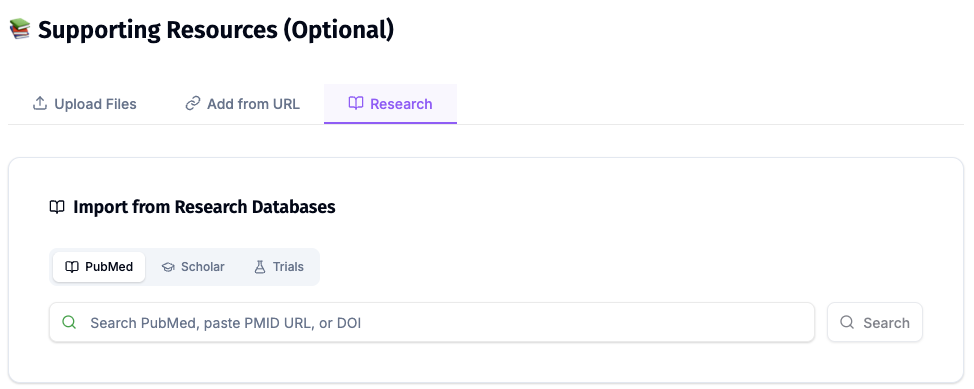
ChatSlide's Research tab connects to the databases physicians use daily:
- PubMed: Search by keyword, PMID, or DOI. Find the landmark trials, recent publications, and clinical guidelines relevant to your case. The AI reads abstracts and incorporates key findings into your slides with citations.
- Google Scholar: When your topic spans disciplines — say, the intersection of genetics and oncology — Scholar captures the broader academic literature that PubMed alone might miss.
- Clinical Trials (NCT): Presenting on a treatment where pivotal trials are ongoing? Search by NCT number or condition to pull trial design, endpoints, and status into your slides.
What a Strong Biotech Deck Includes
The unmet need in one slide. Who the patients are, what the current standard of care leaves unsolved, and how you know. Cite the epidemiology and the guideline.
The mechanism, drawn. One diagram that a non-specialist can follow, with the target, the modality and the expected biological effect.
Data with its denominators. For every result: the model or population, n, endpoint, comparator and the statistic. A claim without its n is the first thing a partner's scientist will ask about.
What the data does not show. A limitations slide earns more trust than a slide of superlatives, especially in a scientific or diligence setting.
The pipeline as a table. Program, modality, indication, stage, next milestone and timing, with the same column order in every version of the deck.
Differentiation against named alternatives. Approved therapies and the competitor programs you are measured against, with sources.
The ask. For a partnering deck, the deal shape you are open to. For a board deck, the decisions you need. For a scientific talk, the open questions.
Best Practices
Do:
- Build from the study reports and the data room, not from memory.
- Keep separate confidential and non-confidential versions, and check which one you are sending.
- Keep every number traceable to a report, a publication or a registry entry.
- Use one section order across a deck series so updates take minutes.
- Route anything that will be used with healthcare professionals through your medical, legal and regulatory review.
Don't:
- Do not let the AI fill in an efficacy value, n or p-value your source did not state. Replace every placeholder from the source.
- Do not put confidential partner data or unpublished results into a deck meant for a public meeting.
- Do not make clinical claims for a preclinical asset.
- Do not paste patient-level data into prompts or uploads.
Life Sciences Teams Across an Organization
Business development, medical affairs, R&D and investor relations all present the same science and drift apart in how they show it. ChatSlide Enterprise adds SSO, centralized team billing, shared brand templates and team collaboration on one deck library, so the platform slide that BD shows is the same one R&D approved. Contact us to set it up.
Note on patient data: ChatSlide's standard plans are not a HIPAA-covered service — keep PHI out of slide content and uploads. For hospital systems, group practices, and clinics that need a Business Associate Agreement, our Enterprise plan offers HIPAA-compliant deployment options — contact us to discuss BAA terms, SSO, and on-prem / private-cloud hosting.
Frequently Asked Questions
What is the best AI presentation tool for life sciences teams? One that builds from your own study reports and papers, cites the literature, and keeps you in control of every number. ChatSlide builds from your uploads, searches PubMed, Google Scholar and ClinicalTrials.gov in the editor, and is instructed to leave placeholders where your source has no number. You still check every value.
Can it build a biotech partnering deck? Yes. Upload the non-confidential material, set the audience to the partner's BD team, and ask for the sections you need. Build the confidential version separately after the CDA.
Will it make up preclinical or clinical results? It is instructed to build from your sources, and where a value is missing it leaves a placeholder. You remain the verifier: check every number against the study before the deck leaves the building.
Does it replace medical, legal and regulatory review? No. Any material used with healthcare professionals or in promotion still goes through your MLR process. ChatSlide shortens the drafting, not the review.
Can it make a deck for a scientific conference? Yes. Generate from the abstract and figures with the audience set to a scientific meeting, and keep pipeline and business slides out of it.
How is this different from your pharma and pharmaceutical conference guides? The pharma HCP deck guide covers healthcare professional education and medical affairs decks. The pharmaceutical conference guide covers congress talks. This page is the company side: platform, partnering, investor and portfolio decks. For lab-level teaching see the molecular biology lecture guide and for genomics data the genomics and bioinformatics guide.
Is it free? Yes, free to start with no card required. Paid plans add higher limits and more export options.
Get Started
Upload your study report or pipeline table, name the room and the time slot, and let ChatSlide draft the deck while your team keeps the time for checking the data.
Make your life sciences presentation with ChatSlide →: free to start, no credit card required.