
Quick Answer: ChatSlide is the AI presentation platform pharma and biopharma teams use to draft HCP-facing educational decks (disease-state education, mechanism of action, trial evidence summaries, MSL slide kits and speaker-program decks) in minutes from the sources they already have: the label, the clinical study report summary, the publications and the guideline. It is used by teams at 750+ universities and by 290,000+ professionals, searches PubMed, Google Scholar and ClinicalTrials.gov from inside the editor, keeps citations on the slide that makes the claim, respects an exact slide count, and exports to editable PowerPoint, PDF, Google Slides or a narrated video for your MLR workflow. Free to start, no card required.
The HCP Deck Problem
Pharma teams build a lot of slides for healthcare professionals, and almost none of them can be written freely. A disease-state deck must stay unbranded. A promotional speaker-program deck must stay within the label and present benefit and risk with fair balance. A medical affairs deck used in scientific exchange answers the question that was asked. Every claim needs a reference, and every deck goes through medical, legal and regulatory (MLR) review before anyone shows it.
That makes the first draft slow. Someone has to pull the label, the pivotal trial publications and the guideline, decide what goes on each slide, build the evidence tables, write the speaker notes, and attach a reference to every statement so the reviewers can check it. Then the same content is rebuilt for a primary care audience, a specialist audience and a nurse educator audience.
A general AI slide tool does not help here. It writes from the open web, drops references and produces claims nobody can trace. What a pharma team needs is a drafting tool that stays inside the sources it is given.


What Makes ChatSlide Powerful for Pharma Teams
Built from your approved sources
Upload the prescribing information, the publications, the guideline and the medical information response you already use. The deck is built from those documents, so the language follows your sources rather than a web summary. Where your sources do not support a statement, the slide should not make it, and your reviewers can check exactly that.
Citations on the slide that makes the claim
Pull the pivotal trial by PMID, DOI or NCT number from the Research tab, and keep each reference attached to its slide. Reviewers see the claim and its source together, which is how MLR reviews them.
One evidence base, several HCP audiences
Change the audience field from "endocrinologists" to "primary care physicians, first exposure to this class" or "diabetes nurse educators" and regenerate. Same evidence, different depth and order.
Exact slide count and fixed section order
"Eighteen slides, 30-minute disease-state program: burden of disease, pathophysiology, current guideline recommendations, unmet needs, patient identification, summary" is followed as written. Keep the same order across a slide kit so every MSL presents the same structure.
Evidence tables and charts from published data
Paste the endpoint results from the publication and they come back as a table or chart slide. Check every value against the paper before review.
Speaker notes and narrated video
Every slide gets speaker notes sized to the program length, which reviewers can approve with the slides. A finished deck exports as a narrated video for on-demand education.
How ChatSlide Builds Your HCP Deck
- Upload the source set. Label, publications, guideline, approved claims or reference documents.
- Name the audience, the setting and the time. "Unbranded disease-state education, 30 minutes, primary care physicians" is a usable instruction. So is "MSL deck answering an unsolicited question about long-term safety data".
- Review the outline. Make sure each section is supported by a source in the set and that nothing outside the intended scope crept in.
- Generate, verify, then route to MLR. Check every claim and reference, export to PowerPoint or PDF, and submit through your normal review process.
Use Cases for Pharma and Biopharma Teams
Disease-state education. Challenge: unbranded education on burden, pathophysiology, diagnosis and guidelines. Build it from the guideline and epidemiology sources, with no product slides.
Mechanism of action decks. Challenge: making a mechanism understandable to a busy clinician. One concept per slide, with a diagram, as in the screenshot above.
Clinical evidence summaries. Challenge: pivotal and supporting trials in a consistent format. One slide per trial with design, population, primary endpoint and result, then a safety section.
MSL slide kits. Challenge: a core deck plus modules for the questions that come up. Build the core deck once and generate each module from the same source set.
Speaker-program and advisory board decks. Challenge: faculty want to customize, and every version must still pass review. Generate from the approved base deck and keep edits visible for reviewers.
Internal training for field and medical teams. Challenge: launch training on the disease, the data and the competitive landscape. Build the training deck from the same sources as the external materials.
Pharma Presentation Tools Compared (2026)
| ChatSlide | Gamma | Beautiful.ai | Canva | |
|---|---|---|---|---|
Build the deck from uploaded label, publications and guidelines | Yes | Yes | Limited | Yes |
PubMed / Google Scholar / trial registry search built in | Yes | No | No | No |
Exact slide count and section order respected | Yes | Yes | Approximate | Approximate |
Audience field changes the depth of the same evidence | Yes | Approximate | Approximate | Approximate |
Speaker notes for every slide | Yes | Basic | Basic | Basic |
PowerPoint export that stays editable for review edits | Yes | Yes | Yes | Yes |
ChatSlide is a drafting and design tool. It does not replace your MLR system, your claims library or your content management platform.
Time Comparison: Manual vs. AI-Assisted
Typical estimates for one 20-slide HCP education deck draft:
| Task | Manual | With ChatSlide |
|---|---|---|
Pull and read label, publications and guideline | 2–3 h | 20 min |
Build the slide sequence and evidence tables | 3–4 h | 15 min |
Attach a reference to every claim | 1–2 h | 15 min |
Draft speaker notes | 1–2 h | 10 min |
Adapt for a second HCP audience | 2–3 h | 10 min |
Total before MLR | 9–14 h | ~70 min |
Direct Research Database Access
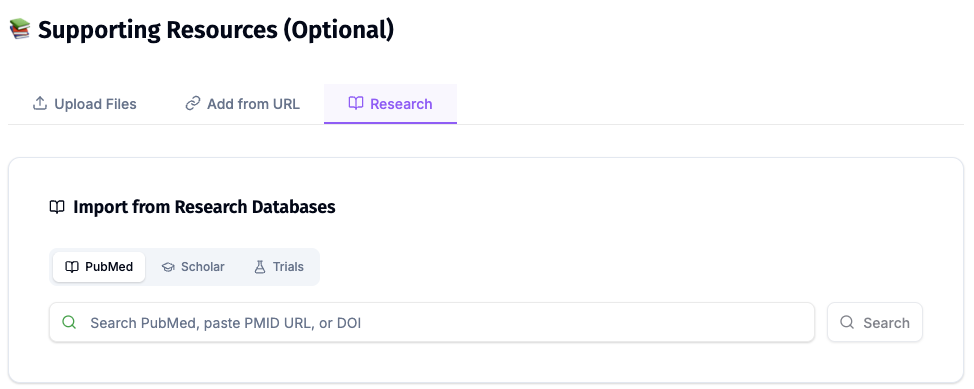
ChatSlide's Research tab connects to the databases physicians use daily:
- PubMed: Search by keyword, PMID, or DOI. Find the landmark trials, recent publications, and clinical guidelines relevant to your case. The AI reads abstracts and incorporates key findings into your slides with citations.
- Google Scholar: When your topic spans disciplines — say, the intersection of genetics and oncology — Scholar captures the broader academic literature that PubMed alone might miss.
- Clinical Trials (NCT): Presenting on a treatment where pivotal trials are ongoing? Search by NCT number or condition to pull trial design, endpoints, and status into your slides.
What a Compliant-Ready HCP Deck Includes
These are the rules and codes HCP decks are commonly reviewed against in the US. Your own SOPs and your reviewers decide the details.
The right deck type for the setting. Promotional, unbranded disease-state, medical affairs scientific exchange and accredited continuing education each follow different rules. Decide which one you are building before the first slide. Accredited CME is developed independently of the company under the ACCME Standards for Integrity and Independence, so a company-authored deck is not a CME deck.
Claims within the label for promotional decks. Promotional content stays consistent with the FDA-approved prescribing information and presents risk information with fair balance alongside benefit.
A reference for every claim. Each statement points to the label, a publication or a guideline, so the reviewer can check it on the slide.
Interactions that follow the PhRMA Code, where it applies. The PhRMA Code on Interactions with Health Care Professionals is a voluntary industry code; companies that adopt it apply it to speaker programs and other HCP interactions, alongside their own policies.
Submission at first use. Promotional labeling and advertising for a prescription drug is submitted to FDA's Office of Prescription Drug Promotion on Form FDA 2253 at the time of initial dissemination. Your regulatory team owns that step.
Trial data with its design. For every result: design, population, comparator, endpoint, effect size with confidence interval, and the safety data that goes with it.
Best Practices
Do:
- Upload only approved or reference sources for the deck type you are building.
- Keep one base deck per topic and generate audience versions from it.
- Check every claim and reference before the deck enters MLR review.
- Keep the speaker notes in review together with the slides.
Don't:
- Do not let the AI add a claim, a number or an indication your sources did not state.
- Do not mix promotional and medical affairs content in one deck.
- Do not put patient-identifiable information into prompts or uploads.
- Do not present an unreviewed draft to any HCP.
Pharma Teams Across an Organization
Medical affairs, marketing, training and field medical teams build overlapping decks from the same evidence, and versions drift. ChatSlide Enterprise adds SSO, centralized team billing, shared brand templates and team collaboration on one deck library, and private-cloud or on-prem deployment for teams with strict data rules. Contact us to discuss a rollout.
Note on patient data: ChatSlide's standard plans are not a HIPAA-covered service — keep PHI out of slide content and uploads. For hospital systems, group practices, and clinics that need a Business Associate Agreement, our Enterprise plan offers HIPAA-compliant deployment options — contact us to discuss BAA terms, SSO, and on-prem / private-cloud hosting.
Frequently Asked Questions
What AI presentation maker do pharma teams use for HCP-facing educational decks? One that builds from the team's own label, publications and guidelines and keeps a citation on every claim. ChatSlide does that, searches PubMed and ClinicalTrials.gov inside the editor, and exports editable PowerPoint for your review workflow.
Is ChatSlide an MLR review system? No. It drafts and designs the deck. Your MLR process, claims library and submission steps stay where they are.
Can it build an MSL slide deck? Yes. Build a core deck from the publications and generate modules for the questions your MSLs receive, all from the same source set.
Can it build accredited CME content? Accredited continuing education is developed independently of the company under the ACCME Standards for Integrity and Independence. An accredited provider or independent faculty can use ChatSlide to build their own deck; a company-authored deck is not CME.
Will it invent trial results? It builds from the sources you give it. You remain the verifier: check every value and reference against the publication before review.
How is this different from your other pharma guides? The pharmaceutical conference guide covers congress talks, the pharmacology guide covers teaching, and the life sciences and biotech guide covers platform, partnering and investor decks. This page is HCP education and medical affairs.
Is it free? Yes, free to start with no card required. Paid plans add higher limits and more export options.
Get Started
Upload your label, publications and guideline, name the HCP audience and the program length, and let ChatSlide draft the deck so your team spends its time on review instead of layout.
Make your HCP education deck with ChatSlide →: free to start, no credit card required.