
Quick Answer: ChatSlide is the AI presentation maker anatomy faculty, demonstrators, residents and fellows use to build an anatomy lecture (gross anatomy, neuroanatomy, or a regional session such as the brachial plexus, cranial nerves or the basal ganglia circuits) in under two minutes. Upload your syllabus, dissection guide or the chapter you teach from, and the slides follow that material: structure, relations, blood and nerve supply, pathways and clinical correlations. Replace any generated picture with your own licensed atlas figure or a de-identified scan. It is used by teams at 750+ universities and by 290,000+ professionals, searches PubMed and Google Scholar from inside the editor, respects an exact slide count, and exports to PowerPoint, PDF, Google Slides or a narrated video. Free to start, no card required.
The Anatomy Lecture Problem
Anatomy is taught as pictures with words attached, and the pictures are the hard part. A good anatomy slide shows one structure, labels it, and says why it matters at the bedside. Most anatomy decks fail on one of those three: too many structures per slide, a figure nobody can read from the back row, or no clinical reason to remember any of it.
Neuroanatomy adds a second layer. The basal ganglia, the cranial nerve nuclei or the ascending and descending tracts are pathways, not just shapes, so a lecture needs the structure, then the circuit, then the lesion and what the patient looks like. That is three slides per idea, repeated for every nucleus.
The audience changes everything. First-year medical students need orientation and terminology. Residents need the anatomy that decides an examination finding or an approach. A fellows' teaching session wants imaging correlation and the clinical syndromes.


What Makes ChatSlide Powerful for Anatomy Lectures
Your syllabus and dissection guide are the source
Upload the course syllabus, the dissection manual, the learning objectives or the textbook chapter you assign. The deck is built from those files, so terminology, order and depth follow what your course actually teaches and examines.
The same structure for every region or nucleus
Ask for one fixed order per structure (location and boundaries, relations, blood supply, innervation, function, clinical correlation) and every section comes back in that shape. A brachial plexus session, a cranial nerve session and a basal ganglia session then read like one course.
Your own figures, not just generated ones
Every image on a slide can be swapped from the image panel: search stock images, generate one, or upload your own. For anatomy, upload the licensed atlas figure, the department's own labelled photograph or a de-identified MRI or CT slice. Generated and stock pictures are fine for title and context slides, never as the figure you teach from.
The audience field sets the depth
Write "first-year medical students, introduction to the upper limb" and the deck explains terms and orientation. Write "neurology residents, clinical neuroanatomy" and it leads with localization and syndromes. One field, one regeneration, same source material.
Exact slide count and time slot respected
"Twenty slides for a 50-minute lecture: roots, trunks, divisions, cords, terminal branches, lesions by level, a self-test" is followed as written. Review and reorder the outline before any slide is drawn.
Tables, speaker notes and self-test slides
Comparison tables (nerve, root value, muscles, sensory area, lesion sign) come back as table slides. Each slide gets speaker notes timed to your slot, and a finished deck exports as a narrated video for revision before the exam.
How ChatSlide Builds Your Anatomy Deck
- Upload what you already have. The syllabus, the learning objectives, a chapter or your old handout, in any combination.
- Say who it is for and how long you have. "50-minute lecture for second-year medical students on the brachial plexus, with lesions by level and one clinical case per cord" is a usable instruction.
- Review the outline first. Check that every learning objective has a section before slides are generated.
- Generate, then replace the figures. Slides, images and speaker notes come back together. Swap every teaching figure for your licensed atlas image, check every label and root value against your source, then export to PowerPoint, PDF, Google Slides or a narrated video.
Check Every Anatomy Image (a Real Example)
We built the brachial plexus demo deck shown above with automatic stock images. Most were usable context pictures. One slide on the cords around the axillary artery came back with a historical engraving from a book on the anatomy of the horse. The search matched the words, not the species.
That is the rule for anatomy decks, from any tool: automatic images are placeholders until a person who knows the anatomy has looked at each one. Replace the teaching figures with your own, and treat generated diagrams as decoration rather than reference.
Use Cases for Anatomy Presentations
Gross anatomy lecture series. Challenge: one session per region (upper limb, lower limb, thorax, abdomen, pelvis, head and neck) with the same depth each time. Fix the section order once and reuse it.
Neuroanatomy and the basal ganglia. Challenge: nuclei, the direct and indirect pathways, neurotransmitters and the movement disorders that follow a lesion. Structure first, circuit second, clinical picture third, on separate slides.
Cranial nerves. Challenge: twelve nerves, each with nuclei, course, exit, function and a lesion sign. Ask for one summary table, then one section per nerve.
Brachial and lumbosacral plexus. Challenge: root values and lesions by level. A table per plexus plus one clinical case per major nerve keeps it memorable.
Clinical anatomy for residents. Challenge: the anatomy that decides an examination finding, an injection site or a surgical approach. Lead with the clinical question and answer it with the structure.
Imaging anatomy. Challenge: matching textbook diagrams to real MRI and CT appearances. Put the diagram and a de-identified scan side by side and label the same structures on both. For imaging-led teaching see the neuroradiology guide.
Dissection room briefing. Challenge: what students should find and protect before they start. A short deck with the target structures, their relations and the common mistakes.
Anatomy Presentation Tools Compared (2026)
| ChatSlide | Gamma | Tome | Beautiful.ai | |
|---|---|---|---|---|
Build the deck from an uploaded syllabus, chapter or handout | Yes | Limited | Limited | Limited |
Replace any image with your own upload | Yes | Yes | Yes | Yes |
PubMed / Google Scholar search built in | Yes | No | No | No |
OCR for scanned handouts and old notes | Yes | No | No | No |
Exact slide count and section order respected | Yes | Yes | Approximate | Approximate |
Audience level controls the depth | Yes | Approximate | Approximate | Approximate |
Speaker notes for every slide | Yes | Basic | Basic | Basic |
Export to narrated video for revision | Yes | No | No | No |
PowerPoint export that stays editable | Yes | Yes | Limited | Yes |
Time Comparison: Manual vs. AI-Assisted
| Task | Manual | With ChatSlide |
|---|---|---|
Turn learning objectives into a slide sequence | 1–2 h | 10 min |
Build summary tables (nerve, root, muscles, lesion sign) | 1–2 h | 10 min |
Place and label atlas figures | 2–3 h | 1–2 h (your figures, your labels) |
Write clinical correlation slides | 1–2 h | 15 min |
Draft speaker notes to the time slot | 1–2 h | 10 min |
Total per lecture | 6–11 h | ~2–3 h |
Figure work stays the longest step, because the figures should be yours.
Direct Research Database Access
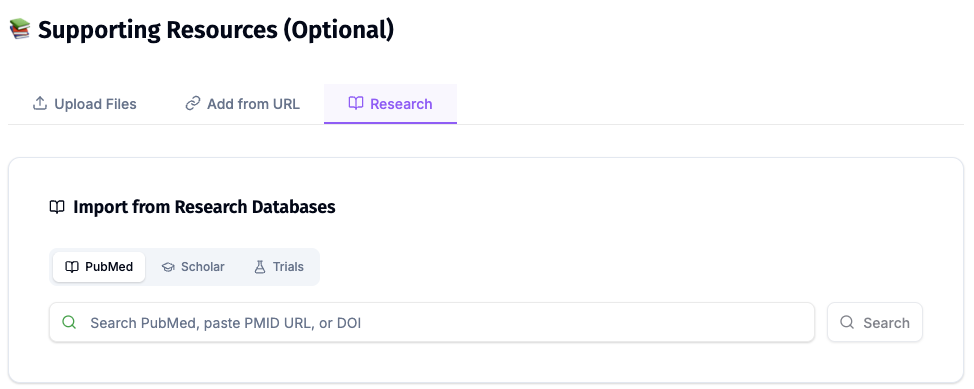
ChatSlide's Research tab connects to the databases clinicians and educators use daily:
- PubMed: Search by keyword, PMID, or DOI. Find anatomical variation studies, imaging correlation papers and clinical reviews, and keep each citation on the slide that uses it.
- Google Scholar: When your topic spans disciplines, such as anatomy education research or surgical anatomy, Scholar captures the broader academic literature that PubMed alone might miss.
- Clinical Trials (NCT): Search by NCT number or condition when a clinical correlation slide refers to an ongoing treatment trial.
What a Strong Anatomy Lecture Includes
Orientation before detail. Start each region with where it is, its boundaries and the planes you use to describe it.
One structure per slide. One labelled figure, three or four points, one clinical sentence. If a slide needs more labels than the back row can read, split it.
Relations and supply. What lies in front, behind and beside the structure, its blood supply and its innervation. Relations are what surgeons and examiners ask about.
Pathways as circuits. For neuroanatomy, draw the circuit as a sequence (input, nucleus, output, target) on its own slide after the structures are named.
Clinical correlation. The lesion, the sign and why the anatomy explains it. This is the slide students remember.
Variation. Name the common anatomical variants that matter clinically, with a reference.
Self-test. Two or three unlabelled figures or short questions at the end of each section.
References. Every root value, relation and variant traceable to the textbook, atlas or paper the learner can look up.
Best Practices
Do:
- Upload your syllabus so terminology matches what you examine.
- Use your own licensed atlas figures or departmental photographs for teaching figures.
- Keep one section order for every structure in the series.
- Use de-identified scans for imaging correlation.
- Check every label, root value and relation against your source before teaching.
Don't:
- Do not teach from a generated or automatically chosen anatomy image without checking it.
- Do not paste copyrighted atlas figures into a deck you publish unless your licence allows it.
- Do not put patient names, record numbers or identifiable images into a prompt or upload.
- Do not crowd a slide with every label on the figure; split it.
Anatomy Teaching Across a Department
Anatomy departments, medical schools and residency programs teach the same regions to every new cohort, often from decks that drift apart between lecturers. ChatSlide Enterprise adds SSO, centralized team billing, shared brand templates, and team collaboration on a single deck library, so the upper limb lecture one demonstrator gives is the one the next gives, contact us to set it up.
Note on patient data: ChatSlide's standard plans are not a HIPAA-covered service, so keep PHI out of slide content and uploads, including clinical images. For hospital systems and teaching hospitals that need a Business Associate Agreement, our Enterprise plan offers HIPAA-compliant deployment options, contact us to discuss BAA terms, SSO, and on-prem / private-cloud hosting.
Frequently Asked Questions
Can it make a neuroanatomy presentation, for example on the basal ganglia? Yes. Ask for the nuclei, the direct and indirect pathways and the clinical correlations as separate sections, and upload the chapter you teach from. Replace the generated figures with your own atlas images.
Are the AI images anatomically accurate? Do not assume so. Automatic images are matched by words and can show the wrong structure, or even the wrong species, as our own demo did. Check each one and use your own figures for anything you teach from.
Can I use my own atlas pictures and scans? Yes. Upload them from the image panel on any slide. Use figures you are licensed to use, and de-identify any scan.
Can it build a summary table of nerves, root values and lesion signs? Yes. Ask for the table in the outline and it is built as a table slide. Check every entry against your textbook.
Is it suitable for first-year students and for residents? Yes. Set the audience field to the learners' level and the depth changes with it.
How is this different from your neurology guides? The neurology guide covers clinical neurology presentations, and the pediatric neurology guide covers child neurology teaching and cases. This page is anatomy teaching itself: structures, relations, pathways and the clinical reason to know them. For general lecture structure see the teacher lecture guide.
Is it free? Yes, free to start with no card required. Paid plans add higher limits and more export options.
What languages does it support? The interface runs in 30+ languages, and decks can be generated in the language your students speak.
Get Started
Upload your syllabus or chapter, name the region, the audience and the time slot, and let ChatSlide build the first full draft while you spend your time on the figures and the labels.
Make your anatomy presentation with ChatSlide →: free to start, no credit card required.