
Quick Answer: ChatSlide is the AI presentation maker built for neurologists, neurohospitalists, and neurology residents. Trusted across 750+ universities and hospital systems, it turns a topic prompt, a guideline PDF, or a case file into a structured, citation-backed neurology deck in under two minutes — with PubMed, Google Scholar, and clinical-trial search built in, real data charts for outcome scales and imaging statistics, speaker notes, and 19 AI editing tools. It's free to start and exports to PowerPoint, PDF, and Keynote.
The Neurology Presentation Problem
Neurology talks carry an unusual load. A single review of autoimmune encephalitis for an acute care audience has to move through epidemiology, clinical presentation, a differential that spans infection, malignancy, and psychiatry, antibody panels and CSF findings, MRI and EEG patterns, and finally an acute management pathway — first-line immunotherapy, escalation criteria, ICU triggers. A stroke case presentation has to reconstruct a timeline measured in minutes, defend an imaging decision, and end with a management plan the audience can argue with.
The clinical reasoning is never the hard part. The hard part is that localizing a lesion and formatting forty slides are completely different skills, and the second one eats the evening before a national conference talk, a morning report, or a resident didactic session.

What Makes ChatSlide Powerful for Neurology
Three input modes. Start from a topic prompt ("autoimmune encephalitis for acute care neurologists — epidemiology, presentation, differential, workup, acute management"), upload an existing PowerPoint to restyle, or drop in a guideline or trial PDF and let ChatSlide draft the outline from it. Neurology talks almost always begin from source material — ChatSlide reads it instead of making you retype it.
OCR on uploaded documents. Upload a scanned stroke pathway, an antibody-panel reference sheet, or a figure-heavy PDF and ChatSlide extracts the text and images, so your institutional protocol lands in the deck intact.
Real data charts. Neurology outcomes are numbers: NIHSS and modified Rankin distributions, door-to-needle times, seizure frequency, relapse rates. Turn your own figures into clean charts instead of decorative graphics that misstate the data.
Research search built in. The Research tab queries PubMed, Google Scholar, and ClinicalTrials.gov directly (detailed below), so the pivotal thrombectomy, thrombolysis, and immunotherapy evidence lands in your slides with citations — essential for journal club, guideline talks, and any practice-changing lecture.
Speaker notes. ChatSlide drafts per-slide notes, so a resident presenting at morning report or a first-time conference speaker has a script to work from rather than a bare bullet list.
19 AI editing tools. Tighten a dense differential slide, generate a diagram of a management algorithm, rephrase for a non-neurologist audience, or restyle the whole deck to your department's look — without leaving the editor.
How ChatSlide Builds Your Neurology Deck
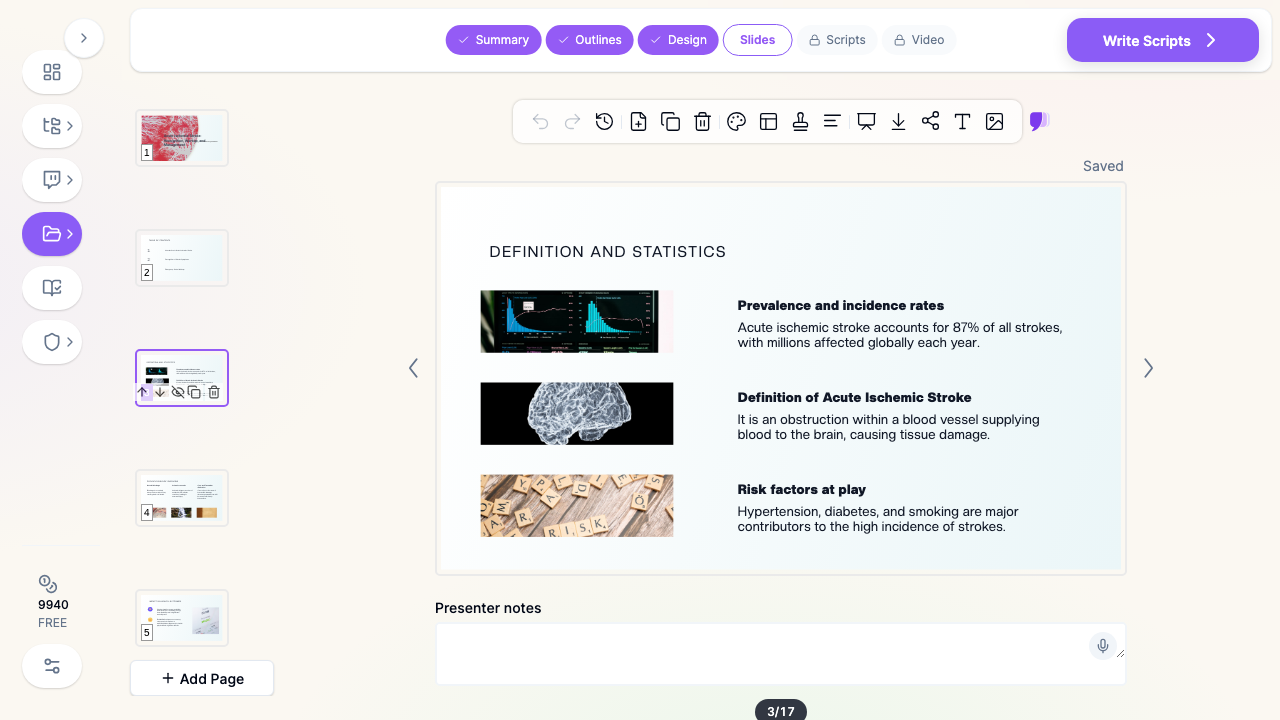
1. Start with your topic or source material. A prompt with your learning objectives, an existing deck, or a guideline PDF — ChatSlide reads it and drafts a structured outline.
2. Refine the outline before generating slides. Reorder sections so the talk follows the clinical logic — presentation, localization, differential, workup, management, disposition. Fixing structure at the outline stage is far faster than reworking finished slides.
3. Generate slides with relevant imagery and citations. ChatSlide builds each slide with a clean layout and supporting visuals, and can attach trial evidence from the Research tab. Swap any generic image for your own anonymized MRI, CT perfusion, or EEG figures.
4. Export to your format. Download as PowerPoint or PDF for didactics and grand rounds, or Keynote for a conference talk.
Use Cases for Neurology Teams
National and regional conference talks. A 20-slide invited review — an encephalitis update, a stroke-systems talk, a movement or epilepsy topic — where structure and citation quality are what the audience remembers. Time saved: an evening of outlining and formatting.
Stroke case presentations and morning report. A cryptogenic stroke in a young adult, reconstructed from timeline to imaging to secondary-prevention plan, with the guideline evidence attached at each decision point. Time saved: hours reformatting images and tables the night before.
Resident and fellow didactics. Core-curriculum lectures across stroke, epilepsy, neuroimmunology, neuromuscular disease, and headache, built to a consistent template the whole program reuses. Time saved: a reusable lecture scaffold instead of forty blank slides.
Neurohospitalist and acute care in-services. Teaching emergency physicians, intensivists, and nursing colleagues when to suspect autoimmune encephalitis, how the code-stroke pathway runs, or what a status epilepticus escalation looks like. Time saved: protocol-to-deck in minutes.
Journal club and guideline reviews. Critical appraisal of a thrombectomy-window trial or a new immunotherapy study, with the study design and the practice-changing takeaway on the same slide. Time saved: hours pulling and citing evidence.
Patient and family education. Plain-language decks — and narrated video versions — explaining a stroke diagnosis, a seizure action plan, or what recovery typically looks like. Time saved: one clinical deck restyled into a patient-facing version.
Neurology Presentation AI Tools Compared (2026)
| Capability | ChatSlide | Gamma | Tome | Beautiful.ai |
|---|---|---|---|---|
PubMed / clinical-trial search built in | Yes | No | No | No |
Reads uploaded guideline PDFs & PPTX | Yes | Partial | Partial | No |
OCR on scanned protocols and pathways | Yes | No | No | No |
Real data charts from your own outcome numbers | Yes | Partial | No | Partial |
Per-slide speaker notes | Yes | Partial | No | No |
PowerPoint + Keynote export | Yes | Partial | Partial | Partial |
Free tier | Yes | Yes | Yes | Limited |
Time Comparison: Manual vs. AI-Assisted
| Task | Manual | With ChatSlide |
|---|---|---|
Outline a conference review talk | 1–2 hours | 2 minutes |
Draft slides from a guideline PDF | 3–4 hours | 5 minutes |
Pull and cite trial evidence | 1–2 hours | 10 minutes |
Chart NIHSS or outcome-scale data | 1 hour | Minutes |
Restyle to department branding | 1–2 hours | Minutes |
What a Strong Neurology Presentation Includes
Localization before labels. The audience follows a differential far better when the talk first commits to where the lesion is — cortex, white matter, brainstem, cord, nerve, muscle — and only then to what it is.
A timeline made explicit. Stroke talks live on the clock: last-known-well, arrival, imaging, treatment decision. Encephalitis talks live on a slower one: prodrome, psychiatric phase, seizures, autonomic instability. Putting the time course on screen is what makes the management logic land.
A differential with structure. Infectious, autoimmune, metabolic, neoplastic, psychiatric — organized by category and pruned by the case's actual features, not an alphabetical list of twenty diagnoses.
Workup tied to decisions. Antibody panels, CSF findings, MRI sequences, and EEG patterns earn their slide when each result changes what happens next. A results table nobody acts on is filler.
Management as an algorithm. First-line, escalation criteria, and the disposition decision on one clean slide, with the supporting trial evidence cited behind it.
Honest imaging. Show the actual sequence and the actual finding, anonymized — not a stock brain render where a DWI slice should be.
Best Practices (Do's and Don'ts)
Do open a case talk with the presentation as it actually unfolded — the audience should reason forward, not backward from the diagnosis.
Do put each algorithm on one slide the audience can hold in their head, with detail on backup slides.
Do cite the specific trial or guideline behind every prescriptive statement — thrombolysis windows, immunotherapy sequencing, anticoagulation timing.
Do state what changed after each landmark result: what you did next matters more than what the panel reported.
Don't paste a full antibody panel or coagulation workup onto one slide — split it into what was sent, what returned, and what it changed.
Don't lean on stock imagery of glowing brains where an anonymized MRI, a perfusion map, or an outcome chart would actually teach.
Don't end a case at diagnosis — the disposition, secondary prevention, and follow-up plan are the decisions the audience takes home.
Direct Research Database Access
ChatSlide's Research tab connects to the databases physicians use daily:
- PubMed: Search by keyword, PMID, or DOI. Find the landmark trials, recent publications, and clinical guidelines relevant to your case. The AI reads abstracts and incorporates key findings into your slides with citations.
- Google Scholar: When your topic spans disciplines — say, the intersection of genetics and oncology — Scholar captures the broader academic literature that PubMed alone might miss.
- Clinical Trials (NCT): Presenting on a treatment where pivotal trials are ongoing? Search by NCT number or condition to pull trial design, endpoints, and status into your slides.

Neurology for Departments, Residencies, and Stroke Programs
For a neurology department, a residency program, or a stroke center's education committee, ChatSlide scales past the individual lecturer. Shared brand templates keep every resident's morning report and every faculty lecture consistent, team collaboration lets attendings review trainees' decks before they present, and centralized billing plus SSO simplify rollout across a department. Decks can also be exported as narrated video for an on-demand teaching library or community stroke-education program.
For patient data specifically: ChatSlide's standard plans are not a HIPAA-covered service — keep protected health information (PHI) out of slide content and uploads, and anonymize case details and imaging before they go in a deck. For hospital systems, group practices, and clinics that need a Business Associate Agreement, our Enterprise plan offers HIPAA-compliant deployment options — contact us to discuss BAA terms, SSO, and on-prem / private-cloud hosting.
Frequently Asked Questions
Can ChatSlide build slides from a guideline or an existing PowerPoint? Yes. Upload a guideline, a protocol, a trial paper, or an existing deck, and ChatSlide reads the content — including scanned documents via OCR — then drafts a structured outline you can refine before generating slides.
Does it add real citations? Yes. The Research tab queries PubMed, Google Scholar, and ClinicalTrials.gov, so pivotal stroke and neuroimmunology trials land in your deck with citations.
Can it build a case presentation from my notes? Yes. Paste or upload your case summary and ChatSlide structures it into presentation, workup, differential, and management sections you can refine — just anonymize it first.
Can I use my own MRI or EEG images? Yes. Swap any generated image for your own anonymized figures in the editor.
Is it free? You can start for free. Free decks are watermarked and viewable or shareable online; PDF, PowerPoint and Keynote export are on the paid tiers.
Is it HIPAA compliant? The standard plans are not a HIPAA-covered service — keep PHI out and anonymize cases. Enterprise offers HIPAA-compliant deployment options and a BAA; contact us to discuss.
What formats can I export? PowerPoint, PDF, and Keynote.
Related Guides
This guide covers general and acute neurology — stroke, encephalitis, conference talks, and case presentations. For Parkinson's disease, tremor, and deep brain stimulation topics, see our movement disorders neurology guide. For the structure of a clinical case itself, see the clinical case presentation guide, and for the resuscitation-room side of stroke and status epilepticus, the emergency medicine presentation guide.
Get Started
Neurology asks clinicians to hold a timeline, a localization, a differential, and a management algorithm in one talk — and then deliver it to residents, conference audiences, and families. The hours spent formatting slides are hours away from that work.
With ChatSlide, turn your expertise in stroke, neuroimmunology, and acute neurology into structured, citation-backed slides in minutes — whether you're presenting at a national conference, running morning report, or teaching the next code-stroke in-service.
Make your neurology presentation with ChatSlide — free to start, no credit card required.