
Quick Answer: ChatSlide is the fastest way for pediatricians, residents, ED clinicians, nurses, and social workers to build a child abuse recognition and child protection lecture. Used at 750+ universities and teaching hospitals, it turns a PubMed search or your own draft into a case-based deck in under two minutes: sentinel-injury patterns, the differential for non-accidental trauma, mandated-reporting workflow, and the multidisciplinary child protection team. Built-in PubMed and ClinicalTrials.gov import, real-data charts, AI images, and speaker notes. Free to start, exports to PowerPoint, PDF, and video.
The Child Protection Teaching Problem
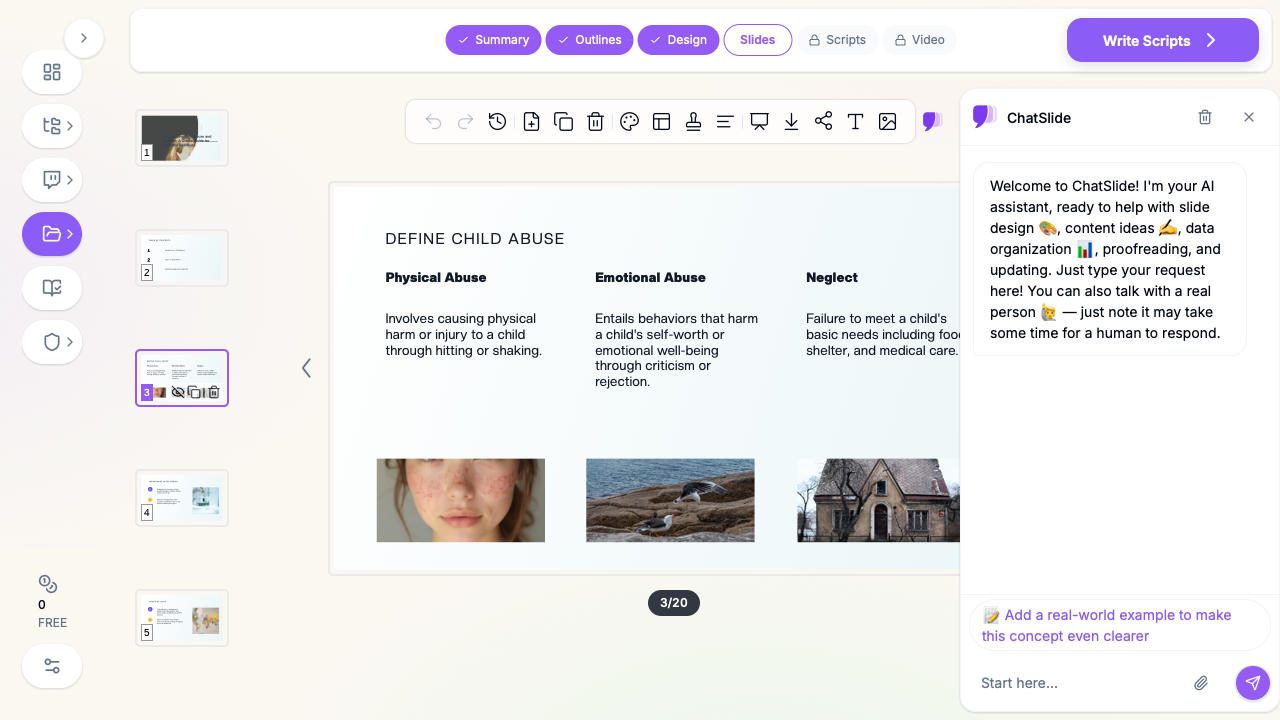
Recognizing child abuse is one of the hardest, highest-stakes skills in pediatrics. A missed sentinel injury — a bruise on a non-cruising infant, a frenulum tear, a "TEN-4" distribution — is a child sent back into danger. Yet most residents get a single lecture on it, often built the night before by a senior who is also covering a full service.
The teaching burden is real. A strong child-maltreatment talk has to weave together radiology (the classic metaphyseal lesion, rib fractures, the dating of subdural collections), the recognition mnemonics, the legal duty to report, and the human reality of interviewing a frightened family. Pulling that together from scattered papers and old slide decks eats an entire weekend.
Generic AI slide tools do not help, because they do not understand clinical medicine and cannot reach the literature physicians actually cite. That is the gap ChatSlide closes.
What Makes ChatSlide Powerful for Child Protection Lectures
3 Input Modes
Start from a topic ("recognizing inflicted injury in infants"), paste your own notes, or upload a PDF — a clinical guideline, an AAP policy statement, or a journal article. ChatSlide reads it and builds the outline for you.
PubMed + Research Import
The evidence base here matters enormously and changes fast. ChatSlide connects directly to PubMed, Google Scholar, and ClinicalTrials.gov so the landmark studies on sentinel injuries, bruising prediction rules, and abusive head trauma land in your slides with formatted citations.
Real Data Charts
Prevalence by age band, injury-type distributions, sensitivity/specificity of screening tools — paste the numbers and ChatSlide renders clean charts instead of the cluttered tables most child-protection decks fall back on.
AI Images and OCR
Pull in a clinical-style illustration of a bruising distribution, or upload a (de-identified) radiograph and have its key teaching point captioned. OCR lets you drop in a scanned protocol and have the text extracted into bullet points.
Speaker Notes and 19 AI Editing Tools
Auto-generated speaker notes give residents a script for the hard parts — how to phrase a report to CPS, how to document objectively. Then tighten any slide with one-click editing: shorten, simplify, make it more case-based, add a discussion question.
How ChatSlide Builds Your Child Protection Deck
- Input — type the topic, paste your notes, or upload a guideline PDF.
- Extract & outline — ChatSlide structures it into recognition → differential → workup → reporting → team, and you edit the outline before any slides are made.
- Generate — slides, images, charts, and speaker notes are produced in one pass.
- Refine & export — adjust with the AI editing tools, then export to PowerPoint, PDF, or a narrated video for asynchronous resident training.
Use Cases for Pediatric and Child Protection Educators
- Pediatric resident didactic — a 45-minute "Recognizing Child Abuse and Neglect" lecture with case vignettes. Saves a full weekend of prep.
- Case-based child protection conference — build the deck around a real (de-identified) presentation, revealing the differential step by step. Cuts hours of slide assembly.
- ED / urgent care in-service — a focused talk on sentinel injuries and the TEN-4-FACESp rule for front-line clinicians. Ready in minutes between shifts.
- Mandated-reporter training — for teachers, nurses, and child-care staff: what to recognize, what the legal duty is, how to document and report. Reusable, audience-tunable in one click.
- Multidisciplinary team teaching — explaining the roles of the child protection team, CPS, and law enforcement to new staff. Generated from a single protocol PDF.
Direct Research Database Access
ChatSlide's Research tab connects to the databases physicians use daily:
- PubMed: Search by keyword, PMID, or DOI. Find the landmark trials, recent publications, and clinical guidelines relevant to your case. The AI reads abstracts and incorporates key findings into your slides with citations.
- Google Scholar: When your topic spans disciplines — say, the intersection of genetics and oncology — Scholar captures the broader academic literature that PubMed alone might miss.
- Clinical Trials (NCT): Presenting on a treatment where pivotal trials are ongoing? Search by NCT number or condition to pull trial design, endpoints, and status into your slides.

Child Protection AI Tools Compared (2026)
| Feature | ChatSlide | Gamma | Beautiful.ai | Generic AI |
|---|---|---|---|---|
PubMed / citation import | Yes | No | No | No |
Case-based clinical structure | Yes | Partial | No | No |
Real-data charts | Yes | Limited | Yes | Limited |
Speaker notes (scripted) | Yes | Partial | No | Partial |
Export to narrated video | Yes | No | No | No |
Free tier | Yes | Limited | No | Varies |
Time Comparison: Manual vs. AI-Assisted
| Task | Manual | With ChatSlide |
|---|---|---|
Literature review + citing | 3–4 hrs | 20 min |
Outline + structure | 1–2 hrs | 5 min |
Building slides | 4–6 hrs | 10 min |
Charts + images | 2 hrs | 5 min |
Speaker notes | 1–2 hrs | Auto |
Total | ~12 hrs | ~45 min |
What a Strong Child Abuse Recognition Presentation Includes
A complete teaching deck on child maltreatment generally covers:
- Definitions — physical abuse, sexual abuse, emotional abuse, and neglect, with the legal framing.
- Sentinel injuries and red flags — bruising in non-mobile infants, the TEN-4-FACESp rule, frenulum and oral injuries, patterned marks, and injuries inconsistent with the stated mechanism or developmental stage.
- The differential — mimics that must be excluded (bleeding disorders, osteogenesis imperfecta, metabolic bone disease, cultural practices, accidental trauma).
- The workup — skeletal survey, neuroimaging, retinal exam, coagulation studies, and when each is indicated.
- Documentation and reporting — objective recording of findings, the clinician's role as a mandated reporter, and how to make a report to child protective services.
- The multidisciplinary response — the child protection team, social work, CPS, and law enforcement, and how they coordinate.
- Communicating with families — non-accusatory, child-safety-centered language.
Best Practices
Do:
- Lead with a case to anchor the recognition skills.
- Keep one teaching point per slide; use the AI charts for epidemiology.
- Cite current AAP and peer-reviewed guidance — and let PubMed import keep the references clean.
- Include a clear "what to do next" reporting workflow slide.
Don't:
- Crowd radiographs onto a single slide — give each finding room.
- Use real patient identifiers (see the privacy note below).
- Rely on a wall of text for the legal/reporting section; make it a flow.
Frequently Asked Questions
Can ChatSlide build a case-based child protection lecture? Yes. Describe the case or upload your notes and it structures the deck as case → differential → workup → reporting, with discussion prompts.
Does it cite the medical literature? Yes — paste a PMID, DOI, or keyword in the Research tab and references format automatically.
Can I turn the lecture into a video for asynchronous training? Yes. Export to a narrated video with an AI voice or avatar presenter, ideal for self-paced mandated-reporter modules.
Is it free? There is a free tier to start, no credit card required. Exports include PowerPoint, PDF, and video.
Can non-physicians use it for mandated-reporter training? Yes — teachers, nurses, child-care, and social-work staff use the same flow to build recognition-and-reporting training.
A Note on Patient Data
ChatSlide's standard plans are not a HIPAA-covered service — keep PHI out of slide content and uploads, and fully de-identify any case material or imaging used for teaching. For hospital systems, residency programs, and clinics that need a Business Associate Agreement, our Enterprise plan offers HIPAA-compliant deployment options — contact us to discuss BAA terms, SSO, and on-prem / private-cloud hosting.
Get Started
Stop spending weekends rebuilding the child-protection lecture from scratch. Make your child abuse recognition presentation with ChatSlide — free to start, PubMed-connected, and ready to export to slides or video in minutes.