
Quick Answer: ChatSlide is the AI presentation maker strength and conditioning coaches, kinesiology and exercise science lecturers, and personal trainers use to build an exercise program design deck (aerobic, resistance, plyometric or speed training) in a few minutes. Upload your course chapter, lab manual or programming template, set the audience, and the slides follow that material: needs analysis, exercise selection, intensity, volume, frequency, recovery and progression, with technique cues and speaker notes. It is used by teams at 750+ universities and by 300,000+ professionals, respects an exact slide count, and exports to PowerPoint, PDF or a narrated video. Free to start, no card required.
The Program Design Lecture Problem
Program design is a sequence of decisions, and most decks show the decisions as a list. A student who reads "intensity, volume, frequency, recovery" on one slide has not learned how to choose any of them for a real athlete or client.
A useful program design lecture walks through the decisions in order, with one worked example that carries through the whole deck: who the athlete is, what the sport or goal demands, what was tested, which exercises were picked and why, how much and how often, and how the plan moves from week to week.
Each training mode adds its own vocabulary. Aerobic programming runs on heart rate zones and weekly minutes. Resistance training runs on load, sets and repetitions. Plyometrics are counted in foot contacts, and speed work is counted in distance and rest. One template can carry all of them, but only if the deck is built in the same order every time.


What Makes ChatSlide Powerful for Program Design Decks
Your course material is the source
Upload the textbook chapter, the lab manual, last term's handout or your own programming template. The deck is built from those files, so terminology, order and the numbers you teach follow your course rather than a generic internet summary.
One decision order for every training mode
Ask for a fixed order (needs analysis, exercise selection, intensity, volume, frequency, recovery, progression, technique) and every section comes back in that shape. An aerobic lecture, a resistance lecture and a plyometric lecture then read like one course.
The audience field sets the depth
Write "first-year exercise science students" and the deck defines terms and explains the reasoning. Write "certified coaches, continuing education" and it moves faster to case decisions and progressions. Same source material, one regeneration.
Exact slide count, outline first
"Twenty slides for a 50-minute lecture" is followed as written. You review and reorder the outline before any slide is drawn, so every learning objective has a home.
Charts and tables you can edit
Ask for a weekly volume table or a contact-count chart and edit the numbers directly in the chart's data table (bar, line or pie). You can also upload a spreadsheet of your training log and build the slides from it.
Speaker notes and a narrated version
Every slide gets speaker notes for your time slot, and the finished deck exports as a narrated video students can rewatch before a practical exam.
How ChatSlide Builds Your Program Design Deck
- Upload what you already have. A chapter, a lab sheet, your periodization template, or a training log spreadsheet.
- Say who it is for and how long you have. "50-minute lecture for undergraduate exercise science students on plyometric and speed program design, with one athlete case carried through the deck" is a usable instruction.
- Review the outline. Check that needs analysis, exercise selection, intensity, volume, frequency, recovery and progression each have a section.
- Generate, then check every number. Slides, images and speaker notes come back together. Check each prescription against your source, swap any image that shows the wrong sport, then export to PowerPoint, PDF or a narrated video.
Check Every Image (a Real Example)
We built the plyometric and speed demo deck shown above with automatic stock images. Most fit: box jumps, sprint starts, a coach with a clipboard. The slide on logging foot contacts by drill came back with a photo of an ice hockey tactics board, chosen because it matched "coach" and "drill", not jumping.
That is the rule for any training deck from any tool: an automatic picture is a placeholder until someone who knows the movement has looked at it. For technique slides, use your own photo or video still of the drill done well.
The same applies to the text. The draft said "3 sets of 5 bounds per leg equals 30 contacts", which is correct (15 per leg, two legs), but every count, load and rest period in a generated deck should be checked before you teach from it.
Use Cases for Exercise Program Design Presentations
Strength and conditioning course lectures. Challenge: one lecture per training mode with the same structure each time. Fix the decision order once and reuse it for aerobic, resistance, plyometric and speed sessions.
Plyometric and speed training. Challenge: progressions from landing mechanics to reactive jumps, counted in foot contacts, with recovery between sessions. One section per decision, one athlete case throughout.
Aerobic training program design. Challenge: zones, weekly minutes and progression for different goals. A heart rate zone table and one worked example of target heart rate.
Resistance training program design. Challenge: load, sets, repetitions and rest by goal (strength, hypertrophy, endurance). A goal-by-variable table, then one block of weeks.
Personal trainer client presentations and workshops. Challenge: explaining a plan to a client or a small group without jargon. Set the audience to "new gym members" and the same plan comes back in plain language.
Certification exam review. Challenge: covering many programming rules fast. Summary tables plus a short self-test at the end of each section.
Team staff meetings. Challenge: sharing a training block with coaches, physios and medical staff. For the rehabilitation side see the physiotherapy guide, and for injury and return-to-play talks the sports medicine guide.
Program Design Presentation Tools Compared (2026)
| ChatSlide | Gamma | Tome | Beautiful.ai | |
|---|---|---|---|---|
Build the deck from an uploaded chapter, handout or spreadsheet | Yes | Limited | Limited | Limited |
Replace any image with your own upload | Yes | Yes | Yes | Yes |
PubMed / Google Scholar search built in | Yes | No | No | No |
Exact slide count and section order respected | Yes | Yes | Approximate | Approximate |
Audience level controls the depth | Yes | Approximate | Approximate | Approximate |
Speaker notes for every slide | Yes | Basic | Basic | Basic |
Export to narrated video | Yes | No | No | No |
PowerPoint export that stays editable | Yes | Yes | Limited | Yes |
Time Comparison: Manual vs. AI-Assisted
| Task | Manual | With ChatSlide |
|---|---|---|
Turn a chapter into a slide sequence | 1–2 h | 10 min |
Build prescription tables (zones, loads, contacts) | 1 h | 10 min, plus checking |
Write a worked athlete case across the deck | 1–2 h | 15 min |
Find and place technique images | 1–2 h | 30–60 min (your own photos) |
Draft speaker notes to the time slot | 1 h | 10 min |
Total per lecture | 5–8 h | ~1.5–2.5 h |
Checking the numbers and the technique images stays your job, and it should.
What a Strong Program Design Lecture Includes
Needs analysis first. The demands of the sport or goal (movement patterns, energy systems, common injuries) and the athlete's own testing and training history. Every later decision points back to this slide.
FITT-VP as the backbone. Frequency, intensity, time, type, volume and progression is the framework the American College of Sports Medicine uses for exercise prescription. One slide per variable, each tied to the case.
Aerobic numbers students can calculate. The Physical Activity Guidelines for Americans (2nd edition, 2018) set 150 to 300 minutes a week of moderate or 75 to 150 minutes of vigorous aerobic activity for adults, plus muscle-strengthening on two or more days. For individual zones, show the Karvonen method: target heart rate = (maximum HR − resting HR) × intensity + resting HR. If you estimate maximum heart rate, name the equation, for example Tanaka et al. (2001): 208 − 0.7 × age.
Plyometric volume in foot contacts. The NSCA's Essentials of Strength Training and Conditioning gives per-session guidelines of 80 to 100 contacts for beginners, 100 to 120 for intermediate and 120 to 140 for advanced athletes, with 48 to 72 hours between plyometric sessions. Teach students to log contacts per drill and total them per session.
Progression one variable at a time. Complexity, speed, load or volume, not all four in the same week. Show a three or four week block on one slide.
Technique cues. Short cues the athlete can act on, with a photo of the movement done well.
Monitoring. What you will watch to decide whether the plan is working, such as jump height, sprint times, session RPE or landing quality.
References. Every guideline traceable to the textbook, position stand or paper the learner can look up.
Research Behind the Prescription
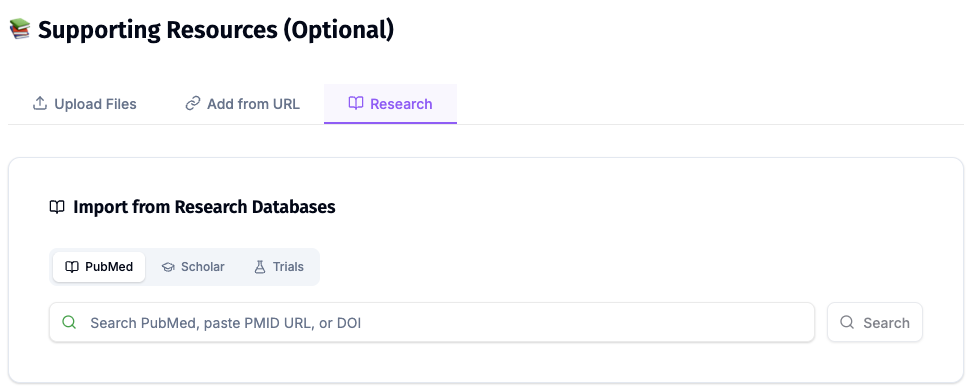
ChatSlide's Research tab searches PubMed and Google Scholar from inside the editor, so a slide on plyometric volume, concurrent training or heart rate methods can carry the citation that supports it. Search by keyword, PMID or DOI and keep each reference on the slide that uses it.
Best Practices
Do:
- Upload your course chapter so the numbers match what you examine.
- Carry one athlete or client case through the whole deck.
- Put prescriptions in tables (variable, value, reason).
- Use your own photos for technique slides.
- Check every count, load, zone and rest period against your source.
Don't:
- Do not teach a technique from an automatically chosen image without looking at it.
- Do not change volume, intensity and complexity in the same week of an example progression.
- Do not put client names, health histories or screening results into a prompt or upload.
- Do not crowd one slide with a full season; split it into blocks.
Program Design Teaching Across a Department or Facility
Kinesiology departments, coaching education programs and multi-site gyms teach the same programming to every new cohort of students or trainers, often from decks that drift apart. ChatSlide Enterprise adds SSO, centralized team billing, shared brand templates and team collaboration on one deck library, so the plyometrics lecture one instructor gives is the one the next gives. Contact us to set it up.
Client health information (screening forms, medical history, injury notes) does not belong in slides. ChatSlide's standard plans are not a HIPAA-covered service; for clinical exercise or hospital-based programs that need a Business Associate Agreement, our Enterprise plan offers HIPAA-compliant deployment options, contact us.
Frequently Asked Questions
Can it make a plyometric or speed training program design presentation? Yes. Ask for needs analysis, exercise selection, intensity, volume in foot contacts, frequency and recovery, progression and technique cues as separate sections, and upload the chapter you teach from.
Can it make an aerobic or resistance training lecture with the same structure? Yes. Give the same section order in each prompt, or reuse the outline from your first deck, and every training mode follows it.
Are the numbers in the generated slides correct? Check them. In our demo the contact arithmetic was right, but a generated deck is a draft. Compare every prescription with your textbook or position stand before teaching.
Can I add my own exercise photos or video stills? Yes. Replace any image from the image panel on the slide with your own upload.
Can personal trainers use it for client workshops? Yes. Set the audience to your clients and the deck explains the plan in plain language. Keep client health details out of the slides.
Is it free? Yes, free to start with no card required. Paid plans add higher limits and more export options.
What languages does it support? The interface runs in 30+ languages, and decks can be generated in the language your students speak. For general lecture structure see the teacher lecture guide.
Get Started
Upload your chapter or programming template, name the training mode, the audience and the time slot, and let ChatSlide build the first full draft while you spend your time on the numbers and the technique photos.
Make your exercise program design presentation with ChatSlide →: free to start, no credit card required.