
Quick Answer: If you need to build a sports medicine presentation on muscle injury, return-to-play, orthobiologics, rehab planning, or team care, ChatSlide is one of the fastest ways to get from a topic or source document to a polished draft. It is used by 290,000+ users across 750+ universities, generates slide outlines in minutes, adds relevant visuals, supports PubMed and Google Scholar research import, and exports to PowerPoint when you need a file for a conference room or grand rounds projector.
The Sports Medicine Slide Problem
Sports medicine presentations are rarely simple lecture decks. A single talk on acute muscle injury may need epidemiology, mechanism, MRI grading, biologic rationale, surgical indications, rehab progression, and return-to-play criteria in one coherent story. The audience is often mixed too: sports medicine physicians, orthopedic surgeons, fellows, physiotherapists, athletic trainers, and sometimes team staff.
That makes generic AI presentation tools a poor fit. They can produce something that looks polished from a distance, but they usually miss the structure clinicians actually need. Instead of showing a mechanism of injury, a phased rehab pathway, and the decision points between conservative management and operative treatment, they tend to fall back to broad wellness copy and irrelevant stock photos.
The manual alternative is not much better. Most clinicians end up juggling journal PDFs, screenshots of MRI grading tables, lecture notes, and old conference decks while rebuilding the same structure from scratch. The work is repetitive even when the clinical expertise is already there.
This page is for sports medicine presentation maker intent specifically. If your focus is broader rehabilitation teaching, see our physiotherapy presentation guide. If your talk is subspecialty spine surgery, our orthopedic spine surgery presentation guide is the closer fit.
What Makes ChatSlide Powerful for Sports Medicine
1. Multiple input modes for real-world workflows
Some sports medicine decks start from a topic prompt like "Acute hamstring injury management in elite football." Others start from a review article, a guideline PDF, a case note summary, or an old PowerPoint that needs to be rebuilt. ChatSlide handles all of those starting points, which matters because clinicians do not work from one neat format.
2. Research import for evidence-heavy talks
Sports medicine talks often need recent trials, systematic reviews, or consensus guidance. ChatSlide's Research tab can pull in PubMed, Google Scholar, and Clinical Trials sources so you are not copying citations by hand across tabs while building the deck.
3. Visuals that fit the topic
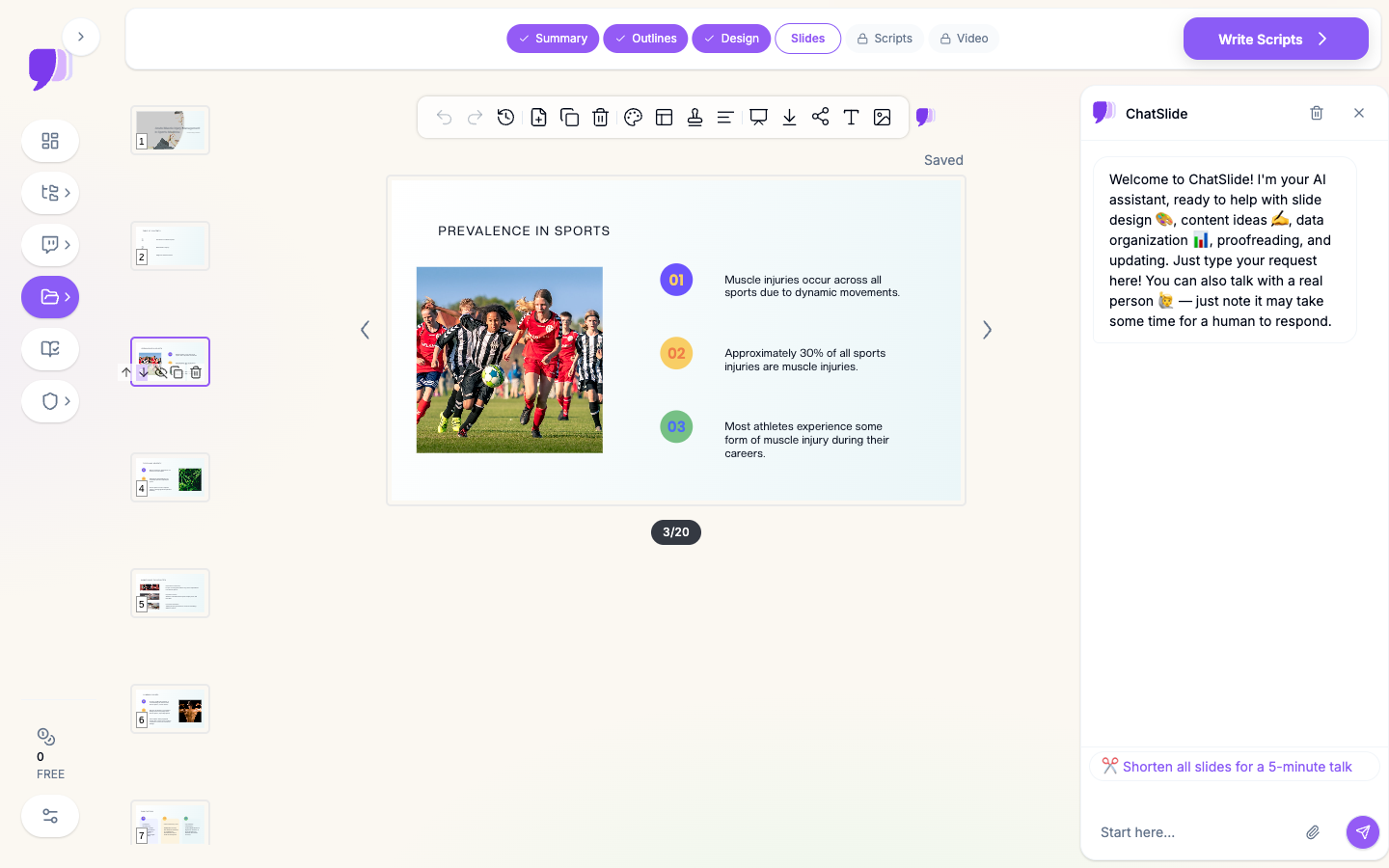
A usable sports medicine slide needs athlete and injury imagery, not generic hospital stock. ChatSlide's image workflow gives you slides that look closer to conference-ready sports medicine content, with visual slots that you can later replace with your own de-identified imaging, ultrasound stills, or rehab diagrams.
4. Faster outline-to-slide conversion
The bottleneck in medical decks is usually structure, not typing. Once the outline is right, the rest becomes much easier to refine. ChatSlide can generate that scaffold quickly, which is especially useful when you need a 20- to 30-slide talk that follows the logic of assessment, classification, treatment, and return to sport.
5. Speaker support and AI editing tools
Sports medicine presenters often need to adapt the same core deck for different rooms: fellows, residents, mixed multidisciplinary staff, or a short sponsor-free journal-club format. ChatSlide's editing tools make it easier to shorten, expand, simplify, or reframe a draft without rebuilding the whole presentation.
6. PowerPoint export when the room requires it
Conference organizers, hospital lecture halls, and teaching programs still frequently ask for a PPTX file. Browser-based editing is helpful during drafting, but export still matters. ChatSlide supports that handoff cleanly.
How ChatSlide Builds Your Sports Medicine Deck
Step 1: Start with a precise topic
The best prompts are concrete. Instead of "sports injury presentation," use something like:
- "Acute hamstring injury management: grading, imaging, rehab, and return-to-play"
- "PRP in acute muscle injury: evidence review, indications, and practical decision-making"
- "Quadriceps strain in elite athletes: diagnosis, treatment progression, and re-injury prevention"
This gives the outline generator enough context to build a deck that feels clinical rather than generic.
Step 2: Set the audience correctly
Audience changes the deck. A presentation for orthopedic fellows can assume more imaging and operative nuance than a talk for athletic trainers. A lecture for sports medicine residents may need differential diagnosis and exam structure; a multidisciplinary team meeting may need more emphasis on rehab phases and communication.
Step 3: Review the outline before generating slides
For sports medicine, this is usually where the big quality jump happens. A strong outline often includes:
- mechanism and epidemiology
- anatomy relevant to the injured structure
- classification or grading
- imaging and diagnosis
- treatment options
- rehab progression
- return-to-play criteria
- recurrence prevention
If any of those are missing, fix the outline first. It is faster than patching a weak deck later.
Step 4: Generate the slide deck with images
Once the structure is right, ChatSlide generates the slides and fills the visual slots. That gets you to a credible first draft quickly, which you can then tailor with your own tables, cited figures, or institutional references.
Step 5: Refine for your exact use case
The same sports medicine topic can become several different decks:
- a conference talk with evidence and comparative treatment strategy
- a team-physician lecture for fellows and residents
- a rehab-focused in-service for physiotherapists and athletic trainers
- a case conference deck with imaging and return-to-play decision points
The core content stays similar; the framing changes.
Use Cases for Sports Medicine Teams and Clinicians
Acute muscle injury conference talks
This is the clearest fit for the keyword cluster that drove this article. Talks on hamstring, quadriceps, calf, and adductor injuries usually need a practical mix of epidemiology, grading, treatment pathways, and athlete timelines. ChatSlide helps generate that backbone quickly.
Return-to-play decision presentations
These decks are rarely about one intervention. They are about balancing healing, objective progression, athlete demands, and recurrence risk. That usually means a combination of load progression, imaging context, functional testing, and communication across the care team.
Orthobiologics evidence reviews
PRP and other biologic interventions remain frequent sports medicine presentation topics because the audience wants both mechanism and evidence. ChatSlide is useful here because the structure often has to separate biologic rationale from actual clinical outcomes and indications.
Teaching sessions for fellows, residents, and athletic trainers
Education decks often need the same clinical content as a conference talk, but simplified into a cleaner teaching progression. That means more anatomy and mechanism up front, more explicit rehab logic, and less assumption that the audience already knows the literature.
Team or clinic standardization
Some sports medicine groups need internal presentations for how they document, classify, image, or progress injuries. This is where organization-level features matter more than one-off deck speed.
Sports Medicine AI Tools Compared (2026)
| Tool | Best fit | Where it works well | Common limitation for sports medicine |
|---|---|---|---|
ChatSlide | Medical, research, and education decks | Topic-to-outline workflow, research import, images, PPTX export | Still needs clinician review for specialty nuance |
Gamma | Fast general-purpose visual decks | Lightweight brainstorming and visually polished broad presentations | Less tuned for evidence-heavy clinical structure |
Tome | Narrative product-style presentations | Storytelling and simple high-level overviews | Weaker fit for medical teaching and citation-driven talks |
Beautiful.ai | Business-style slide assembly | Clean design patterns and executive decks | More rigid when you need subspecialty medical content |
For sports medicine specifically, the main question is not which tool looks most modern. It is which one gets you closest to a medically credible first draft without flattening the clinical reasoning.
Time Comparison: Manual vs. AI-Assisted
| Task | Manual workflow | With ChatSlide |
|---|---|---|
Build initial outline | 30-60 minutes | a few minutes |
Draft 20-25 content slides | 2-4 hours | 10-20 minutes for first draft |
Add basic visuals | 30-90 minutes | included in generation flow |
Reframe for a different audience | 45-90 minutes | substantially faster from the same draft |
Prepare PPTX export | extra formatting pass | direct export |
The big win is not perfect automation. It is cutting the repetitive setup work so your time goes into the clinical message instead of layout assembly.
What a Strong Sports Medicine Presentation Includes
Even with AI assistance, the ranking and teaching value come from substance. A strong sports medicine presentation usually includes:
A clear injury framework. Define the structure involved, the mechanism of injury, and how you classify severity. Without that, treatment recommendations float without context.
Imaging and diagnosis that answer a decision. Imaging should support management, not just decorate the talk. Explain what MRI, ultrasound, or exam findings change in your decision-making.
A treatment pathway rather than a list. Good sports medicine talks show what happens first, what changes at follow-up, and which findings push you toward a different plan.
Rehab progression with criteria. Athletes and clinicians both care about progression criteria, not just exercise names. Range of motion, pain response, strength testing, sprint tolerance, and sport-specific function all matter.
Return-to-play logic. One of the highest-value parts of a sports medicine deck is making return-to-play criteria explicit. This is often the section that gets discussed most in Q&A.
Re-injury prevention. The presentation is stronger when it closes the loop by addressing load management, recurrence risk, and monitoring strategy.
Best Practices
Do
- build the outline around decision points, not just anatomy
- use your own de-identified imaging or figures where they add real value
- separate biologic theory from outcome evidence when discussing orthobiologics
- tailor the deck for the room before presenting
- keep a short backup appendix for treatment controversies and key studies
Don't
- rely on generic motivational sports imagery as the whole visual strategy
- bury return-to-play criteria at the end without operational detail
- present one treatment pathway as universal when the evidence is mixed
- paste PHI, athlete-identifying data, or raw patient documents into standard-plan slides
- assume an AI-generated first draft is ready without clinical review
Direct Research Database Access
ChatSlide's Research tab connects to the databases physicians use daily:
- PubMed: Search by keyword, PMID, or DOI. Find the landmark trials, recent publications, and clinical guidelines relevant to your case. The AI reads abstracts and incorporates key findings into your slides with citations.
- Google Scholar: When your topic spans disciplines — say, the intersection of genetics and oncology — Scholar captures the broader academic literature that PubMed alone might miss.
- Clinical Trials (NCT): Presenting on a treatment where pivotal trials are ongoing? Search by NCT number or condition to pull trial design, endpoints, and status into your slides.

For sports medicine topics, this is useful for pulling systematic reviews on acute muscle injury, rehabilitation progression literature, consensus statements on return to sport, and orthobiologic evidence updates without interrupting the drafting process.
Frequently Asked Questions
Can ChatSlide make sports medicine conference presentations?
Yes. It works well for conference-style drafts where you already know the topic and need a structured slide deck quickly. You should still review the content clinically before presenting.
Is ChatSlide useful for muscle injury presentations specifically?
Yes. That is one of the strongest use cases because these talks usually follow a repeatable structure: mechanism, grading, imaging, treatment, rehab, and return to play.
Can I import papers or source material?
Yes. You can start from a topic, upload source files, or use the Research tab to bring in supporting literature.
Does it work for multidisciplinary sports medicine teams?
Yes. You can draft one core presentation and then adapt it for physicians, fellows, physiotherapists, athletic trainers, or internal clinic teaching.
Can I export to PowerPoint?
Yes. If your institution or conference requires a local slide file, ChatSlide supports PPTX export.
Is this only for doctors?
No. It is also useful for physiotherapists, athletic trainers, educators, and clinic teams who need sports medicine teaching material with a stronger clinical structure than generic AI deck tools usually provide.
What about patient or athlete data?
Keep PHI and identifying athlete data out of standard-plan slides and uploads. Use de-identified material only unless you are on an appropriate enterprise deployment.
Enterprise for Sports Medicine Groups and Clinics
If you are building sports medicine content across a department, fellowship, multi-site orthopedic group, or athlete-care organization, the individual drafting workflow is only part of the story. Teams often need shared templates, centralized billing, collaboration, and identity controls.
For organizations that need tighter governance, ChatSlide also supports SSO, centralized team billing, shared brand templates, and team collaboration. If your workflows involve protected health information or clinical operations that require stricter deployment controls, our Enterprise plan offers HIPAA-compliant deployment options - contact us to discuss BAA terms, private-cloud, and on-prem hosting.
Note on patient data: ChatSlide's standard plans are not a HIPAA-covered service - keep PHI out of slide content and uploads. For hospital systems, sports medicine clinics, and orthopedic groups that need a Business Associate Agreement, our Enterprise plan offers HIPAA-compliant deployment options - contact us to discuss BAA terms, SSO, and on-prem / private-cloud hosting.
Get Started
If you need to make a sports medicine presentation on acute muscle injury, rehab progression, orthobiologics, or return-to-play strategy, ChatSlide gets you to a real first draft much faster than starting from a blank slide sorter.
Start with a topic, review the outline, add your own de-identified evidence or imaging, and export when the deck is ready for your next conference, fellow lecture, or clinic education session.