Quick Answer: ChatSlide is the AI presentation maker nurses, nursing students, pharmacists and clinical educators use to build a medication review presentation (a case-based review for a nursing assessment, a medication safety in-service, a heart failure regimen review for a ward team) in under two minutes. Upload your de-identified case summary, the medication list, your unit's marking guide or the guideline you follow, and the slides are built from those files. It is used by teams at 750+ universities and by 290,000+ professionals, searches PubMed, Google Scholar and ClinicalTrials.gov from inside the editor, respects an exact slide count, and exports to PowerPoint, PDF, Google Slides or a narrated video. Free to start, no card required.
The Medication Review Presentation Problem
A medication review is one patient, one list and a dozen decisions. Each medicine needs an indication, a dose that suits this patient's kidneys, weight and age, a check against every other medicine on the list, and a reason to continue, change or stop it. Then come the parts that markers and senior clinicians look for first: whether the patient actually takes the medicines, what they understand about them, and what non-drug measures would help.
Turning that into slides is where the time goes. A twelve-item medication list becomes a wall of text. Pharmacokinetics and pharmacodynamics get explained in the abstract instead of applied to the patient. The recommendations end up on the last slide with no link back to the problems that justified them.
And the format keeps changing. A postgraduate nursing unit asks for an audio-visual presentation with narration and a strict time limit. A ward wants a ten-minute safety huddle. A pharmacy placement wants a formal case presentation with references. Same skills, three different decks.


What Makes ChatSlide Powerful for Medication Review Decks
Your case, medication list and marking guide are the source
Upload the de-identified case summary, the medication chart transcribed without identifiers, the assessment brief and its learning outcomes, or the guideline your service follows. The deck is built from those files rather than from a generic overview of pharmacology, so the structure follows what you are actually being asked to show.
The audience field sets the altitude
Write "postgraduate nursing assessors" and the deck applies pharmacokinetics and pharmacodynamics to the case and justifies each recommendation. Write "ward nurses, 10-minute safety huddle" and it becomes the three things to check before the next round. Write "patient and carer" and it becomes plain-language education about what each medicine is for. One field, one regeneration, same source material.
Exact slide count, section order and time limit respected
"Twelve slides for a ten-minute narrated presentation: patient profile, medication list, three medicines analysed in depth, interactions, adherence, education, recommendations, references" is followed as written. Review and reorder the outline before a single slide is drawn.
PubMed, Google Scholar and trial registry search inside the editor
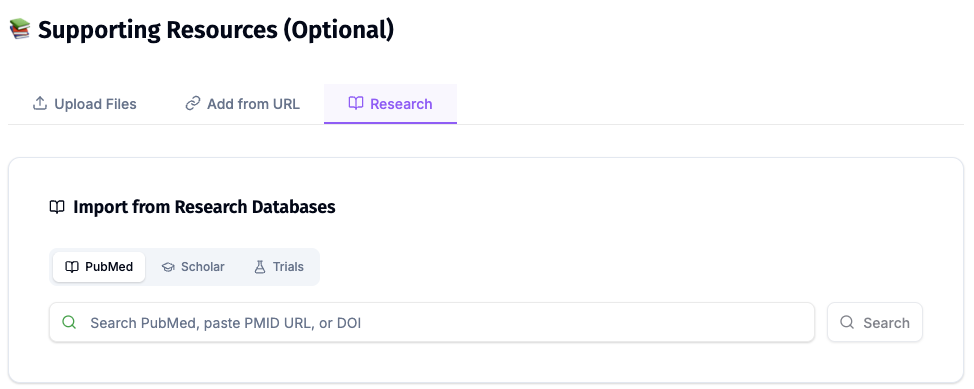
Every recommendation in a medication review needs evidence behind it. Pull the guideline, the systematic review or the trial by keyword, PMID, DOI or NCT number from the Research tab and keep each citation attached to the slide that makes the claim.
OCR reads scanned charts, leaflets and printed briefs
Printed medication charts with identifiers removed, consumer medicine information leaflets and photocopied assessment rubrics often arrive as scans or photos. OCR reads them, so the text comes through as content you can build on.
Speaker notes and narrated video for audio-visual assessments
Each slide gets speaker notes timed to your slot, and a finished deck exports as a narrated video. That suits assessments that ask for a recorded multimedia presentation instead of a live one, and in-service sessions that night staff watch later.
How ChatSlide Builds Your Medication Review Deck
- Upload what you already have. The de-identified case, the medication list, the assessment brief, the guideline or formulary entry, in any combination.
- Say who it is for and how long you have. "Ten-minute narrated medication review for postgraduate nursing assessors, older adult with heart failure, focus on medication safety, adherence and patient education" is a usable instruction.
- Review the outline first. Check that each learning outcome or marking criterion has a section before slides are generated.
- Generate, then verify. Slides, images and speaker notes come back together. Check every dose, indication, interaction, monitoring value and citation against your sources, then export to PowerPoint, PDF, Google Slides or a narrated video.
Use Cases for Medication Review Presentations
Nursing medication review assessment. Challenge: present a medication review for one person in your care, apply pharmacokinetics and pharmacodynamics, optimise the regimen and propose education and non-drug strategies, inside a time limit. Upload the brief so every criterion gets its own section. Saves 4–6 hours.
Heart failure regimen review. Challenge: several medicines that each need monitoring, with renal function, potassium, blood pressure and daily weight all moving together. Build a monitoring slide per medicine class and a single action plan from your service's protocol.
Polypharmacy review in an older adult. Challenge: a long list, more than one prescriber and medicines whose original indication nobody remembers. Ask for a continue / change / stop table with the reason for each line.
Medication reconciliation at transitions of care. Challenge: admission, transfer and discharge lists that disagree. Present omissions, duplications and unexplained changes as separate slides so the discrepancies are easy to act on.
Medication safety in-service for a ward. Challenge: high-risk medicines, near-miss themes and double-check rules taught to staff in fifteen minutes. Build it from your local policy and incident themes with no identifying details.
Pharmacy placement case presentation. Challenge: a formal case with a pharmaceutical care plan, references and questions from preceptors. Pull the evidence into the slides and keep the citations visible.
Patient and carer education session. Challenge: explaining what each medicine is for, what side effects to report and how to use a dose administration aid, in plain language. Same case, audience set to "patient and carer".
Medication Review Presentation Tools Compared (2026)
| ChatSlide | Gamma | Tome | Beautiful.ai | |
|---|---|---|---|---|
Build the deck from an uploaded case, medication list and marking guide | Yes | Limited | Limited | Limited |
PubMed / Google Scholar / trial registry search built in | Yes | No | No | No |
OCR for scanned charts, leaflets and briefs | Yes | No | No | No |
Exact slide count and section order respected | Yes | Yes | Approximate | Approximate |
Audience level controls the altitude | Yes | Approximate | Approximate | Approximate |
Speaker notes for every slide | Yes | Basic | Basic | Basic |
Export to narrated video for recorded assessments | Yes | No | No | No |
PowerPoint export that stays editable | Yes | Yes | Limited | Yes |
Interface languages | 30+ | Fewer | Fewer | Fewer |
Time Comparison: Manual vs. AI-Assisted
| Task | Manual | With ChatSlide |
|---|---|---|
Map the brief or marking criteria into a slide sequence | 1–2 h | 10 min |
Turn the medication list into per-medicine analysis slides | 2–3 h | 15 min |
Find, read and cite the evidence for each recommendation | 2–4 h | 20 min |
Build adherence, education and non-drug intervention slides | 1 h | 10 min |
Draft speaker notes to the time limit for narration | 1–2 h | 10 min |
Total | 7–12 h | ~65 min |
Direct Research Database Access
ChatSlide's Research tab connects to the databases physicians use daily:
- PubMed: Search by keyword, PMID, or DOI. Find the landmark trials, recent publications, and clinical guidelines relevant to your case. The AI reads abstracts and incorporates key findings into your slides with citations.
- Google Scholar: When your topic spans disciplines — say, the intersection of genetics and oncology — Scholar captures the broader academic literature that PubMed alone might miss.
- Clinical Trials (NCT): Presenting on a treatment where pivotal trials are ongoing? Search by NCT number or condition to pull trial design, endpoints, and status into your slides.
What a Strong Medication Review Presentation Includes
A patient profile that explains the list. Age, relevant diagnoses, renal and hepatic function, weight, allergies, living situation and who manages the medicines. Every later decision refers back to this slide, so keep it de-identified and complete.
A reconciled medication list. Name, dose, route, frequency and indication for each medicine, including over-the-counter and complementary products. Flag anything with no clear indication.
Pharmacokinetics and pharmacodynamics applied, not recited. How this patient's kidney function, age or interacting medicines change exposure or effect for the medicines that matter. Two or three medicines analysed properly beat twelve listed.
Problems named before solutions. Omissions, duplications, interactions, doses that no longer suit, monitoring that is overdue, side effects the patient reports. One problem per line, each traceable to the list.
Adherence assessed, not assumed. What the patient actually takes, the barriers they describe and how you checked. A recommendation that ignores adherence rarely survives contact with the patient.
Education and non-drug strategies. Plain-language explanations, dose administration aids, self-monitoring such as daily weights where your guideline calls for it, and lifestyle measures, each tied to a problem from the earlier slides.
Recommendations with a rationale and a monitoring plan. Continue, change or stop, why, who needs to agree, and what will be checked and when. Where your course or country uses a framework such as Quality Use of Medicines, map the recommendations to it.
References. Every dose, interaction and monitoring statement traceable to a guideline, formulary or study the reader can look up.
Best Practices
Do:
- Upload the assessment brief or marking criteria so each one has its own section.
- Use a de-identified or illustrative case, and transcribe the medication list without names, dates of birth or record numbers.
- Analyse a few medicines in depth rather than listing every one at the same level.
- Link every recommendation back to a named problem and a reference.
- Verify every dose, indication, interaction, monitoring value and citation against a current formulary or guideline before presenting or submitting.
Don't:
- Do not let the AI supply a dose, interaction or monitoring threshold your source did not state. Check every one.
- Do not put identifiable patient details, chart photos with names, or record numbers into a prompt or upload.
- Do not submit AI-assisted work for assessment without following your institution's rules on AI use and acknowledging it where they require you to.
- Do not reuse last year's deck without checking for formulary and guideline changes.
Medication Safety Education Across a Service
Nursing schools, hospital education teams and pharmacy departments teach the same medication safety content to every intake: new graduates, agency staff, students on placement, patients and carers. ChatSlide Enterprise adds SSO, centralized team billing, shared brand templates, and team collaboration on a single deck library, so the high-risk-medicines session taught on one ward is the one taught across the hospital — contact us to set it up.
Note on patient data: ChatSlide's standard plans are not a HIPAA-covered service — keep PHI out of slide content and uploads. For hospital systems, group practices, and clinics that need a Business Associate Agreement, our Enterprise plan offers HIPAA-compliant deployment options — contact us to discuss BAA terms, SSO, and on-prem / private-cloud hosting.
Frequently Asked Questions
Can it build a narrated medication review for a nursing assessment? Yes. Upload the brief, give the time limit and slide count, and the deck comes back with speaker notes timed to the slot. Export it as a narrated video if the assessment asks for a recorded presentation. Follow your unit's rules on AI use and acknowledge it where required.
Can it apply pharmacokinetics and pharmacodynamics to my case? It structures that analysis from the case details and sources you upload, medicine by medicine. Whether the reasoning is right for your patient is yours to check against your pharmacology text, formulary or guideline.
Does it check doses or interactions for accuracy? No. It builds slides from what you upload and the sources you choose, and you remain the verifier. Check every dose, interaction and monitoring value against a current formulary before presenting.
Can I present a heart failure or polypharmacy case? Yes. Give the medicines, the relevant results and the audience, and ask for the sections you need, for example a monitoring slide per medicine class or a continue / change / stop table.
Can I use a real patient from my placement? Only as a de-identified case. Remove names, dates of birth, record numbers and any detail that could identify the person before anything goes into a prompt or upload.
How is this different from your pharmacology, geriatrics and nursing education guides? Pharmacology covers drug-class lectures and mechanisms. Geriatrics covers frailty and comprehensive geriatric assessment. Nursing education covers teaching sessions for nurses in general. This page is the medication review itself: one patient's list, analysed, reconciled and turned into recommendations. For a whole-patient case write-up see the clinical case presentation guide, for the evidence step see the nursing research and EBP guide, and for patient-facing sessions see the patient education guide.
Is it free? Yes, free to start with no card required. Paid plans add higher limits and more export options.
What languages does it support? The interface runs in 30+ languages, and decks can be generated in the language your audience speaks.
Get Started
Upload the de-identified case, the medication list and the brief, say who is assessing it and how many minutes you have, and let ChatSlide build the first full draft while you still have time to check every dose against your sources.
Make your medication review presentation with ChatSlide → — free to start, no credit card required.