
The Challenge of Neuropharmacology Presentations
Neuropharmacology sits at one of the most complex intersections in medicine. Presenting drug development pipelines, receptor binding mechanisms, or clinical trial outcomes for CNS disorders demands a rare combination: scientific rigor and visual clarity.
Whether you're a pharmacology professor preparing a lecture on cholinesterase inhibitors, a graduate student presenting your thesis on amyloid-beta pathways, or a researcher sharing Phase III trial results at a department meeting, the challenge is the same. Dense molecular data, multi-stage clinical pipelines, and nuanced mechanism-of-action diagrams need to be communicated clearly — often to audiences with varying levels of expertise.
Most neuropharmacology presenters spend hours building slides from scratch, manually formatting receptor diagrams, drug comparison tables, and timeline graphics. That time could be spent on the research itself.
What Makes a Strong Drug Development Lecture
Effective neuropharmacology presentations share several characteristics that distinguish them from generic science talks:
Clear Mechanistic Storytelling
The best drug development lectures follow the logic of the science itself. They start with the disease mechanism — what goes wrong at the molecular level — then walk through how a therapeutic candidate addresses that mechanism. For Alzheimer's presentations, this might mean explaining amyloid plaque formation before introducing anti-amyloid antibodies. For Parkinson's lectures, it means grounding dopaminergic pathway disruption before discussing levodopa or MAO-B inhibitors.
Data Visualization That Respects Complexity
Neuropharmacology data is inherently multi-dimensional. Dose-response curves, pharmacokinetic profiles, and clinical endpoint comparisons all need to be presented without oversimplification. Strong presentations use structured layouts — side-by-side comparisons, clearly labeled axes, and consistent color coding — to make dense data accessible.
Audience-Appropriate Depth
A lecture for medical students on cholinesterase inhibitors requires different depth than a departmental seminar on novel TREM2 agonists. The best presenters calibrate their molecular detail to their audience, using progressive disclosure: overview slides for context, detailed slides for the core science.
Step-by-Step: Creating Your Neuropharmacology Presentation with ChatSlide
1. Define Your Topic and Scope
Start by specifying your drug development topic with precision. Rather than "Alzheimer's drugs," try "Challenges and Future Directions in Alzheimer's Disease Drug Development" or "Comparative Efficacy of Cholinesterase Inhibitors vs. Anti-Amyloid Therapies."
ChatSlide uses your topic to generate a structured outline that follows the logical progression of drug development: disease background, mechanism of action, preclinical evidence, clinical trial design, efficacy outcomes, and future directions.
2. Review and Customize Your Outline
The generated outline provides a framework you can refine. For a pharmacology lecture, you might want to:
- Add a section on historical drug development failures (which are instructive in neuropharmacology — over 99% of Alzheimer's drug candidates have failed in clinical trials)
- Include a dedicated section for safety and adverse effect profiles
- Add comparative slides if covering multiple drug classes (e.g., cholinesterase inhibitors vs. NMDA receptor antagonists vs. anti-amyloid monoclonal antibodies)
3. Generate and Enhance Your Slides
Once your outline is set, ChatSlide generates professional slides with structured content layouts. The platform automatically creates:
- Title slides with appropriate scientific framing
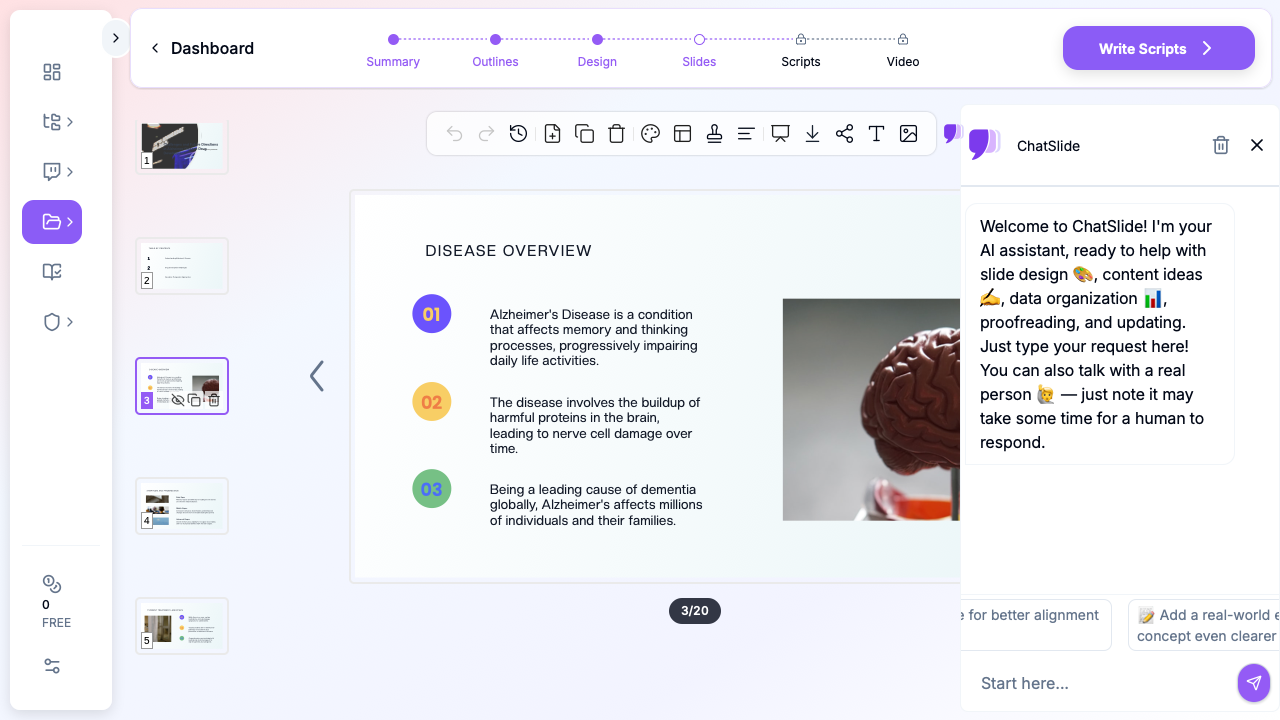
- Content slides with numbered key points and supporting visuals
- Comparison layouts suitable for drug class comparisons
- Summary slides for clinical data highlights
4. Add Relevant Imagery
ChatSlide's image integration pulls relevant stock imagery — brain anatomy, laboratory settings, molecular structures — that complement your scientific content. For neuropharmacology presentations, you'll typically see images of neural tissue, research environments, and clinical settings that provide visual anchoring for dense textual content.
5. Refine and Export
Review your completed deck, adjust any section ordering, and export. Many pharmacology lecturers use the slides as a foundation, then add their own proprietary data, institutional branding, or specific clinical trial figures from published papers.
Common Neuropharmacology Presentation Types
Disease Mechanism Lectures
These foundational presentations explain the pathophysiology underlying CNS disorders. They typically cover:
- Molecular and cellular pathology (e.g., tau phosphorylation, alpha-synuclein aggregation)
- Genetic risk factors and biomarkers
- How the disease mechanism informs therapeutic targets
ChatSlide structures these as progressive educational narratives, building from basic neuroscience to therapeutic implications.
Drug Pipeline Reviews
Pipeline presentations survey the landscape of therapies in development for a particular CNS indication. They need:
- Phase-by-phase summaries of candidates in development
- Mechanism-of-action categorization
- Timelines for expected regulatory milestones
These are common in both academic settings (pharmacology courses) and industry (investor updates, medical affairs meetings).
Clinical Trial Result Presentations
Presenting trial outcomes — whether for a journal club, departmental seminar, or conference talk — requires clear data visualization and critical analysis. Key elements include:
- Study design overview (population, endpoints, duration)
- Primary and secondary outcome data
- Safety and tolerability profiles
- Comparison with existing standard of care
Comparative Pharmacology Lectures
These presentations compare drug classes within a therapeutic area. For example, comparing the efficacy profiles of donepezil, rivastigmine, and galantamine for Alzheimer's, or examining the relative benefits of different dopamine agonists for Parkinson's disease.
Direct Research Database Access
ChatSlide's Research tab connects to the databases physicians use daily:
- PubMed: Search by keyword, PMID, or DOI. Find the landmark trials, recent publications, and clinical guidelines relevant to your case. The AI reads abstracts and incorporates key findings into your slides with citations.
- Google Scholar: When your topic spans disciplines — say, the intersection of genetics and oncology — Scholar captures the broader academic literature that PubMed alone might miss.
- Clinical Trials (NCT): Presenting on a treatment where pivotal trials are ongoing? Search by NCT number or condition to pull trial design, endpoints, and status into your slides.

Tips for Neuropharmacology Presentations
Lead with the unmet need. Every drug development story starts with why current treatments are insufficient. Frame your presentation around the clinical gap before introducing therapeutic candidates.
Use consistent terminology. Neuropharmacology is jargon-heavy. Define abbreviations on first use (CNS, BBB, PK/PD, MOA) and maintain consistent naming conventions throughout.
Show the failure landscape. In CNS drug development, failures are as instructive as successes. Including notable trial failures (and why they failed) adds credibility and context to your presentation of newer approaches.
Separate mechanism from evidence. Keep mechanistic slides (how a drug should work) clearly distinct from clinical evidence slides (how a drug actually performed). This prevents the common trap of conflating preclinical promise with clinical proof.
Include pharmacokinetic context. For any CNS drug, blood-brain barrier penetration is a critical consideration. Strong presentations address ADME properties and how they influence therapeutic design.
Get Started
Building a neuropharmacology or drug development presentation doesn't need to consume your research time. ChatSlide helps you create structured, professional lecture slides from your topic in minutes — so you can focus on the science, not the slide formatting.
Whether you're preparing a pharmacology course lecture, a thesis defense on novel CNS targets, or a department seminar on recent clinical trial results, start with a clear topic and let AI handle the layout and structure.
Try ChatSlide for your next neuroscience presentation
A note on patient data and HIPAA. ChatSlide's standard plans are not a HIPAA-covered service — keep PHI out of slide content, prompts, and uploads. For hospital systems, group practices, and clinics that need a Business Associate Agreement, our Enterprise plan offers HIPAA-compliant deployment options — contact us to discuss BAA terms, SSO, and private-cloud or on-prem hosting.