
Quick Answer: ChatSlide is the AI journal club presentation maker used by residents, fellows, and research teams at 750+ universities. Upload the paper PDF (or search PubMed inside the tool) and it builds a structured 12–18 slide deck — background and clinical question, methods, key results, critical appraisal, clinical relevance, and discussion prompts — in under 5 minutes. Built-in OCR, real data charts from the paper's numbers, PubMed and Google Scholar search, and 19 AI editing tools. Free to start. Export to PowerPoint or PDF.
The Journal Club Prep Problem
Journal club is a staple of academic and clinical training — residents, fellows, and research teams meet to dissect a paper, evaluate its methodology, and decide whether it changes practice. It's one of the best formats for staying current and building critical-appraisal skills.
The problem is preparation time. A well-structured journal club deck means reading the full paper (often several times), extracting the key data, building a logical flow from background to critique, and making dense statistics accessible to an audience. For a resident on long shifts or a grad student juggling coursework, that's an entire evening — and the result is often either whole tables pasted onto slides (overwhelming) or oversimplified summaries that lose the critique.
Generic AI slide tools (Gamma, Tome, Beautiful.ai) don't help here: they can't ingest a full paper PDF, search PubMed, build charts from the trial's actual numbers, or structure a deck around critical appraisal. A journal club maker needs all four.
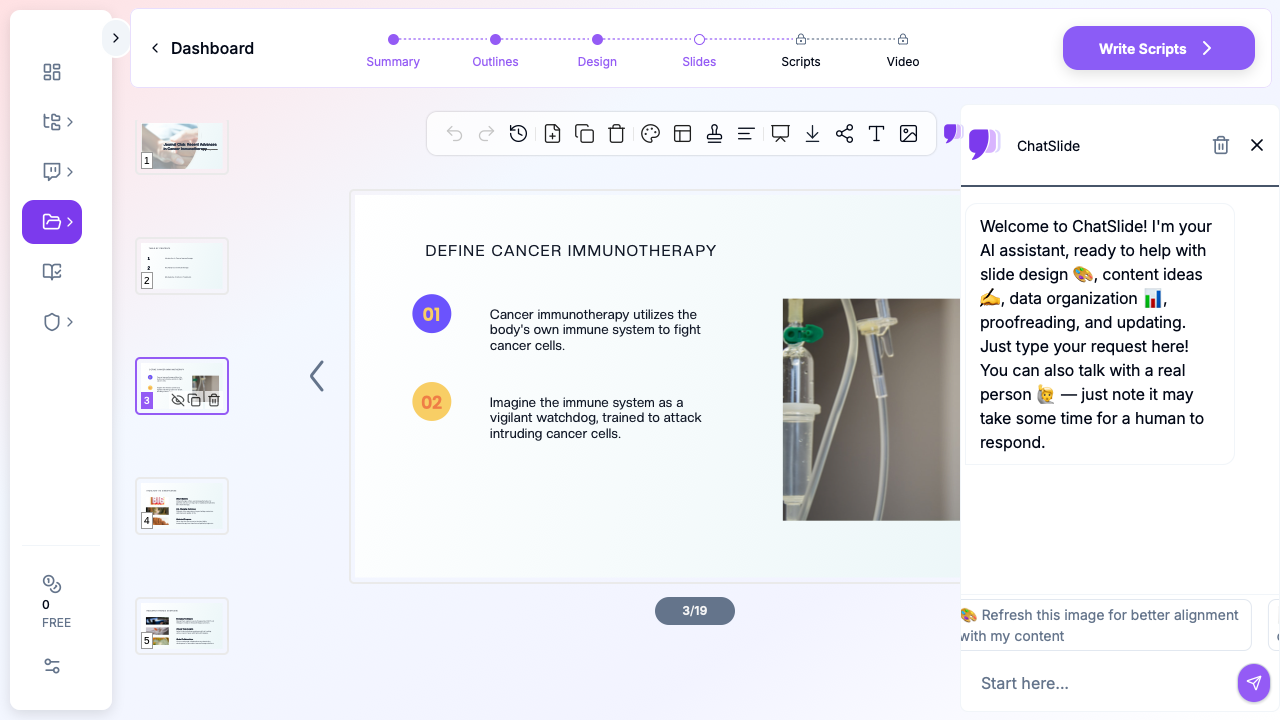

What Makes ChatSlide Powerful for Journal Club
Built-In PubMed, Google Scholar, and Clinical Trials Search
Find the paper you're presenting — and the related evidence you'll compare it to — without leaving the tool. Search PubMed by keyword, PMID, or DOI, Google Scholar for cross-disciplinary literature, and ClinicalTrials.gov (NCT) for trial design and status. The AI reads abstracts and pulls key findings into your slides with citations.
Upload the Paper — Including Scanned PDFs
Upload the full-text PDF (and the online supplement, where the subgroup and sensitivity analyses hide). Built-in OCR extracts text from scanned or image-heavy PDFs, so even a photocopied article becomes usable source content.
Real Data Charts from the Trial's Numbers
Instead of screenshotting a twelve-column table, ChatSlide generates clean charts from the actual data using Chart.js and D3 — Kaplan–Meier-style survival curves, forest-style comparisons, bar charts of primary and secondary outcomes — so you can show the three numbers that matter, legibly.
Critical-Appraisal Structure, Not a Book Report
ChatSlide drafts the canonical journal club flow (background → methods → results → appraisal → relevance → discussion) so the critique is built into the skeleton, not bolted on. You add the specific biases, statistical concerns, and clinical applicability — the thinking only you can do.
AI Speaker Notes and 19 Editing Tools
Get suggested talking points and timing for each slide, then refine with 19 AI editing tools (4 modes, batch editing): Simplify dense methods, Add detail to the appraisal, Rewrite for audience (residents vs. attendings), or "turn this results table into a grouped bar chart" in plain language.
How ChatSlide Builds Your Journal Club Deck
Step 1: Bring in the Paper
Upload the PDF, or search PubMed inside ChatSlide and import the paper directly. Add the supplement and any related studies you'll cite.
Step 2: Choose the Literature/Research Scenario
Select Research → Literature and set your audience ("Internal medicine residents and attendings", "Oncology research fellows"). This structures content around methodology evaluation and critical analysis rather than original research.
Step 3: Customize the Journal Club Outline
ChatSlide generates the section structure; reorder it to the standard flow — Background & Clinical Question, Study Design & Methods, Key Results, Critical Appraisal, Clinical Implications, Discussion Questions. Add a PICO slide near the front if your program uses it.
Step 4: Generate, Refine, Export
Generate the deck, then replace generic statements with the paper's exact numbers (sample sizes, hazard ratios, 95% CIs), add your own appraisal points, and close with 3–5 real discussion prompts. Export to PowerPoint (.pptx) or PDF.
Use Cases
1. Medical Journal Club / Morning Report
Challenge: Critically appraise a landmark trial for a room of residents and attendings. How ChatSlide helps: Search PubMed for the paper, generate the appraisal-structured deck, and build charts from the trial's outcomes. Time saved: 4–6 hours to ~30 minutes.
2. Graduate Research Seminar
Challenge: Present a recent publication in your field and tie it to your own work. How ChatSlide helps: Upload the paper; the AI extracts methods and results, and you add the relevance-to-my-research angle.
3. Evidence-Based Practice (Nursing & Allied Health)
Challenge: Decide whether a new guideline should change practice. How ChatSlide helps: Structure the deck around applicability and limitations, with citations pulled from PubMed/Scholar.
4. Corporate R&D Literature Review
Challenge: Brief the team on a published finding that affects product or regulatory strategy. How ChatSlide helps: Turn the paper into a concise findings-and-implications deck in minutes.
Journal Club AI Tools Compared (2026)
| Feature | ChatSlide | Gamma | Tome | Beautiful.ai |
|---|---|---|---|---|
Ingest full paper PDF (+ supplement) | Yes | Limited | Limited | No |
Built-in PubMed / Scholar search | Yes | No | No | No |
OCR for scanned papers | Yes | No | No | No |
Real data charts (Chart.js/D3) | Yes | Basic | Basic | Template-based |
Citation extraction | Yes | No | No | No |
AI editing tools | 19 tools, 4 modes, batch | Limited | Limited | Template editing |
AI speaker notes | Yes | Limited | Limited | No |
PowerPoint / PDF export | Yes | Yes / PDF | Limited | Yes / PDF |
Free tier | Yes | Yes | Yes | Yes |
Direct Research Database Access
ChatSlide's Research tab connects to the databases physicians use daily:
- PubMed: Search by keyword, PMID, or DOI. Find the landmark trials, recent publications, and clinical guidelines relevant to your case. The AI reads abstracts and incorporates key findings into your slides with citations.
- Google Scholar: When your topic spans disciplines — say, the intersection of genetics and oncology — Scholar captures the broader academic literature that PubMed alone might miss.
- Clinical Trials (NCT): Presenting on a treatment where pivotal trials are ongoing? Search by NCT number or condition to pull trial design, endpoints, and status into your slides.

What a Strong Journal Club Presentation Includes
A purpose-built maker helps most when you know the structure the room expects:
- Background & clinical question — why this paper matters; PICO format works well.
- Methods — study design, population, intervention, comparator, outcomes, statistics.
- Key results — extract the data points that matter, don't paste whole tables; annotate figures.
- Critical appraisal — selection bias, sample size, follow-up, multiplicity, CIs vs. p-values, generalizability. This is what separates journal club from a book report.
- Clinical relevance — the "so what": does this change practice, or what study would answer it better?
- Discussion prompts — specific questions that spark dialogue, not "Any questions?"
Aim for 12–18 slides: ~15–20 minutes presenting, 20–30 minutes discussion.
Tips for Better Journal Club Presentations
- Read the supplement — subgroup, sensitivity, and protocol-deviation details often live there.
- Calibrate scrutiny to the venue — a landmark NEJM trial warrants different framing than a specialty-journal pilot.
- Time it — if your slides run past 20 minutes, cut the background first; the room knows the context.
- Practice the names — stumbling over "pembrolizumab" or the lead author undermines credibility.
- Prepare for pushback — "follow-up was too short because…" beats "it seems short."
Frequently Asked Questions
Can AI build a journal club deck from a paper PDF?
Yes. Upload the full-text PDF (or import it via the built-in PubMed search) and ChatSlide generates an appraisal-structured 12–18 slide deck — background, methods, results, critique, relevance, discussion. Always verify the data against the paper.
Does it search PubMed?
Yes. The Research tab searches PubMed, Google Scholar, and ClinicalTrials.gov so you can find and import the paper and related evidence with citations, without leaving the tool.
Can it handle a scanned or image-heavy paper?
Yes — built-in OCR extracts the text from scanned PDFs and figures.
Will it make charts from the trial's data?
Yes. Provide the numbers (or upload the data) and ChatSlide builds real charts with Chart.js/D3 instead of pasting the original tables.
Does it write the critical appraisal for me?
It drafts the appraisal structure and flags common limitations, but the substantive critique is yours to add — the AI is a drafting tool, not a reviewer.
Is it free for trainees?
Yes, there's a free tier to start, no credit card required.
Get Started
Journal club prep doesn't have to cost an evening. With ChatSlide, search PubMed or upload the paper, generate an appraisal-structured deck in minutes, and spend your time on the analysis and discussion that make journal club worthwhile. Free to start, no credit card required.
A note on patient data and HIPAA. ChatSlide's standard plans are not a HIPAA-covered service — keep PHI out of slide content, prompts, and uploads. For hospital systems, group practices, and clinics that need a Business Associate Agreement, our Enterprise plan offers HIPAA-compliant deployment options — contact us to discuss BAA terms, SSO, and private-cloud or on-prem hosting.