
Quick Answer: To build a medical presentation with AI, (1) upload your source — a clinical guideline, PubMed paper, or scanned PDF; (2) let the tool extract evidence-based points with citations and structure them into case, methods, results, and discussion sections; (3) export to PowerPoint or PDF. Generic AI tools miss medical needs like cited evidence and accurate terminology, so use a document-grounded tool such as ChatSlide that turns your uploaded papers into citation-backed slides in under 2 minutes — free to start.
The Challenge of Medical Presentations
Healthcare professionals spend an average of 6 hours per week creating presentations. That adds up to more than 300 hours per year — time that could be spent on patients, research, or continuing education.
The problem is not just time. Medical presentations have unique requirements that generic AI tools do not solve:
- Evidence-based content with citations extracted from original papers
- Clinical data visualization using real data, not decorative charts
- Multiple source formats — research PDFs, scanned documents, clinical guidelines, web resources
- Direct access to literature — search for and import papers without leaving the tool
- Structured editing — detailed control over every slide, not just automatic generation
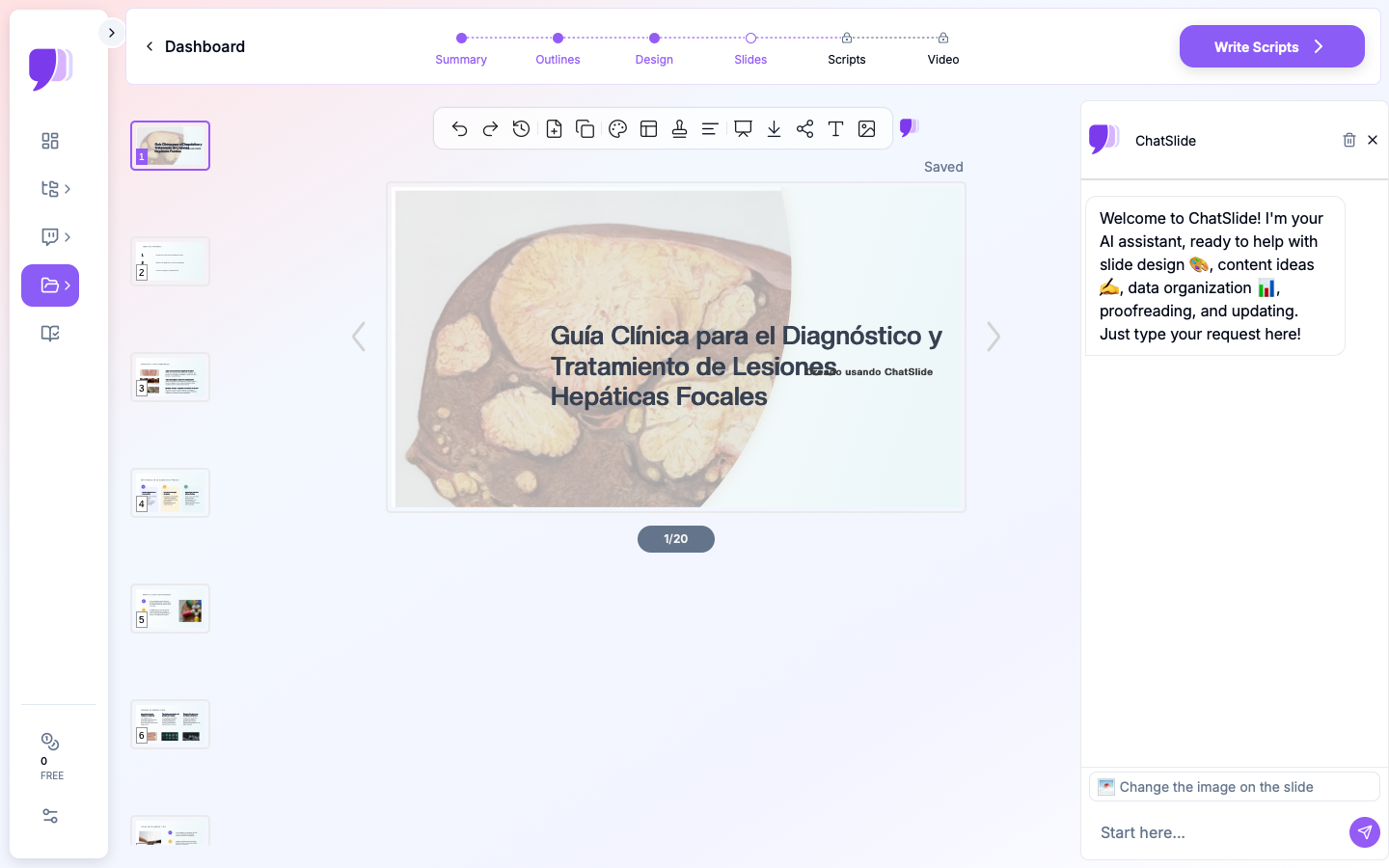
How ChatSlide Works for Medical Presentations
3 Input Modes for Any Clinical Material
ChatSlide accepts content in three different ways:
-
Upload files — PDFs, Word documents, PowerPoint files, images, and more (more than 7 file types). Scanned documents and images are processed with OCR to extract text automatically.
-
Web and YouTube URLs — Paste a URL from a medical lecture, talk, or online clinical guideline, and ChatSlide extracts the content to generate slides.
-
Write a topic — Describe your presentation topic and let the AI generate the slides.
You can combine these modes: upload a research paper and write instructions about the structure you prefer.
Built-In PubMed Search
ChatSlide has built-in PubMed search — you can search for papers directly inside the platform, select the ones you need, and import them as source material without leaving the tool. The Research tab also connects to Google Scholar for broader academic literature and ClinicalTrials.gov (NCT) for data from ongoing and completed clinical trials.

Need to prepare a presentation on the latest SGLT2 inhibitor trials? Search PubMed inside ChatSlide, select the relevant papers, and generate the slides in a single workflow.
OCR for Scanned Documents
Upload scanned clinical guidelines, printed papers, handwritten notes, or images of tables and charts. ChatSlide's OCR capability extracts the text automatically, allowing even older printed materials to be used as source content.
Real Data Visualization
ChatSlide generates charts from real data — producing authentic data visualizations, not generic AI graphics. Upload a document with data and the AI creates:
- Bar, line, and scatter charts with your real numbers
- Pie and comparison charts
- Multi-series charts to compare treatment groups
- Professional-quality visualizations
AI Editing Tools
After generation, ChatSlide provides AI editing tools to refine each slide:
- Chat editing — "Add a comparison table of treatment options"
- Text regeneration — Rewrite content for different audiences
- Batch editing — Apply changes to multiple slides at once
- Manual editing — Adjust individual elements directly
Use Cases in Medicine
1. Clinical Sessions (Grand Rounds)
The challenge: Synthesize 10-20 papers into a 45-minute evidence-based talk.
How ChatSlide helps: Search for papers in PubMed directly on the platform, upload them, and the AI extracts the most relevant findings, creates charts from the outcome data, and structures the presentation. Use the editing tools to refine each slide.
Time saved: From 8-12 hours to 30 minutes.
2. Conference Presentations
The challenge: Turn an accepted abstract and research data into a 10-minute presentation.
How ChatSlide helps: Upload your abstract PDF and data files. The AI creates a research presentation (Introduction, Methods, Results, Discussion, Conclusions) with charts generated from your real data.
Time saved: From 4-6 hours to 15 minutes.
3. Clinical Case Presentations
The challenge: Prepare a clinical case presentation with history, findings, differential diagnosis, and management.
How ChatSlide helps: Describe the case or upload the clinical documentation (without identifiable patient data). The AI structures the presentation following the standard case presentation format.
Time saved: From 2-3 hours to 15 minutes.
4. Patient Education Materials
The challenge: Explain complex medical conditions to patients in accessible language.
How ChatSlide helps: Upload clinical guidelines or paste a URL from an authoritative source, and the AI creates patient-friendly slides that explain the condition, treatment options, and expected outcomes in plain language.
Time saved: From 2-3 hours to 10 minutes.
5. Journal Club
The challenge: Critically analyze a research paper for weekly discussion.
How ChatSlide helps: Upload the paper (or search for it directly in PubMed inside ChatSlide), and the AI extracts the study design, main results, and clinical applicability into a structured presentation.
Time saved: From 2-3 hours to 5 minutes.
Step-by-Step Workflow: From Idea to Final Presentation
Creating a professional medical presentation with ChatSlide follows a structured process that maximizes the quality of the result. The full workflow is described below:
Step 1: Gather Source Material
Before opening ChatSlide, gather all the material you need. This may include PubMed papers, national or international clinical guidelines, data from your own research, notes from departmental meetings, or clinical case documentation. ChatSlide accepts multiple files at the same time, so you do not need to consolidate everything into a single document.
If you do not have material ready, use the built-in PubMed search to find relevant papers directly inside the platform. You can filter by publication date, study type, and clinical relevance to identify the most appropriate sources.
Step 2: Configure the Presentation
When creating a new presentation, select the output language, the approximate number of slides, and the visual style. For formal medical presentations, clean designs with light backgrounds are usually the most appropriate. For educational material aimed at patients, a more visual and accessible style may work better.
You can add specific instructions in the text section. For example: "Structure the presentation using the PICO format" or "Include a slide on study limitations at the end." These instructions guide the AI to produce a result that better matches your expectations.
Step 3: Review and Edit
Once the slides are generated, review each one carefully. Use chat editing to request specific changes, such as adding a table of adverse effects, reorganizing the order of sections, or simplifying the language for a non-specialist audience. Batch editing is especially useful when you need to change the format of every results slide or adjust the typographic style consistently.
Step 4: Export and Present
Export the presentation in PowerPoint format to edit it in Microsoft Office or Google Slides if you need final adjustments. You can also present directly from ChatSlide or export as a PDF for distribution.
Privacy and Regulatory Compliance Considerations
Medical presentations frequently involve sensitive information. Before using any AI tool, it is important to consider the privacy and regulatory compliance implications.
Patient Data
Never upload medical records, lab reports, or any document containing identifiable patient data. This includes names, ID numbers, dates of birth, addresses, and any combination of demographic data that could identify an individual. If you need to present a clinical case, fully anonymize all data before uploading it.
Research Data
For ongoing research data that has not yet been published, evaluate whether the content is confidential before uploading it. Clinical trial data that is in the publication stage or tied to pending patents may require additional caution.
Institutional Use
Many healthcare institutions have specific policies on the use of AI tools. Check your institution's guidelines before adopting any tool for clinical or academic use. ChatSlide does not store generated presentations indefinitely and does not use uploaded content to train AI models.
Customization for Different Medical Audiences
One of the advantages of using AI for medical presentations is the ability to quickly adapt the same content for different audiences.
Specialist Audience
For presentations among colleagues in the same specialty, you can keep the full technical terminology, include detailed statistical analyses, and assume prior knowledge of the topic. ChatSlide makes it possible to generate slides with greater information density and complex charts that would be appropriate for this context.
Multidisciplinary Audience
In interdisciplinary meetings or general clinical sessions, it is helpful to include more context and explanations. Use the text regeneration feature to simplify technical sections without losing accuracy. Add contextual slides that explain the clinical relevance for different specialties.
Patients and Families Audience
Material for patients requires a completely different approach: simple language, more visual elements, fewer numerical data points, and greater emphasis on practical information. ChatSlide can reframe technical content in accessible language, making it easier to communicate with patients and their families about diagnoses, treatments, and prognoses.
Administrative Audience
Presentations for hospital executives or management committees should focus on outcomes, costs, and efficiency. Transform clinical data into performance metrics and use comparison charts that illustrate the impact of the proposed interventions.
Best Practices for AI Medical Presentations
Recommendations
- Always verify clinical data — AI is a drafting tool, not a clinical decision system
- Review citations — Make sure the extracted references are current and accurate
- Confirm terminology — Verify that medical terms and abbreviations are used correctly
- Include disclosures — Add conflict of interest statements where needed
- Never upload identifiable data — Do not upload protected health information without proper de-identification
- Use PubMed search — Take advantage of the direct integration to find the latest evidence
Avoid
- Do not present AI-generated slides without professional review
- Do not rely on a single source — use multiple papers and PubMed search
- Do not upload identifiable patient data to any cloud tool
Acceso Directo a Bases de Datos de Investigación
La pestaña de Investigación de ChatSlide se conecta a las bases de datos que los médicos usan a diario:
- PubMed: Busca por palabra clave, PMID o DOI. Encuentra los ensayos pivotales, las publicaciones recientes y las guías clínicas relevantes para tu caso. La IA lee los resúmenes e incorpora los hallazgos clave en tus diapositivas con citas.
- Google Scholar: Cuando tu tema cruza disciplinas — por ejemplo, la intersección entre genética y oncología — Scholar captura la literatura académica más amplia que PubMed por sí solo podría no cubrir.
- Ensayos Clínicos (NCT): ¿Presentas un tratamiento con ensayos pivotales en curso? Busca por número NCT o condición para extraer diseño del ensayo, criterios de valoración y estado a tus diapositivas.
Tool Comparison (2026)
| Feature | ChatSlide | Gamma | Tome | Beautiful.ai |
|---|---|---|---|---|
Input modes | 3 (file, URL, text) | Text | Text | Text |
File types | 7+ (PDF, Word, PPTX, images) | Limited | Limited | None |
Built-in PubMed search | Yes | No | No | No |
OCR for scanned documents | Yes | No | No | No |
Charts with real data | Yes | Basic | Basic | Templates |
AI editing tools | Multiple modes + batch editing | Limited | Limited | Limited |
Export to PowerPoint | Yes | Yes | Limited | Yes |
Free plan | Yes | Yes | Yes | Yes |
Get Started Now
Try ChatSlide for Medical Presentations — Search PubMed, upload your research papers, and get a professional clinical presentation in less than 60 seconds. Free, no credit card required.
ChatSlide is used by more than 290,000+ professionals to turn documents and data into presentations. Available in Spanish and 13 more languages.
Nota sobre datos de pacientes y HIPAA. Los planes estándar de ChatSlide no son un servicio bajo HIPAA — mantén los datos protegidos de salud (PHI) fuera del contenido de las diapositivas, los prompts y los archivos cargados. Para sistemas hospitalarios, grupos médicos y clínicas que necesitan un Business Associate Agreement, nuestro plan Enterprise ofrece opciones de despliegue compatibles con HIPAA — contáctanos para discutir términos del BAA, SSO y alojamiento privado o on-premise.