
Quick Answer: ChatSlide is an AI tuberculosis training presentation maker for TB program nurses, DOT workers, community health staff, and public-health educators. It turns program protocols, national TB guidelines, case summaries, and lecture topics into structured decks with treatment timelines, comparison tables, plain-language patient slides, speaker notes, and PowerPoint or Google Slides export. Trusted across 750+ universities and hospital training programs, ChatSlide can build a 40-slide TB training deck in under 2 minutes. Free to start, no card required.
The TB Training Deck Problem
A TB program does not run on one presentation. The same content has to be retold for three very different rooms: program nurses who need clinical depth, directly observed therapy (DOT) workers who need a practical field workflow, and patients and families who need plain language with almost no jargon. Rebuilding one deck three times, by hand, is where the week goes.
Extra-pulmonary TB makes it harder. Lymph node, pleural, bone and joint, abdominal, and central nervous system disease each have their own presentation, diagnostic route, and treatment duration, and staff training material usually has to cover all of them in one sitting without turning into a wall of text.
ChatSlide keeps the clinical and program judgment with you. It removes the slide assembly work, and it makes the three audience versions cheap to produce instead of a second project.
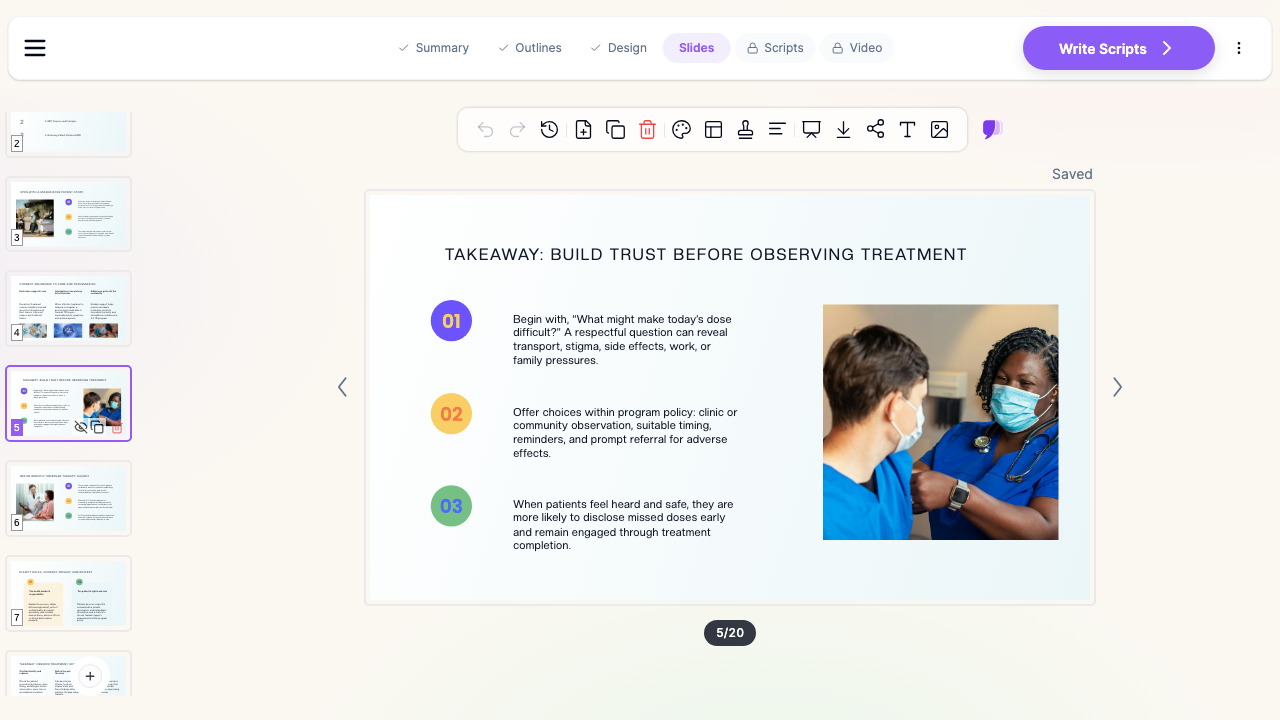

What Makes ChatSlide Powerful for TB Training
Rewrites one deck for a different reading level
Ask for the same TB content "for program nurses" and then "for patients with limited reading ability," and you get two genuinely different decks: the first keeps regimen tables and diagnostic algorithms, the second keeps short sentences, one idea per slide, and concrete images. You are not editing a clinical lecture down by hand.
Reads your program guidelines
Upload national TB program guidelines, WHO or ministry PDFs, treatment protocols, or an existing training manual. ChatSlide extracts the recommendations, dosing tables, and follow-up rules into editable slides, so the deck matches the protocol your staff actually works to.
Builds the tables TB training depends on
Regimen by TB type, drug and adverse-effect table, duration by site of disease, monitoring schedule, and a "when to refer" red-flag list. ChatSlide assembles those as tables and structured layouts instead of paragraphs, which is what makes them usable in a training room.
Handles long decks without losing structure
A 40-slide TB program deck is a normal request. You can set the section count and slides per section so the deck keeps an arc, with a section on pulmonary TB, one on extra-pulmonary sites, one on DOT workflow, and one on adherence and follow-up.
Speaker notes for people who did not write the deck
TB training material is usually delivered by someone other than the author, often at a district or facility level. ChatSlide can generate speaker notes per slide so a supervisor can hand the deck to a colleague and have it taught the same way.
Charts from real numbers
Paste your own program figures, such as treatment success rate by quarter, loss to follow-up, or case notifications by site of disease, and ChatSlide turns them into chart slides. Use your program's data, not invented numbers.
How ChatSlide Builds Your TB Training Deck
- Start from a topic or a file. Type "Extra-pulmonary TB for TB program nurses, 40 slides" or upload the program guideline PDF, a manual chapter, or your existing slides.
- Set audience and language. Choose the audience, the reading level, and any of the supported languages, which matters when clinical training and patient sessions run in different languages.
- Review the outline first. ChatSlide produces the section structure before writing slides, so you can fix the teaching order once instead of rewriting 40 slides.
- Generate, then edit. Slides come back with layouts, images, and notes. Edit any slide inline, regenerate a single slide, then export to PowerPoint, PDF, or Google Slides, or present from the browser.
Use Cases for TB Programs
- DOT worker onboarding. A practical field deck: what directly observed therapy is, how to confirm a dose, what to do about a missed dose, and how to ask about barriers without accusation. Challenge: mostly workflow, little pathophysiology. Saves roughly a day of building.
- Extra-pulmonary TB refresher for program nurses. One section per site of disease, each with presentation, diagnostic route, and duration. Challenge: keeping six sites consistent in structure. ChatSlide reuses the same slide pattern across sites.
- Patient and family education sessions. A short plain-language deck on what TB is, why the full course matters, side effects worth reporting, and when to come back. Challenge: reading level. Ask for a low-literacy version and cut jargon in one pass.
- Community health worker training. Case finding, referral, and household contact screening, kept concrete and image-led for staff who are not clinicians.
- TB training for teams and districts. Departments and programs that roll the same curriculum out across facilities can keep a shared template so every district deck looks the same. Contact us about team billing, SSO, and shared brand templates.
TB Training AI Tools Compared (2026)
| Capability | ChatSlide | Gamma | Tome | Beautiful.ai |
|---|---|---|---|---|
Upload guideline PDF and build from it | Yes | Limited | Limited | No |
40+ slide decks with section control | Yes | Partial | Partial | Partial |
Rewrite same deck for a lower reading level | Yes | Manual | Manual | Manual |
PubMed / Google Scholar / trial search built in | Yes | No | No | No |
Speaker notes generated per slide | Yes | Partial | Partial | No |
PowerPoint and Google Slides export | Yes | Yes | Partial | Yes |
Time Comparison: Manual vs. AI-Assisted
| Task | Manual | With ChatSlide |
|---|---|---|
Outline a 40-slide TB curriculum | 2 to 3 hours | 2 minutes |
Draft slide content from the guideline | 6 to 8 hours | Minutes |
Build regimen and monitoring tables | 1 to 2 hours | Included |
Produce a plain-language patient version | 3 to 4 hours | One regeneration |
Write speaker notes | 2 hours | Included |
Direct Research Database Access
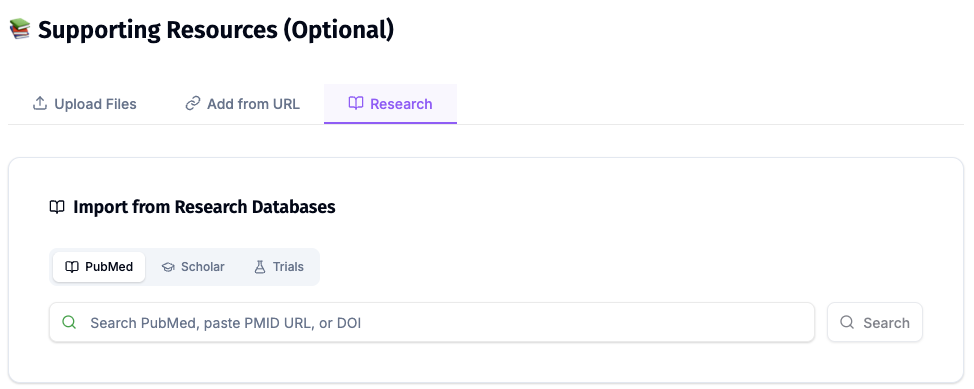
ChatSlide's Research tab connects to the databases physicians use daily:
- PubMed: Search by keyword, PMID, or DOI. Find the landmark trials, recent publications, and clinical guidelines relevant to your case. The AI reads abstracts and incorporates key findings into your slides with citations.
- Google Scholar: When your topic spans disciplines — say, the intersection of genetics and oncology — Scholar captures the broader academic literature that PubMed alone might miss.
- Clinical Trials (NCT): Presenting on a treatment where pivotal trials are ongoing? Search by NCT number or condition to pull trial design, endpoints, and status into your slides.
What a Strong TB Training Deck Includes
- A clear scope slide. Who this deck is for and what it does not cover, so a nurse deck is not delivered to patients by accident.
- Transmission and natural history, kept short. Enough to make the rest make sense, not a microbiology lecture.
- Pulmonary and extra-pulmonary separated. Same slide pattern per site: how it presents, how it is confirmed, how long it is treated.
- A DOT workflow section. Observation, documentation, missed dose handling, and escalation, written as steps rather than principles.
- Adherence and barriers. Transport, stigma, work, side effects, and family pressure, with the program's own options listed.
- A referral and red-flag slide. The short list that a field worker can act on without calling anyone.
- A summary slide people can photograph. In practice this is the slide that gets used after the training ends.
Best Practices
Do
- Build the clinical version first, then generate the patient version from it, so the facts stay identical.
- Use your program's real indicators for charts and label the period clearly.
- Keep one idea per slide in patient and DOT-worker decks.
- Put the drug and adverse-effect table in every staff-facing version.
- Have a clinical lead review the final deck. The AI drafts, it does not sign off.
Don't
- Do not put patient names, record numbers, photographs, or any other identifiable detail into slides or uploads.
- Do not reuse a nurse-level deck for a patient session by deleting a few slides. Regenerate at the right reading level instead.
- Do not present regimen details that conflict with your national program guideline. The guideline is the source of truth.
Note on patient data: ChatSlide's standard plans are not a HIPAA-covered service — keep PHI out of slide content and uploads. For hospital systems, group practices, and clinics that need a Business Associate Agreement, our Enterprise plan offers HIPAA-compliant deployment options — contact us to discuss BAA terms, SSO, and on-prem / private-cloud hosting.
Frequently Asked Questions
Can ChatSlide build a 40-slide TB training deck? Yes. Set the section count and the number of slides per section, and generate the whole deck in one pass. You can add or regenerate individual slides afterwards.
Can it make a version for patients with limited reading ability? Yes. Ask for a plain-language or low-literacy version for the same topic and ChatSlide rewrites the content at that level, with shorter sentences and more visual slides.
Can it cover extra-pulmonary TB specifically? Yes. Ask for one section per site of disease, such as lymph node, pleural, bone and joint, abdominal, and CNS TB, and the deck keeps the same structure for each.
Can I build from my national TB program guideline? Yes. Upload the PDF and generate from it, so the deck follows the protocol your staff works to rather than a generic summary.
Does it work in other languages? Yes. Choose the output language when you generate, which is useful when staff training and patient sessions run in different languages.
Can I export to PowerPoint? Yes. Export to PowerPoint, PDF, or Google Slides, or present directly from the browser.
Is it free? Yes, you can start free without a card. Paid plans add longer decks, more generations, and more export options.
Get Started
Make your TB training deck with ChatSlide: pick the audience, paste your topic or upload the program guideline, and get a structured deck with tables, notes, and images in minutes. Start free at ChatSlide — no card required.
Related guides: infectious disease presentations, public health presentations, patient education presentations, nursing education presentations, and pulmonology presentations.