
Quick Answer: An AI in healthcare presentation works best with six sections: what AI does in care today, medical imaging, clinical decision support, documentation and operations, risks and regulation, and how to adopt it safely, backed by one primary data source such as the FDA's list of AI-enabled medical devices (1,614 devices on the list as of its September 2026 update, 76% of them in radiology). ChatSlide builds that deck in minutes: give it the topic and your audience, or upload a paper or report, and it produces slides with cited sources, images, charts and speaker notes, exported as PowerPoint, PDF, Google Slides or a narrated video. It is used by teams at 750+ universities and by 290,000+ professionals. Free to start, no card required.
The AI in Healthcare Presentation Problem
"AI in healthcare" is one of the most assigned presentation topics in medicine, nursing, health administration and health informatics, and one of the easiest to get wrong. The topic is huge, the hype is loud, and the numbers that circulate online are often projections from market research firms rather than measurements.
The other problem is images. Search "AI in healthcare" and you get glowing blue robots and holographic brains. They say nothing, and many stock photos cannot be reused without a license. A good deck shows real things: a chest radiograph with a flagged finding, a sepsis alert in an EHR, a clinician dictating while an ambient scribe drafts the note.
What helps is a structure that covers the real uses, a few numbers from primary sources, and images that illustrate the clinical point.


The Number Worth Putting on a Slide
The FDA keeps a public list of AI-enabled medical devices that have been authorized for marketing in the US. It lists AI-enabled devices that have been cleared or approved for marketing in the US. It records authorizations, not how widely each device is used.

What the list shows (FDA, Artificial Intelligence-Enabled Medical Devices, page updated September 4, 2026; decisions through June 29, 2026):
| Lead review panel | Devices | Share (rounded) |
|---|---|---|
Radiology | 1,230 | 76% |
Cardiovascular | 154 | 10% |
Neurology | 73 | 5% |
Anesthesiology | 30 | 2% |
Gastroenterology-Urology | 27 | 2% |
All other panels | 100 | 6% |
Total | 1,614 |
Authorizations per year went from 6 in 2015 to 235 in 2024 and 335 in 2025. Two caveats belong in your speaker notes: the FDA says the list is not a comprehensive resource (it is compiled from terms in authorization summaries and device classifications), and a device being authorized does not tell you how widely it is used.
What Makes ChatSlide Powerful for an AI in Healthcare Deck
A full deck from a topic, or from your sources
Type the topic and the audience and you get an outline, slides, images and speaker notes. Better: upload the review article, the report or the guideline your instructor assigned, and the deck is built from that.
Citations from PubMed and Google Scholar
Search PubMed or Google Scholar from the Research tab for the studies behind each use case and keep the citation on the slide. "AI improves diagnosis" becomes a specific study with a specific result.
Images that illustrate the clinical point
ChatSlide adds images to every slide and you can swap any of them. The deck in the screenshot above uses a chest radiograph for an imaging case and a bedside monitor for a sepsis-alert case. You can also upload your own de-identified images or generate an illustration.
Charts from real data
Paste a table (like the FDA counts above) and it becomes a chart slide. Check the numbers against the source.
Exact slide count and the audience you set
"Twelve slides for a 15-minute nursing school presentation" and "25 slides for a 45-minute grand rounds on AI" are both followed as written. The audience field sets how technical it gets.
Speaker notes and narrated video
Every slide gets speaker notes. The finished deck can be exported as a narrated video for an online class or an in-service.
How ChatSlide Builds Your AI in Healthcare Presentation
- Give the topic, or upload a source. "AI in healthcare for hospital administrators" or a review paper on AI in radiology.
- Set audience and length. "15 minutes, second-year nursing students" or "30 minutes, hospital leadership".
- Check the outline. Make sure it covers benefits and risks, not only benefits.
- Generate, then verify. Check every number and citation, swap any image that does not fit, and export to PowerPoint, PDF, Google Slides or video.
A Ready AI in Healthcare PPT Outline
Use this as your outline, or paste it into ChatSlide as the structure.
1. Title and why it matters now. One slide with the FDA authorization trend.
2. What "AI" means in healthcare. Machine learning, deep learning for images, natural language processing, and generative AI, each with one clinical example.
3. Medical imaging. Detection and triage in radiology, pathology slide analysis, retinal screening. Imaging accounts for about three-quarters of the FDA list.
4. Clinical decision support. Early warning and deterioration scores, sepsis alerts, risk prediction. Include alert fatigue as the counterweight.
5. Documentation and operations. Ambient clinical documentation, coding support, scheduling and capacity planning.
6. Patient-facing tools. Symptom checkers, remote monitoring, patient messaging support.
7. Risks. Bias in training data, performance drift after deployment, automation bias, privacy, and accountability when a model is wrong.
8. Regulation and governance. The FDA's device pathway in the US; the EU AI Act, which entered into force on August 1, 2024, and classes most AI in medical devices that need third-party conformity assessment as high-risk; the WHO's 2021 guidance on the ethics and governance of AI for health and its 2024 guidance on large multi-modal models.
9. Adopting AI safely. Local validation, monitoring after go-live, clinician oversight, and clear escalation when the output looks wrong.
10. Case study. One concrete example from your field (an imaging finding, an alert, a documentation workflow) with the outcome.
11. Conclusion and questions.
For specialty versions, keep the structure and swap the examples: nursing (early warning scores, documentation burden), pathology (whole-slide image analysis), cardiology (ECG interpretation), dentistry (radiograph analysis).
Best Images for an AI in Healthcare Presentation
Show the clinical task, not the robot. A radiograph, a monitor, a pathology slide, an EHR screen with an alert, a clinician with a patient. Avoid glowing brains and humanoid robots.
Use images you are allowed to use. Check the license for every image. Photo libraries such as Pexels and Unsplash publish their own free-use licenses; paid libraries such as Getty Images require a license. The US National Library of Medicine's Open-i search indexes figures from open-access biomedical literature, each with its own license to check.
Never use identifiable patient images. Use de-identified images with permission, public teaching cases, or an illustration.
Use a chart for the data. One real chart (like the FDA trend) does more than three stock photos.
One image per idea. If an image does not explain the slide's point, drop it.
AI in Healthcare Presentation Tools Compared (2026)
| ChatSlide | Gamma | Beautiful.ai | Canva | |
|---|---|---|---|---|
Full deck from a topic or an uploaded paper | Yes | Yes | Limited | Yes |
PubMed / Google Scholar search built in | Yes | No | No | No |
Images added to every slide, swappable | Yes | Yes | Yes | Yes |
Charts from pasted data | Yes | Yes | Yes | Yes |
Exact slide count respected | Yes | Yes | Approximate | Approximate |
Speaker notes for every slide | Yes | Basic | Basic | Basic |
PowerPoint export that stays editable | Yes | Yes | Yes | Yes |
Time Comparison: Manual vs. AI-Assisted
Typical estimates for one 15-slide presentation:
| Task | Manual | With ChatSlide |
|---|---|---|
Research and outline | 2–4 h | 15 min |
Find and cite sources | 1–2 h | 15 min |
Find usable images | 1–2 h | 5 min |
Build charts and layout | 1–3 h | 10 min |
Speaker notes | 1 h | 5 min |
Total | 6–12 h | ~50 min |
Direct Research Database Access
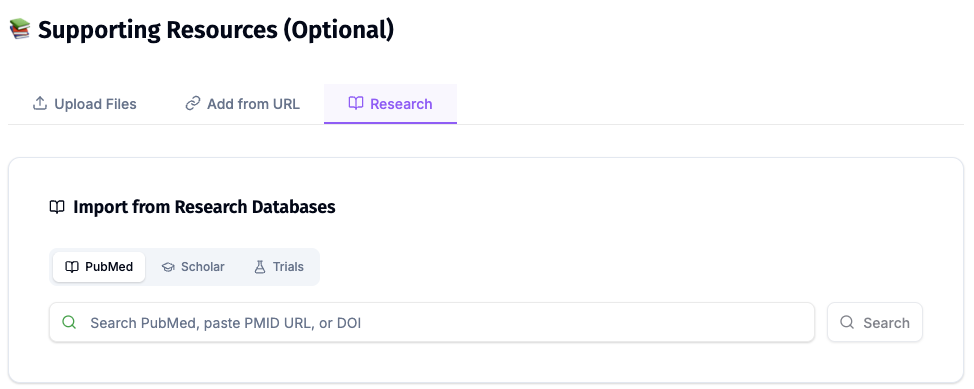
ChatSlide's Research tab connects to the databases physicians use daily:
- PubMed: Search by keyword, PMID, or DOI. Find the landmark trials, recent publications, and clinical guidelines relevant to your case. The AI reads abstracts and incorporates key findings into your slides with citations.
- Google Scholar: When your topic spans disciplines — say, the intersection of genetics and oncology — Scholar captures the broader academic literature that PubMed alone might miss.
- Clinical Trials (NCT): Presenting on a treatment where pivotal trials are ongoing? Search by NCT number or condition to pull trial design, endpoints, and status into your slides.
Best Practices
Do:
- Use primary sources for numbers: the FDA list, peer-reviewed studies, regulators.
- Present risks with the same weight as benefits.
- Use one concrete case from your own field.
- Check every number and citation before presenting.
Don't:
- Do not quote market-size projections as if they were measured outcomes.
- Do not claim a tool "outperforms doctors" without the study, its setting and its limits.
- Do not use patient images or details that could identify anyone.
- Do not use images without checking the license.
AI Education Across a Hospital or School
Hospitals and nursing and medical schools that teach AI literacy present the same material to many cohorts and departments. ChatSlide Enterprise adds SSO, centralized team billing, shared brand templates and team collaboration, so one approved AI-in-healthcare deck can be adapted by each department. Contact us to set it up.
Note on patient data: ChatSlide's standard plans are not a HIPAA-covered service — keep PHI out of slide content and uploads. For hospital systems, group practices, and clinics that need a Business Associate Agreement, our Enterprise plan offers HIPAA-compliant deployment options — contact us to discuss BAA terms, SSO, and on-prem / private-cloud hosting.
Frequently Asked Questions
What should an AI in healthcare presentation include? What AI does in care today, medical imaging, clinical decision support, documentation and operations, risks, regulation, safe adoption, one case study and a conclusion. Back it with one primary data source such as the FDA device list.
How many AI medical devices has the FDA authorized? The FDA's AI-enabled medical device list held 1,614 devices as of its September 4, 2026 update (decisions through June 29, 2026), with 1,230 (76%) in radiology. The FDA notes the list is not comprehensive.
What are the best images for an AI in healthcare presentation? Images of real clinical tasks (radiographs, monitors, pathology slides, EHR alerts) that you have a license to use, plus one chart of real data. Avoid generic robot and glowing-brain images and never use identifiable patient images.
Can ChatSlide make an AI in healthcare PPT for free? Yes. It is free to start with no card required, and it exports to PowerPoint.
Can I make a specialty version, such as AI in nursing or AI in pathology? Yes. Keep the same structure, set the audience, and ask for examples from that specialty.
How is this different from your medical presentation maker guide? The AI medical presentation maker guide covers making any medical presentation with AI. This page is about presenting AI itself as the topic. For a hospital talk see the grand rounds guide, and for teaching nurses the nursing education guide.
Get Started
Give ChatSlide your topic and audience, or upload the paper you were assigned, and get a cited AI in healthcare deck with images and speaker notes in minutes.
Make your AI in healthcare presentation with ChatSlide →: free to start, no credit card required.