
Quick Answer: The AI slideshow makers teachers shortlist in 2026 are MagicSchool, Monsha.ai, Slidesgo, Plus AI, Canva and ChatSlide. They differ less in whether they can generate a slide than in four things that decide classroom fit: whether output lands cleanly in Google Slides or PowerPoint, whether it can differentiate by grade and reading level, what its student-data-privacy terms actually say, and whether the free tier is usable or a trailer. MagicSchool and Monsha.ai are purpose-built for K-12 workflows; Canva and Slidesgo lead on templates; ChatSlide is strongest when the input is an existing document — a textbook chapter, a PDF, a research paper — rather than a prompt.
Who this is actually for has shifted
Roughly 8.73 million people work in US elementary and secondary schools, according to BLS Quarterly Census of Employment and Wages data for NAICS 6111. That total has barely moved since 2019, up 2.7%. But the composition has.
Private school employment grew 12.1% between Q1 2019 and Q1 2024. Public (local government) school employment grew 1.7% — roughly seven times slower.
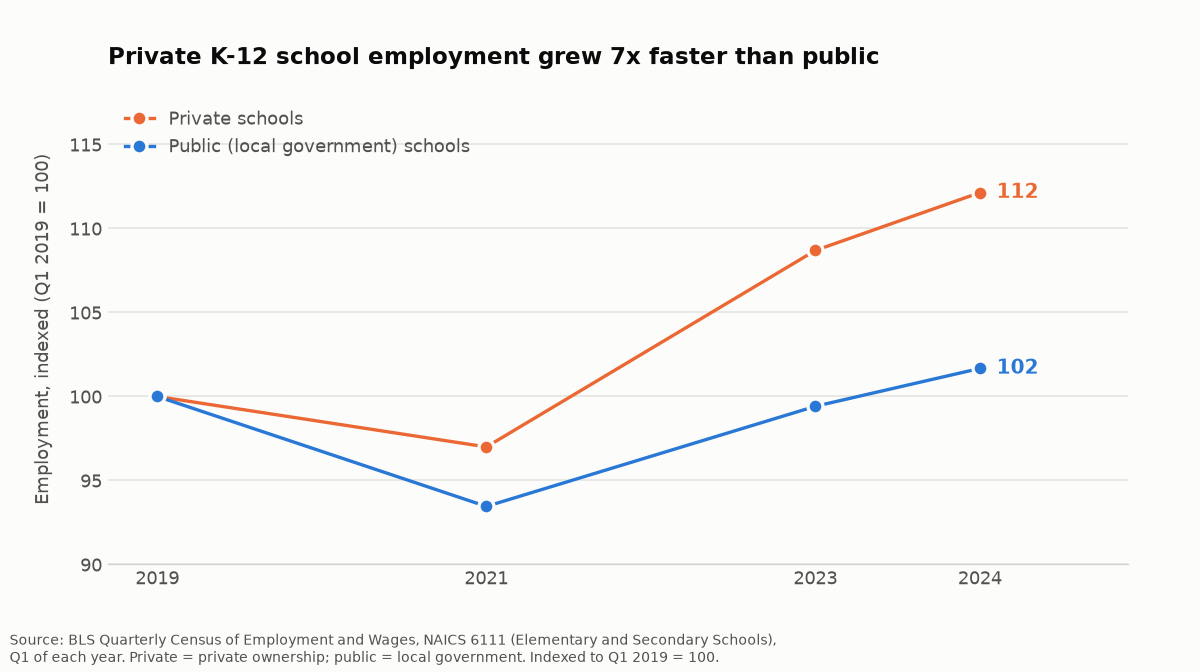
Source: BLS Quarterly Census of Employment and Wages, NAICS 6111, Q1 of each year. Private = private ownership; public = local government. Indexed to Q1 2019 = 100.
This matters for tooling more than it first appears. Private and charter schools tend to run with less centralised curriculum infrastructure — fewer district-purchased content libraries, less instructional-design support, more of the materials burden landing on the individual teacher. Average pay is lower too: $984 a week against $1,126 in local-government public schools, a 12.6% gap — QCEW counts everyone on a school's payroll, not teachers alone, so read it as a sector-level pay gap rather than a teacher-salary comparison. The picture it sketches: the fastest-growing part of the sector is the part with less institutional support and lower average pay.
That is the buyer for this category: a teacher building their own materials, often on their own money.
The four things that decide classroom fit
1. Where the output lands. Most teachers live in Google Workspace. A tool that produces a beautiful deck inside its own web app, with no clean path into Google Slides or PowerPoint, creates a second place to keep your materials. Check for genuine export, not a screenshot-quality PDF.
2. Grade-level and reading-level differentiation. The same lesson for a 5th grader and an 11th grader is not the same slides. The education-specific tools have built real features here — Bloom's taxonomy levels, Depth of Knowledge, Lexile bands — and the general-purpose tools mostly have not. If you teach mixed-ability groups this is the single biggest time saver in the category.
3. Student data privacy. This is the criterion with actual legal weight, and the one most likely to be skipped. If you upload student work, names, grades or IEP details, student-privacy law can be engaged — FERPA for schools that receive federal education funds, COPPA where an online service collects information from under-13s. Before uploading anything identifying, confirm the vendor states plainly whether it trains on uploads, whether it offers a school agreement, and what its retention window is. If the documentation does not answer that clearly, treat it as a no and de-identify first.
4. Whether the free tier is real. Teachers frequently pay out of pocket. Free tiers in this category commonly restrict the thing that matters most — export format — rather than generation quality. A free plan that will not export to Google Slides or PowerPoint is a demo, not a tool.
A fifth, document-to-slides input, matters if your starting point is a textbook chapter, a PDF worksheet or a paper rather than a topic in your head.
How this comparison was made
This is a capability comparison based on each tool's published documentation and feature pages as of September 2026 — not a hands-on classroom trial. No one here ran the same lesson through six products with a real class. Where a vendor states a capability, it is reported as stated; where behaviour depends on the subject or grade, that is said rather than scored.
Several vendor-published roundups cover this space and are worth reading for the observations rather than the verdicts, since each is written by a competitor: SlideSpeak, Plus AI and Alai all maintain one. This page is in the same position and says so.
Features in this category change fast. Verify against current vendor documentation before committing a department to anything.
AI slideshow makers for teachers compared
| Capability | ChatSlide | MagicSchool | Monsha.ai | Slidesgo | Plus AI | Canva |
|---|---|---|---|---|---|---|
Google Slides / PowerPoint export | PowerPoint, PDF (paid plans) | Google Slides + PowerPoint | Yes | Yes | Works inside Slides / PPT | Yes |
Built for K-12 specifically | No — general + document focus | Yes | Yes | Education templates | Education templates | No |
Grade-level differentiation | No | Yes | Yes — Bloom's, DOK, Lexile | No | No | No |
Document upload as input | Yes — PDF, Word, PPTX, images, scans | Yes — docs, lesson plans, YouTube | Limited | No | Yes | Limited |
OCR for scanned worksheets | Yes | Not stated | Not stated | No | No | No |
Interactive polls / quizzes | No | Limited | Yes | No | No | Limited |
Template library depth | Moderate | Moderate | Moderate | Very large | Moderate | Very large |
Free tier | Yes | Yes (teacher free tier) | Yes | Yes | Trial | Yes |
Where each one is actually strongest
MagicSchool
Built for teachers first, and it shows in the workflow: enter a topic or upload an existing lesson plan, document or YouTube video, and it generates slides pitched at a grade level, with a genuine path into Google Slides and PowerPoint. It has the widest teacher mindshare of the group. Best for: K-12 teachers who want a tool whose defaults already assume a classroom.
Monsha.ai
The strongest differentiation features in this comparison. It targets subject-specific needs including STEM, with a maths keyboard and vocabulary image generation, and it differentiates against recognised frameworks — Bloom's taxonomy, Depth of Knowledge, Lexile reading levels. Best for: mixed-ability classrooms and teachers who differentiate every lesson.
Slidesgo
An enormous template library with education-specific collections, plus AI writing, text-to-image and translation. It is a template product with AI attached rather than a generation product. Best for: teachers who want a polished visual starting point and will write the content themselves.
Plus AI
Works inside Google Slides and PowerPoint rather than replacing them, which removes the export question entirely — the output is already in the tool you use. Best for: teachers who will not adopt a separate app and want AI where they already work.
Canva
The broadest design surface of the group, with a very large template library and strong classroom adoption through Canva for Education. Its AI generation is general-purpose rather than pedagogy-aware, so grade-level pitch is on you. Best for: visual polish and classroom design work generally.
ChatSlide
Built around the document-to-slides pipeline. It accepts file upload (PDF, Word, PowerPoint, images, and scanned pages via OCR), URL and YouTube paste, and text prompts, and these can be combined — which fits teachers whose starting point is a chapter, an article or a worksheet rather than a blank prompt. Charts are generated from real data rather than placed as decoration, and export is editable PowerPoint.
Honest limitation: ChatSlide is not K-12-specific. It has no Bloom's or Lexile differentiation, and no built-in quiz layer. If your core need is generating the same lesson at three reading levels, Monsha.ai or MagicSchool fit that better and this is not a close call.
Choosing between them
The decision usually comes down to your starting point:
- Starting from a topic and a grade level → MagicSchool.
- Starting from a lesson you must differentiate three ways → Monsha.ai.
- Starting from a document, chapter or paper → ChatSlide.
- Starting from a deck you already have in Google Slides → Plus AI.
- Starting from wanting it to look good fast → Canva or Slidesgo.
Most disappointment in this category traces to a mismatch on that axis rather than to a tool being bad.
Turning a chapter into a lesson deck, step by step
If your starting point is a document rather than a blank prompt, the sequence that works looks like this.
1. Start from the real source, not a summary of it. Upload the chapter, article or worksheet itself. Summarising it yourself first throws away the detail the tool would have used, and it is the step you were trying to save.
2. Generate a structure, then cut it hard. First passes in this category over-produce — twenty slides where a lesson needs eight. Deleting is faster than generating again, so cut before you edit anything.
3. Set the level before the design. If the tool differentiates by grade or reading level, do it now. Rewriting for level after you have formatted means formatting twice.
4. Check every factual claim in your subject. This is not optional and it is where the time saving partly goes back. Dates, mechanisms, definitions, worked examples — anything a student could copy into a test answer.
5. Add the interaction. A generated deck is a monologue by default. Whatever your tool supports — a poll, a think-pair-share prompt, a deliberately wrong worked example — that layer is yours to add.
6. Export and keep it where you can find it next year. The reuse value of a lesson deck is most of its value, which is why export format matters more than it seems in the moment.
The budget reality
It is worth being blunt about cost, because the wage data above is not incidental to it.
Average pay in the fastest-growing part of the sector runs 12.6% below the public-school equivalent, and materials spending frequently comes out of teachers' own pockets. That makes this one of the few software categories where the free tier is the product for most of the market, not a lead magnet.
Two practical consequences. First, evaluate the free tier as if it were the paid one, because for many teachers it will be — and specifically test export, which is where free plans in this category are usually cut. Second, if you are choosing for a department rather than yourself, ask about education pricing directly; several vendors here run teacher or school programmes that are not advertised on the main pricing page.
What none of these tools do
None of them know your students. Pacing, the misconception your third period keeps hitting, which example lands with a particular class — that is the part of lesson design that is actually hard, and no tool here touches it.
None of them guarantee factual accuracy. A generated slide about a historical date or a scientific mechanism can be confidently wrong, and it will be wrong in front of thirty people who assume you checked. Read every generated claim in your own subject area before it goes on a screen.
And none of them remove your responsibility for student data. A privacy policy is not a permission slip.
The realistic claim is that these tools compress the formatting and first-draft stages of materials creation, which for a teacher building their own is a large share of the unpaid hours. That is a genuine saving. It is not a lesson plan.
Frequently asked questions
What is the best AI slideshow maker for teachers?
It depends on your starting point rather than on overall quality. MagicSchool and Monsha.ai are built for K-12 workflows and handle grade-level pitch natively. ChatSlide is stronger when you are converting an existing document into slides. Canva and Slidesgo lead on template depth. There is no single winner across all five of those needs.
Is there a genuinely free AI slideshow generator for teachers?
Several have free tiers, including MagicSchool, Monsha.ai, Canva, Slidesgo and ChatSlide. The thing to check is not generation quality but export: free plans in this category often restrict the format you can export to — ChatSlide's PPTX export, for example, starts on the paid Plus plan — and a tool you cannot get into Google Slides or PowerPoint is not usable for classroom material you need to keep and reuse.
Can AI make slides directly from my lesson plan or a textbook chapter?
Yes, and this is the case where document-upload tools clearly beat prompt-only ones. Look for multi-format upload and OCR if your source is a scanned worksheet or a photographed page. Tools whose only input is a text prompt will require you to summarise the chapter yourself first, which is the work you were trying to skip.
Is it safe to upload student work to an AI presentation tool?
Not without checking first. Student names, grades, work samples and IEP details are typically covered by FERPA at schools receiving federal education funds, and under-13 data can additionally engage COPPA. Confirm whether the vendor trains on uploads, whether a school or district agreement is available, and what the retention period is. When in doubt, de-identify before uploading — and note that real de-identification means removing anything that could identify a student alone or in combination (initials plus class plus date can be enough to re-identify), not just deleting names.
Can these tools match my school's slide template?
Support varies and is worth testing with your actual template before you rely on it. Tools that export to PowerPoint or Google Slides generally let you apply a school theme after generation, which is the more reliable route than expecting the generator to match branding on the first pass.
Do AI slide tools align to curriculum standards?
The K-12-specific tools have made the most progress here, particularly on reading-level and cognitive-level frameworks. Alignment to a specific state or national standard set is much weaker across the board, so treat any standards claim as a starting point to verify rather than a guarantee.
Working from documents rather than prompts? Try the document-to-slides approach free, or see our guide to turning research into presentation slides.