
The Challenge: Hard Concepts, Code That Won't Fit on a Slide
Teaching computer science well is deceptively hard. The ideas are precise and layered — you cannot explain MVVM before students understand separation of concerns, and you cannot teach that without a working mental model of state, views, and the bindings between them. Every lecture also wants code, and code is exactly what slides handle worst: a thirty-line example shrinks to an unreadable blur, while a two-line snippet strips out the very context that makes it instructive.
Most instructors and engineering leads recognize the pattern. You sit down to build a single lecture on software architecture patterns — MVC, MVVM, MVP — and three hours later you have a deck where half the slides are walls of bullet points and the other half are code pasted from your IDE at the wrong size. The diagram you actually wanted — the one showing how a controller mediates between model and view — never got drawn, because laying it out cleanly would have taken another hour you didn't have.

This is exactly the gap an AI presentation tool should close: not to replace your judgment about what to teach, but to turn the outline already in your head into a structured, diagram-rich deck so your prep time goes into the teaching, not the formatting. This guide walks through how to build computer science and software engineering lectures with ChatSlide — from learning objectives to a finished deck — and how to keep the technical content accurate while doing it.
What Makes a Strong Computer Science Lecture
Before opening any tool, it's worth being clear on what separates a deck students learn from versus one they sit through. The best CS lectures share a few traits:
- One concept per slide, built in dependency order. Software architecture is not one slide — it's separation of concerns, then the model, then the view, then the patterns that wire them together. CS concepts have prerequisites; a deck that respects the dependency chain teaches, and one that jumps around confuses.
- Diagrams that carry the architecture. In software engineering, the diagram is the explanation. A clean box-and-arrow figure showing how MVC routes a user action through controller → model → view teaches more than three bullet points describing the same flow.
- Code shown in small, annotated pieces. Students learn from a focused six-line example with the key line highlighted, not a full class definition. Show the part that demonstrates the idea; link to the full source for the rest.
- A through-line from concept to why-it-matters. Students remember MVVM when you connect the mechanism (data binding decoupling view from logic) to the payoff (testable view models, fewer UI bugs). The pattern without the motivation feels like trivia.
- Calibrated depth. An intro-to-programming survey of "what is an object" and a senior software-engineering seminar on "tradeoffs between MVP and MVVM in large UIs" are different decks. The structure should match where your students actually are.
Holding these in mind while you draft keeps the AI working for you rather than producing a generic, evenly-weighted summary.
Step-by-Step: Creating Your CS Lecture with ChatSlide
Step 1: Start from a clear topic and audience
ChatSlide generates the strongest decks when you state both the subject and who's in the room. Compare:
- Weak: "Software architecture"
- Strong: "Software architecture patterns — MVC, MVVM, and MVP — for an intermediate undergraduate software engineering course. Assume students know object-oriented programming and basic UI development, but not the differences between these patterns or when to choose each."
The second prompt tells the AI what to skip (no slide re-explaining what a class is) and what to develop (the distinctions between patterns, the decision criteria). Setting the scenario to an Education / Lecture type also nudges the structure toward teaching — learning objectives up front, a logical concept sequence, and a summary — rather than a sales or conference arc.
The same workflow applies across the CS curriculum: data structures and algorithms, operating systems, databases, computer networks, programming-language theory, or a research-methods-in-computing seminar. State the subfield and the level, and the outline adapts.
Step 2: Review and edit the outline before generating slides
ChatSlide produces an editable outline first, and this is where your expertise matters most. For a patterns lecture it might propose Introduction to Design Patterns → MVC Architecture → MVVM Architecture → MVP Architecture → Comparison and When to Use Each → Summary. Read it as a domain expert:
- Reorder anything that violates the dependency chain — students need the problem design patterns solve before they meet any specific pattern.
- Delete sections below your students' level, or add a prerequisite recap slide if they're above it.
- Rename vague headings ("Patterns Stuff") into precise learning units ("MVVM: Data Binding and the Testable View Model").
Editing the outline costs two minutes and saves you from regenerating the whole deck later. The outline is the lecture's skeleton — get it right before you add muscle.
Step 3: Generate slides, then add diagrams and code
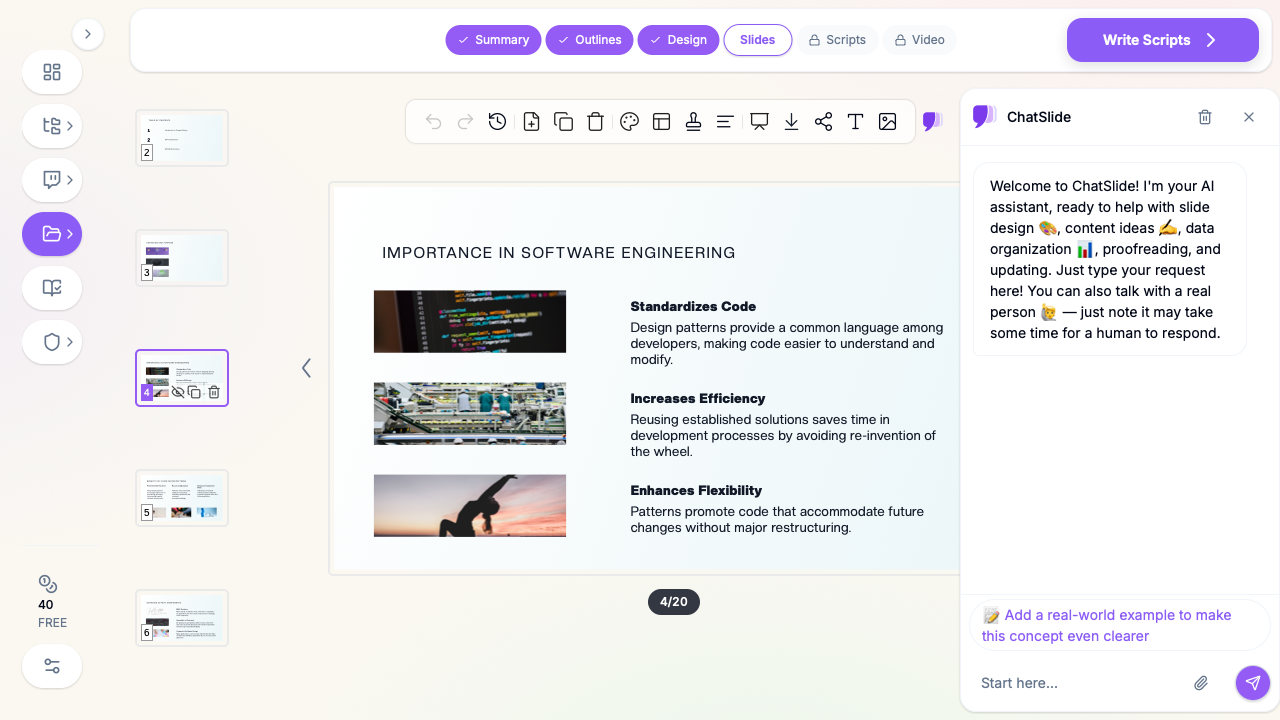
Once the outline is set, ChatSlide builds out the slides. The step most instructors skip — and the one that separates a usable deck from a placeholder — is adding visuals. ChatSlide can populate each slide with relevant figures so your architecture slides carry diagrams instead of bullet lists. In the screenshot above, the "Importance in Software Engineering" slide pairs each point with a supporting visual rather than a paragraph of text.
For computer science specifically:
- Use diagrams to teach structure (a component-and-arrow architecture figure) and keep code snippets short and annotated. If you have your own code examples, paste the focused version — the six lines that show the binding, not the whole file.
- Highlight the one line that matters. A slide that shows a controller method with the dispatch call emphasized teaches the mechanism; an unhighlighted wall of code teaches nothing.
- Upload your own architecture diagrams when you have them. A figure you drew for your exact example almost always teaches better than a generic stock diagram.
Step 4: Tighten the narration and the summary
A good CS lecture ends by closing the loop: here are the three patterns, here is the decision rule for choosing between them, here is what to read next. Use ChatSlide's editing to trim any slide that drifted into generic filler, and make sure the comparison slide actually states the tradeoffs — MVC's simplicity versus MVVM's testability versus MVP's explicit presenter — rather than listing the patterns side by side without a verdict.
Tips for Computer Science Presentations
- Lead with the problem, not the pattern. Open the MVVM slide with the pain it removes (view logic tangled into UI code, untestable), then introduce the pattern as the answer. Motivation first, mechanism second.
- Prefer one worked example over many shallow ones. A single application traced through MVC, then MVVM, then MVP, teaches the differences far better than three unrelated toy examples.
- Keep code legible from the back row. If a snippet needs more than about eight lines, it belongs in a linked repository or a handout, with only the critical fragment on the slide.
- Show the tradeoffs explicitly. CS students are training to make engineering decisions. A comparison slide that ends in "use MVVM when your UI state is complex and you need unit-testable presentation logic" is worth more than a neutral feature table.
- Keep examples current. Reactive frameworks, component models, and architecture conventions evolve. Anchoring a patterns lecture in a framework students actually use makes the abstraction concrete.
- Stay tool-agnostic where it counts. Patterns outlive languages. Teach the idea so it transfers, and use the language example only to make it tangible.
For deeper academic sources — original pattern literature, empirical software-engineering studies, or recent papers — ChatSlide's Research tab connects to Google Scholar, so you can pull peer-reviewed references and let the AI weave key findings into your slides with citations. This is especially useful for a research-methods-in-computing seminar or a graduate course where you want students reading primary sources, not just textbook summaries.
Get Started
Computer science lectures live or die on clarity: the right concepts in the right order, diagrams that carry the architecture, and code shown in pieces small enough to read. The thinking is yours — the typesetting doesn't have to be. ChatSlide turns the outline in your head into a structured, figure-rich deck in minutes, leaving your prep time for the part that matters: teaching the why behind the code.
Whether you're building a software architecture lecture, a data structures and algorithms unit, or a full semester of CS courseware, try ChatSlide and turn your next topic into a finished deck.