
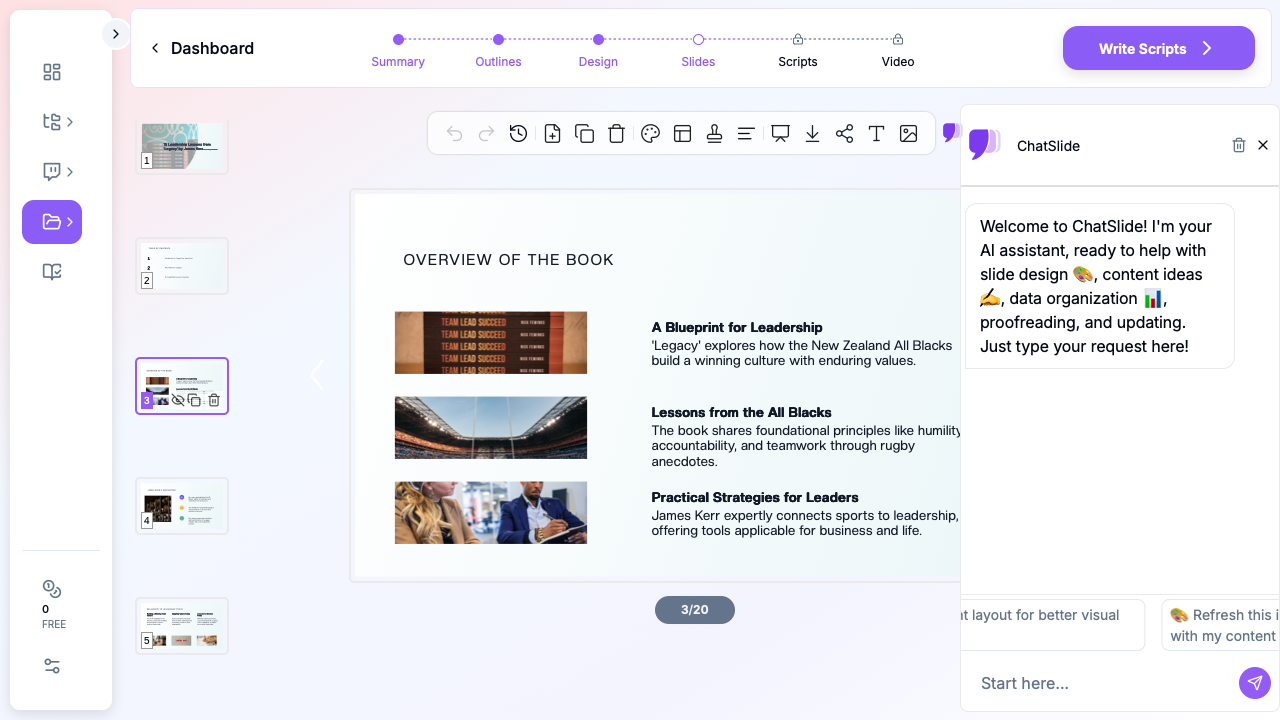
Quick Answer: ChatSlide is the AI book summary presentation maker for reading groups, classes, and team workshops. Upload the book (PDF or EPUB) or your notes and it builds a thematic 12–18 slide deck — a one-idea hook, author context, 3–5 core themes with examples and quotes, counter-arguments, and action items — in under 2 minutes. Real frameworks and comparison charts, OCR for scanned pages, and 19 AI editing tools to add your own take. Free to start. Export to PowerPoint or PDF.
The Book-to-Slides Problem
You just finished a book that could change how your team thinks about leadership, strategy, or habits. Now you have to share it — and distilling 300 pages into 15 compelling slides is harder than it sounds. What do you include? What do you cut? How do you make the key ideas stick with an audience that hasn't read it?
Converting a book into a presentation isn't summarization — it's transformation. A book unfolds ideas linearly over chapters; a presentation has to grab attention immediately, organize insights thematically, and leave the audience with something to do. Doing that by hand means choosing 8–12 ideas out of 40, deciding on a structure, turning prose into visuals, and layering in your own interpretation.
Generic AI slide tools (Gamma, Tome, Beautiful.ai) generate from a text prompt — they can't read the actual book, pull real quotable passages, or build from your notes. A book-summary maker needs to ingest the source and structure it thematically.
What Makes ChatSlide Powerful for Book Summaries
Reads the Actual Book, Not Just a Prompt
Upload the book as a PDF or EPUB, or drop in your own reading notes and highlights — ChatSlide works from your real source, so the themes and quotes reflect the book rather than generic filler. Built-in OCR handles scanned chapters and photographed pages.
Thematic Structure, Auto-Drafted
Books read chapter-by-chapter; great book talks read by theme. ChatSlide drafts the canonical book-summary flow — hook, author/context, 3–5 core themes (concept + example + application), counter-arguments, and action items — so you start from a coherent argument, not a chapter dump.
Quotes, Frameworks, and Comparison Charts
The AI pulls quotable passages and turns the book's models into visuals — a framework slide (the Flywheel, the Golden Circle), "traditional view vs. author's argument" comparison tables, and key-statistic callouts — the visual variety that keeps an audience awake.
19 AI Editing Tools to Add Your Take
The difference between a forgettable summary and a memorable one is your perspective. Use 19 AI editing tools (4 modes, batch editing): Rewrite for audience to retarget the same book for a sales team vs. an engineering team, Add detail on the idea that matters most, or "add a discussion question after each theme."
Export and Reuse
Export to PowerPoint (.pptx) or PDF, and reuse the same content as a one-page handout with key concepts, further reading, and discussion questions.
How ChatSlide Builds Your Book Summary Deck
Step 1: Set Your Core Message
Decide the angle — "After this, my audience will understand ___." The same book points different ways: Atomic Habits for a sales team (habit stacking for prospecting) vs. a product team (compounding small UX wins).
Step 2: Bring in the Book
Upload the PDF/EPUB or your notes (or enter the book and your focus as a prompt). ChatSlide extracts themes and quotable passages.
Step 3: Generate the Thematic Deck
The AI builds a structured deck around the book's key themes with layouts, frameworks, and imagery.
Step 4: Add Your Interpretation, Then Export
For each major concept add the "what does this mean for us?" slide, insert the quotes that resonated, add discussion prompts, and export to PPTX or PDF.
Use Cases
1. Professional Reading Group
Challenge: Present this quarter's business book and connect it to your org's challenges. How ChatSlide helps: Thematic deck from the book + Rewrite for audience to your company's context.
2. Academic Book Report
Challenge: Show comprehension and critical analysis to classmates who haven't read it. How ChatSlide helps: Structure, key themes, and a critique section from the actual text.
3. L&D / Training Workshop
Challenge: Turn a management book into workshop material with exercises. How ChatSlide helps: Theme slides + discussion questions become the workshop backbone.
4. Book Club Facilitation & Content
Challenge: Keep a discussion focused, or make a slide-based review for YouTube/social. How ChatSlide helps: Visual theme summaries and quote slides in minutes.
Book Summary AI Tools Compared (2026)
| Feature | ChatSlide | Gamma | Tome | Beautiful.ai |
|---|---|---|---|---|
Read the book (PDF/EPUB upload) | Yes | No | No | No |
Build from your own notes | Yes | Prompt only | Prompt only | Prompt only |
OCR for scanned pages | Yes | No | No | No |
Pull quotes & build frameworks | Yes | Limited | Limited | Template-based |
Comparison charts | Yes | Basic | Basic | Template |
AI editing tools | 19 tools, 4 modes, batch | Limited | Limited | Template editing |
PowerPoint / PDF export | Yes | Yes / PDF | Limited | Yes / PDF |
Free tier | Yes | Yes | Yes | Yes |
Presentation Structures That Work for Books
- The Framework Approach — organize the whole deck around the book's central model (the Flywheel for Good to Great, the Golden Circle for Start with Why).
- The Top N Lessons — "7 Key Insights from [Book]", each lesson 1–2 slides: concept, example, application.
- The Problem–Solution Arc — the problem the book addresses → the author's argument → practical applications.
- The Before/After Comparison — two-column "traditional view" vs. "author's argument".
- The Chapter Walk-Through — one or two slides per chapter; best for academic coverage.
Tips for Engaging Book Presentations
- Start with a hook, not the title — a provocative quote or question beats "Today we're discussing Drive."
- Use the author's stories — pick the 2–3 most memorable anecdotes; stories are what people remember.
- Build comparison slides — side-by-side layouts make complex ideas digestible.
- Add "Apply This" moments — a quick application slide after each concept turns listening into engagement.
- End with one big idea — close on the single takeaway you want remembered tomorrow.
- Pair with a one-page handout — key concepts, further reading, and discussion questions.
Frequently Asked Questions
Can AI turn a book into a presentation?
Yes. Upload the book (PDF or EPUB) or your notes and ChatSlide builds a thematic 12–18 slide summary — hook, themes with examples and quotes, counter-arguments, and action items — in under 2 minutes. Add your own interpretation before presenting.
Will it pull real quotes from the book?
When you upload the source, the AI surfaces quotable passages you can place directly on slides; verify wording against the text.
Can I build from my reading notes instead of the full book?
Yes — upload your notes and highlights and ChatSlide structures them into a thematic deck.
Can I retarget the same book for a different audience?
Yes. Use Rewrite for audience to shift the same themes from, say, a leadership team to an engineering team.
What formats can I export?
PowerPoint (.pptx) and PDF, plus content you can reuse as a one-page handout.
Is it free?
There's a free tier to start, no credit card required.
Get Started
Ready to turn your next book into a presentation? Upload the book or your notes to ChatSlide, set your audience and angle, and you'll have a structured, thematic deck in minutes — so you can focus on the discussion, the insights, and the application that make book presentations worthwhile. Free to start, no credit card required.