
Quick Answer: ChatSlide is an AI presentation maker network and infrastructure engineers use to turn a design document, an incident timeline, or a topic line into a finished deck in under two minutes. Upload the RFP response, the post-incident report, or the config standard, and it drafts structured slides with real data charts and speaker notes — then exports to PowerPoint, PDF, or a narrated video. Trusted by professionals at 750+ universities and organizations. Free to start, no credit card.
The Network Engineering Presentation Problem
Networking work generates presentations constantly, and none of them are the same audience. A segmentation redesign goes to a change advisory board. A post-incident review goes to the service owners whose application broke. A capacity request goes to a finance-minded director who will not read a routing table. A CCNA or network-security module goes to students who have never configured a VLAN.
The material already exists — the design doc, the NetFlow export, the incident timeline in the ticket, the vendor's reference architecture — but it exists in the wrong form. Converting a topology diagram and 40 lines of interface counters into slides that a non-engineer can follow is an evening of work, and it is the part of the job least related to running a network.
The result is the deck everyone recognizes: a screenshot of a topology map, a wall of CLI output, and a conclusion nobody in the room reached with you.
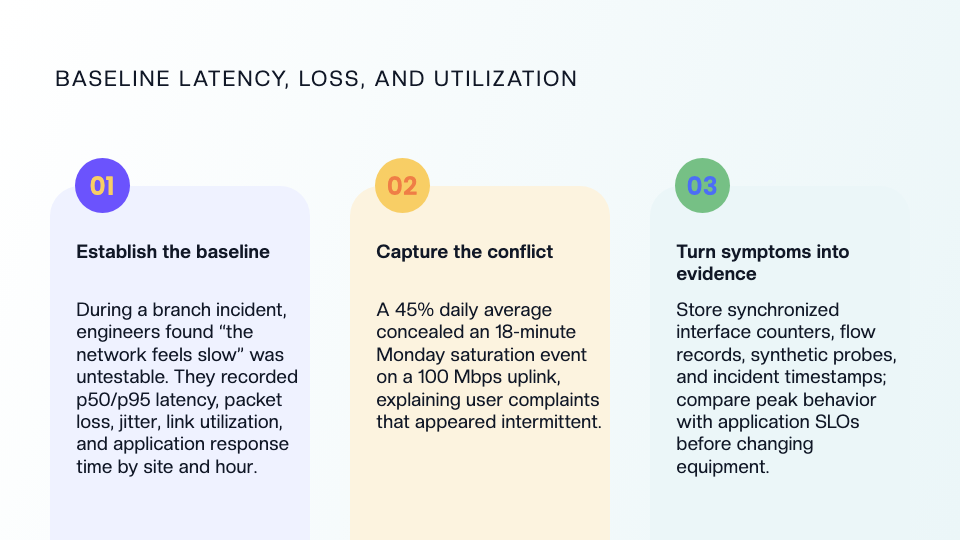

This guide covers network and infrastructure engineering decks specifically — design reviews, troubleshooting write-ups, capacity and resilience proposals, and networking lectures. For risk, governance, and CISO-level board reporting, our cybersecurity presentation guide is the closer fit, and for end-user phishing and policy training see the security awareness training guide.
What Makes ChatSlide Powerful for Network Engineering Decks
Three Input Modes That Match Where Network Content Already Lives
Network content is never written from scratch — it comes out of a document, a monitoring tool, or a ticket. ChatSlide takes it three ways, and they combine:
- File upload — the high-level design PDF, the vendor's reference architecture, the change request, the post-incident report, or the standards document your team maintains. Scanned and photographed pages are read with OCR, which matters when the only copy of the cabling schedule is a photo of a whiteboard.
- Web and video URLs — link the vendor documentation page, an RFC, a configuration guide, or a recorded design walkthrough.
- Text prompt — "30-slide introduction to network security for a second-year module: threat model, segmentation, firewalls, VPN, monitoring" is enough for a full first draft.
Real Data Charts From Your Own Numbers
Network arguments are won with measurements, not adjectives. Paste or upload utilization, latency, packet-loss, or ticket-volume data and ChatSlide renders it as a real chart on the slide — not a pasted screenshot that goes blurry on a projector. A 95th-percentile peak plotted next to the daily average is the slide that gets a firewall upgrade approved; "the link feels saturated" is not.
Outline-First, Because Order Is the Argument
ChatSlide drafts the outline before rendering slides. For an infrastructure deck this is where the work actually happens: you confirm that the current-state evidence comes before the proposal, that the failure domain analysis comes before the redundancy design, and that the rollback plan did not get dropped — all while it is still a reorderable list rather than 25 finished slides.
Speaker Notes for the Questions You Will Actually Get
Every slide gets drafted speaker notes. For a change advisory board this is the difference between presenting and defending: the notes carry the maintenance window, the blast radius, the rollback command, and the reason the alternative design was rejected, so the answer exists before the question is asked.
Narrated Video Export for Runbooks and Modules
The same deck exports as a narrated video with an AI voice, and optionally an avatar presenter. Teams use this for onboarding new NOC staff, for distributing a design decision to engineers across time zones, and for asynchronous lecture modules students can rewatch before a lab.
AI Editing Tools That Update a Deck Without Rebuilding It
Networks change between the design review and the implementation review: a different uplink, a revised address plan, a new carrier. Rather than regenerating, you rewrite the one slide that changed, split an overloaded slide, or swap the diagram — keeping the structure the board already approved.
How ChatSlide Builds Your Network Presentation
- Upload or describe it. Drop in the design document, the incident report, and the utilization export — or type the topic and audience.
- Review the outline. Reorder sections, add the site-specific ones (your address plan, your maintenance window), remove what does not apply.
- Generate and edit. ChatSlide drafts the slides with charts, imagery, and speaker notes. Adjust wording slide by slide with the AI editing tools.
- Export. PowerPoint or PDF for the change board, a narrated video for the team that could not attend.
Use Cases for Network and Infrastructure Teams
Design review for a change advisory board. The challenge is that half the room is not technical. Build the current-state evidence, the proposed segmentation, the failure domains, and the rollback plan from the existing design doc, and spend your preparation time on the risk slide instead of on formatting. Typical saving: an evening per review.
Post-incident review. An outage timeline, the detection gap, the contributing factors, and the follow-up actions — generated from the incident ticket and the monitoring export, with the timeline as a chart rather than a paragraph. The deck is ready while the details are still fresh.
Capacity and resilience proposals. DNS resilience, dual carrier entrances, core redundancy, and circuit upgrades all compete for the same budget. A deck that plots measured peaks against the service level the business expects converts an engineering opinion into a funding request.
Network security and networking lectures. Instructors building a 30-slide network security introduction, a CCNA module, or a troubleshooting workshop can generate from an uploaded reading list or textbook chapter and keep one consistent template across the whole course.
Vendor and managed-service presentations. Solution overviews, service proposals, and quarterly service reviews for clients, built from the statement of work rather than from the last client's deck.
Network Presentation Tools Compared (2026)
| Capability | ChatSlide | Gamma | Tome | Beautiful.ai |
|---|---|---|---|---|
Generate from an uploaded design doc or PDF | Yes, with OCR | Limited | Limited | No |
Real charts from your own utilization data | Yes | Partial | Partial | Yes |
Drafted speaker notes on every slide | Yes | Partial | No | No |
Narrated video export (AI voice / avatar) | Yes | No | No | No |
PowerPoint export that stays editable | Yes | Yes | Limited | Yes |
Free tier to evaluate | Yes | Yes | Yes | Limited |
Time Comparison: Manual vs. AI-Assisted
| Task | Manual | With ChatSlide |
|---|---|---|
Structuring the deck from the design doc | 60–90 min | 2 min |
Building charts from utilization exports | 45–60 min | 5 min |
Writing slide copy | 90 min | 10 min (editing) |
Writing speaker notes | 45 min | 10 min (editing) |
Formatting and template consistency | 40 min | 0 |
Total | ~5 hours | ~30 minutes |
What a Strong Network Engineering Presentation Includes
- Current state, measured. Topology, address plan, and the numbers: p50/p95 latency, packet loss, jitter, link utilization by site and hour. Averages hide the saturation window that users actually feel.
- Trust boundaries and failure domains, stated explicitly. Which zones exist, who owns each boundary, and what shares a rack, a conduit, a power feed, or a carrier entrance. Redundancy that shares a single trench is not redundancy.
- The business impact translation. Recovery targets expressed as RTO and RPO for named services, not as link counts. Payment processing and identity usually justify a different tier than an internal reporting portal.
- The change itself, with a rollback. Owner, intended flow, validation test, maintenance window, and the exact rollback path. A change board approves reversibility as much as design.
- A diagram that survives a projector. One clean topology per idea, labelled, rather than the full network on a single slide.
- What you will measure afterwards. The verification that proves the change worked, and when you will report it.
Best Practices
Do
- Lead with the measurement that motivated the work, then the proposal.
- Show one topology idea per slide and label the elements you will refer to out loud.
- Quantify the failure you are designing against and the test you ran to confirm it.
- Keep the rollback plan on its own slide for change-board decks.
- Reuse one template across a module series or a review cycle so the audience learns the layout once.
Don't
- Paste raw CLI output as evidence — extract the two lines that matter and chart the rest.
- Present redundancy claims you have not failure-tested.
- Include real internal addressing, credentials, device hostnames, keys, or customer identifiers in a deck that will leave the organization; use sanitized examples for training material and external presentations.
- Assume the audience shares your vocabulary — expand the first use of each acronym.
ChatSlide for IT Teams and Departments
Infrastructure documentation is a team output, not a personal one. The Enterprise plan adds SSO, centralized team billing, shared brand templates so every design review and service report looks the same, and collaboration for teams that hand decks between network, security, and service-management functions. Training organizations and university departments use the same controls to keep a whole course series on one template. To discuss it, contact us.
Frequently Asked Questions
Can ChatSlide build a deck from my network design document? Yes. Upload the PDF, Word document, or an existing PowerPoint and it extracts the structure into an outline you can edit before slides are generated. Scanned pages are read with OCR.
Can it chart my utilization or latency data? Yes. Paste or upload the data and ChatSlide renders real charts on the slide, which stay legible when projected — unlike screenshots from a monitoring dashboard.
Does it draw network topology diagrams? It generates supporting imagery and charts. For a precise topology, export your diagram from the tool you already use and place it on the slide; ChatSlide keeps the surrounding structure, labels, and speaker notes consistent around it.
Is it suitable for teaching networking? Yes. Generating a 30-slide network security or CCNA module from an uploaded chapter, with speaker notes and a narrated video version for asynchronous students, is one of the most common uses.
Can I export to PowerPoint? Yes, as an editable PowerPoint file, and as PDF. You can also export a narrated video with an AI voice or an avatar presenter.
Should I put internal network details in it? Keep real addressing, hostnames, credentials, and customer identifiers out of decks that leave your organization, and sanitize examples in training material. For organizations with stricter data-handling requirements, contact us about Enterprise deployment options.
Is it free? Yes, free to start with no credit card. Paid plans add higher generation limits, video export, and team features.
Get Started
Take the design document, incident report, or module outline you already have, drop it into ChatSlide, and have a structured deck with charts and speaker notes in about two minutes — then spend your time on the argument instead of the formatting.
Make your network engineering presentation with ChatSlide — free to start, no credit card required.