
Quick Answer: To build a digital-transformation deck with AI, (1) upload your strategy notes, roadmap, or program data; (2) the tool turns a multi-year program (cloud, data, AI, automation, operating model) into a clear CEO/board story with phased milestones and charts; (3) export to PowerPoint for the boardroom. Instead of wrestling a sprawling program into slides by hand, ChatSlide drafts a fundable transformation deck in under 2 minutes — free to start.
The Challenge
A digital transformation deck is one of the hardest presentations in business to build. You are not summarizing a single project — you are translating a multi-year, cross-functional program (cloud migration, data platforms, AI adoption, process automation, a new operating model) into a story that a CEO or board will understand, believe, and fund.
The audience makes it harder. The CFO wants the business case and payback period. IT leaders want the architecture and sequencing. Department heads want to know what changes for their teams. The board wants the one-slide narrative. The same plan has to land with all of them, and most transformation leads end up rebuilding the deck three or four times before it holds together.
So the work isn't really "make slides." It's structuring a sprawling initiative into a logical arc — vision, current state, target state, roadmap, investment, and measurable outcomes — and doing it fast enough that the deck is ready before the steering-committee meeting, not after. That is exactly where an AI presentation tool earns its place.
What Makes a Strong Digital Transformation Presentation
The best transformation decks all share the same backbone, regardless of industry. Before you open any tool, know which of these you need:
- Vision and business case. Why now? What does the organization look like on the other side, and what does standing still cost? This is the slide that converts skeptics, so it leads with outcomes, not technology.
- Current state, honestly. Legacy systems, manual processes, data silos, the things slowing the business down. A credible "from" makes the "to" believable.
- Target state. The future operating model — what becomes automated, data-driven, cloud-based, or AI-assisted. Pair it visually with the current state so the contrast is obvious at a glance.
- The roadmap. Phased, time-boxed, and sequenced by dependency and value. Most transformations fail in execution, so a clear roadmap with quick wins early is what earns continued funding.
- Investment and ROI. Cost by phase against expected returns — efficiency gains, revenue enablement, risk reduction. Even directional numbers beat a deck that ducks the question.
- People and operating model. New roles, capabilities, and ways of working. Technology is the easy part; this slide acknowledges the hard part.
- Governance, risk, and metrics. How progress is measured (KPIs, OKRs), how risk is managed, and who owns what. This is what turns a vision into a program leadership will trust.
You won't always use all seven, but a deck that skips the roadmap, the ROI, or the people side reads as a wish list rather than a plan.
Step-by-Step: Building Your Deck with ChatSlide
ChatSlide is built to go from a rough plan to a structured, presentable deck quickly — which matters when the meeting is tomorrow.
1. Start from what you already have. Paste your transformation strategy, a planning doc, or even a messy outline of phases and goals. If your plan lives in a PDF or a Word doc — a consultant's assessment, an internal strategy memo — upload it directly and let ChatSlide pull the structure out instead of retyping it.
2. Describe your audience and intent. Tell ChatSlide whether this is a board approval deck, an IT kickoff, or an all-hands rollout. The framing changes everything: a board deck leads with business case and risk; a team kickoff leads with roadmap and responsibilities. Setting this up front saves you the usual round of rework.
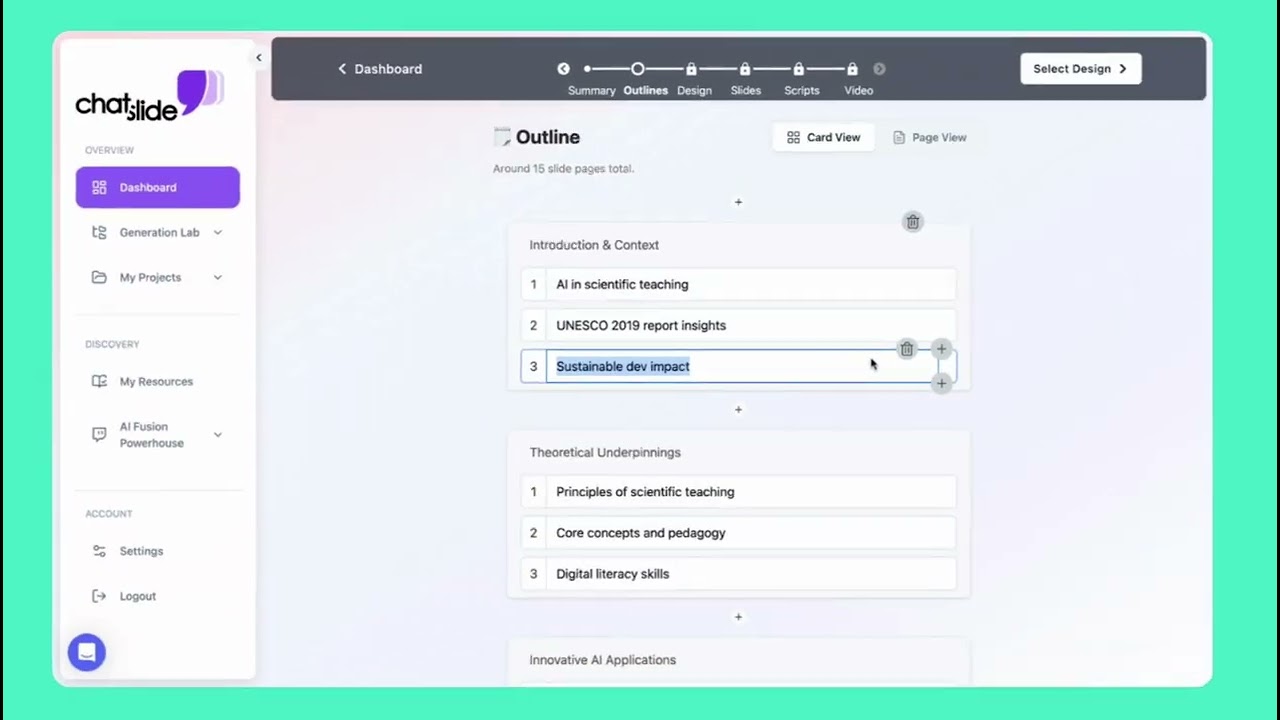
3. Let the AI draft the structure. ChatSlide generates an outline across your core sections — vision, current vs. target state, roadmap, investment, metrics — so you can see the whole argument before committing to design. Reorder, cut, or add sections at the outline stage, where edits are cheap.
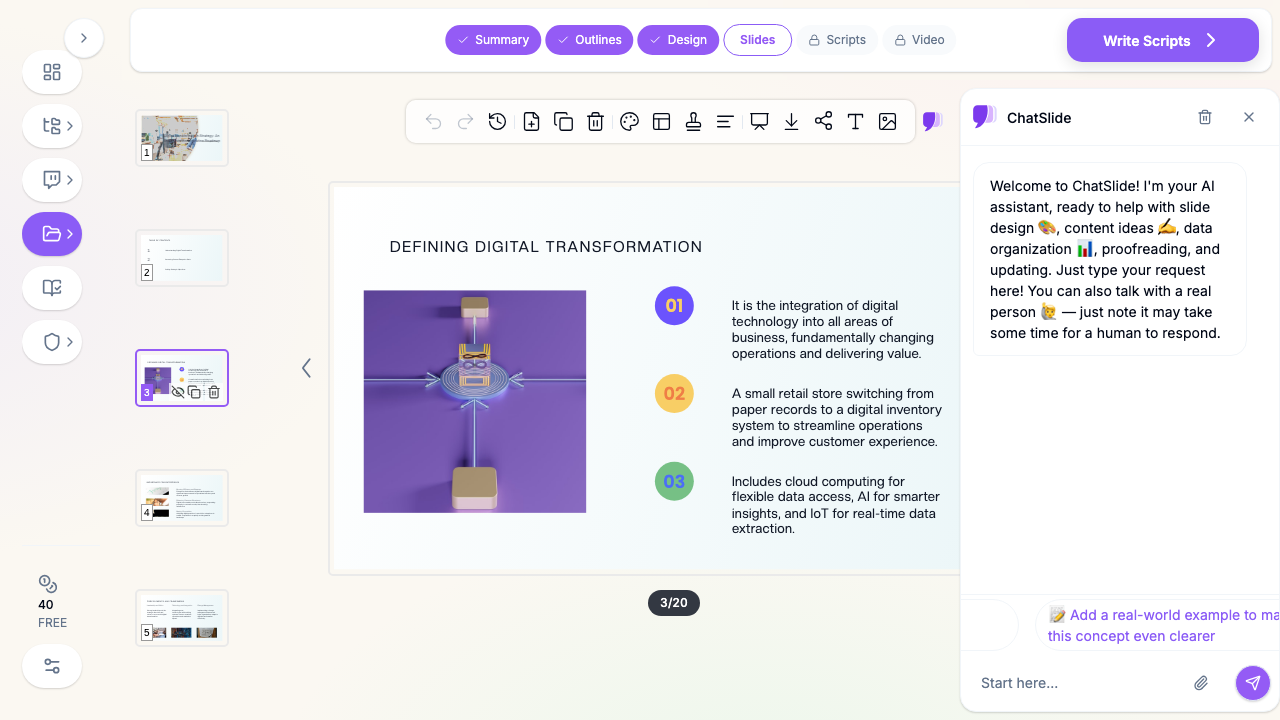
4. Generate slides with visuals. From the approved outline, ChatSlide builds the slides and adds relevant imagery and layouts automatically, so your roadmap and operating-model concepts get visual treatment instead of another wall of bullets. Phased timelines, before/after comparisons, and metric callouts are far more persuasive than text alone.
5. Refine with the AI assistant. Ask it to tighten the business-case slide, turn a paragraph into a phased timeline, or generate speaker notes for the roadmap section. Because the deck is already structured, these are small, fast adjustments rather than rebuilds.
6. Export and present. Download to PowerPoint to drop into your corporate template, share a live link for async review by the steering committee, or present directly. The same source deck can be exported for every stakeholder group.
Tailoring One Deck to Different Audiences
The most common mistake in transformation presentations is using a single version for everyone. Build a master deck, then adapt the emphasis:
- Board / executive approval: Vision, business case, investment, risk, and a single roadmap slide. Keep architecture in an appendix. The decision being asked for should be on its own slide.
- IT and engineering kickoff: Target-state architecture, sequencing, dependencies, and the people/capability plan. This audience wants the "how," not the "why now."
- Department and frontline rollout: What changes for their day-to-day, the timeline that affects them, and where to get help. Lead with impact on their work, not enterprise strategy.
- Customer or partner-facing: The value and experience improvements, minus internal cost and org detail.
Drafting these variants by hand is where transformation leads lose hours. With an AI assistant you keep one source of truth and ask it to re-cut the same content for each audience, so the numbers and roadmap stay consistent across versions.
Digital Transformation vs. Change Management — Don't Conflate Them
These two decks often get merged, and the result satisfies no one. A digital transformation presentation is the strategy-and-technology story: where the business is going, the modernization roadmap, the investment, and the measurable outcomes. A change management presentation is the people-and-adoption story: how you bring employees through the transition, training, communication, and resistance. Strong programs need both, but they are different artifacts for different moments — and usually different audiences. If your deck is really about adoption, communication, and the human side of the transition, build that separately; see our change management presentation guide. Keep the transformation deck focused on strategy, roadmap, and ROI, and reference the change plan rather than absorbing it.
Tips for a Deck That Gets Funded
- Lead with the cost of inaction. The strongest opening isn't your vision — it's what standing still costs in efficiency, risk, or lost revenue. Make the status quo the thing that looks risky.
- Show quick wins on the roadmap. A 24-month program with no value until month 18 is hard to fund. Sequence at least one visible win in the first quarter and put it on the timeline.
- Make the architecture a picture, not a list. Current-state vs. target-state diagrams communicate in seconds what three bullet slides can't. Let the AI generate the visual and refine from there.
- Put one number on every outcome slide. Even directional metrics ("~30% faster onboarding," "two legacy systems retired") beat vague promises. The board remembers numbers.
- Keep technology out of the executive narrative. Name the business outcome, not the vendor or stack. The detailed architecture belongs in an appendix for the IT audience.
- End on the decision. The final slide should make the ask explicit — the funding, the approval, or the green light you need — not a generic "thank you."
Get Started
A digital transformation presentation has to do something difficult: make a complex, multi-year, cross-functional program feel clear, credible, and fundable in twenty minutes. The structure is what does that work — vision, current state, target state, roadmap, investment, and metrics — and getting that structure onto well-designed slides is exactly what an AI tool accelerates.
Instead of spending a weekend rebuilding the same deck for three audiences, start from your plan and let ChatSlide draft the structure, design the slides, and adapt them per stakeholder — so you can spend your time on the strategy, not the formatting. Try ChatSlide free and turn your transformation roadmap into a presentation your leadership will back.