
Quick Answer: ChatSlide is the AI presentation maker for electrical engineering — lecturers, graduate researchers, and practising engineers. Trusted across 750+ universities, it turns a topic prompt, a paper, or an existing lecture into a structured EE deck in under two minutes: equations and symbols kept intact, real data charts from your own measurements, per-slide speaker notes, multilingual output, and 19 AI editing tools. Free to start, exports to PowerPoint, PDF, and Keynote.
The Electrical Engineering Presentation Problem
An EE talk carries more notation per slide than almost any other discipline. A single lecture can move from a governing equation, to a circuit or block diagram, to a measured S-parameter sweep, to a table of design trade-offs — and every one of those needs a different slide layout. Then the same content has to be re-cut three ways: a sixty-minute undergraduate lecture, a fifteen-minute group meeting, and a ten-minute conference slot.
The engineering is not the slow part. The slow part is that formatting a subscript, aligning a three-column comparison, and exporting a plot from MATLAB, ADS, or a VNA capture into something legible from the back row takes an evening that should have gone to the design itself.

What Makes ChatSlide Powerful for Electrical Engineering
Three input modes. Start from a topic prompt ("reflectarray and transmitarray antennas: unit-cell phase control and S-parameter characterization"), upload a lecture you already teach from and restyle it, or drop in a paper, datasheet, or standard and let ChatSlide draft the outline from that source rather than from scratch.
OCR on uploaded documents. Scanned lab manuals, a photographed board derivation, a figure-heavy application note — ChatSlide extracts the text and images so your existing material lands in the deck instead of being retyped.
Real data charts. EE arguments are made with numbers: gain versus frequency, efficiency versus load, harmonic distortion across drive level, loss budget by component. Build charts from your own measured or simulated values rather than dropping in a decorative graphic that misstates the sweep.
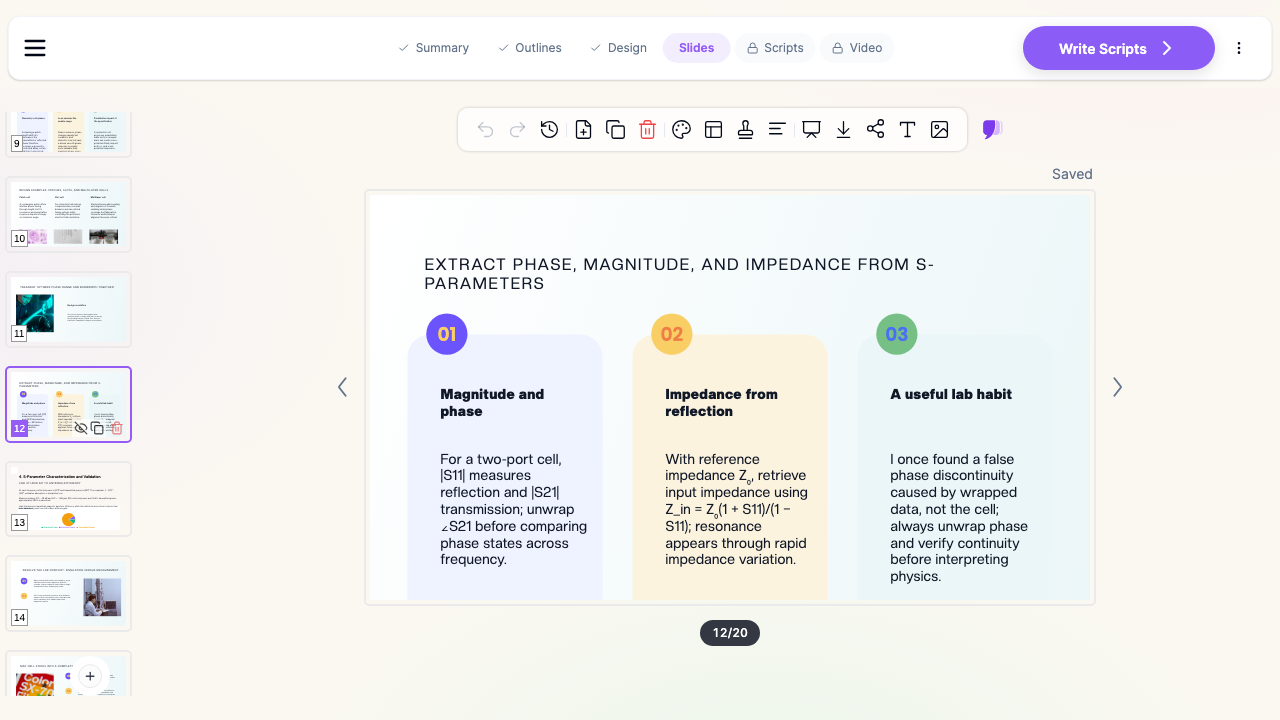
Technical notation preserved. Symbols, subscripts, and units survive generation and editing, so |S11|, Z₀, and ∠S21 read as engineering rather than as mangled plain text.
Speaker notes. ChatSlide drafts per-slide notes — the derivation step you will work through on the board, the assumption you need to state out loud, the question you expect from the third row.
Multilingual output. Generate the same lecture in English, Italian, Spanish, German, Chinese, or Portuguese, so a group teaching international cohorts maintains one deck and localizes it rather than rebuilding it.
19 AI editing tools. Tighten a dense derivation slide, generate a block diagram, rewrite a specialist slide for a general audience, or restyle the whole deck to your department template without leaving the editor.
How ChatSlide Builds Your Electrical Engineering Deck
1. Start with your topic or source material. A prompt with your learning objectives, a paper, a standard, or an existing deck — ChatSlide reads it and drafts a structured outline.
2. Refine the outline before generating slides. Reorder so the talk follows the engineering logic: motivation, governing relations, design method, characterization, results, trade-offs. Fixing the structure at the outline stage is far cheaper than reworking twenty finished slides.
3. Generate slides with layouts that match the content. Comparison cards for reflectarray versus transmitarray, a numbered procedure for a design flow, a chart slide for a measured sweep. Swap any generated image for your own schematic, layout screenshot, or bench photo.
4. Export to your format. PowerPoint for the lecture hall (so you can annotate live), PDF for the LMS, Keynote for a conference talk.
Use Cases for Electrical Engineers
Undergraduate circuits and signals lectures. Node analysis, frequency response, sampling, convolution — one reusable template across a semester instead of twelve differently formatted decks. Time saved: an evening of formatting per lecture.
RF, microwave, and antenna group meetings. Unit-cell design, phase coverage, S-parameter characterization, array synthesis, measured versus simulated comparisons, presented weekly to a supervisor who wants the plot, not the preamble. Time saved: hours per meeting cycle.
Power systems and energy teaching. Load flow, protection coordination, converter topologies, grid integration — with the one-line diagram and the numbers on the same slide. Time saved: a reusable scaffold instead of blank slides.
Conference talks and poster sessions. Cut the same research down to ten minutes, then to a poster, without rewriting the content from zero. Time saved: two derivative formats from one source deck.
Design reviews and internal training. Walking a team through a board respin, an EMC failure, or a new test procedure, with the trade-off table that the review actually turns on. Time saved: document-to-deck in minutes.
Industry short courses and onboarding. Bring a new engineer up to speed on the measurement setup, the simulation toolchain, and the house design rules, in one deck per topic that survives staff turnover.
Electrical engineering for departments and teams. Research groups and engineering organizations standardizing on one branded template can use SSO, centralized billing, and shared templates on the Enterprise plan — contact us to set it up across a group.
Electrical Engineering AI Tools Compared (2026)
| Capability | ChatSlide | Gamma | Tome | Beautiful.ai |
|---|---|---|---|---|
Reads uploaded papers, standards, and PPTX | Yes | Partial | Partial | No |
OCR on scanned lab manuals and app notes | Yes | No | No | No |
Real data charts from your own measurements | Yes | Partial | No | Partial |
Per-slide speaker notes | Yes | Partial | No | No |
Multilingual deck generation | Yes | Partial | Partial | Limited |
PowerPoint + Keynote export | Yes | Partial | Partial | Partial |
Free tier | Yes | Yes | Yes | Limited |
Time Comparison: Manual vs. AI-Assisted
| Task | Manual | With ChatSlide |
|---|---|---|
Outline a lecture on a new topic | 1–2 hours | 2 minutes |
Draft slides from a paper or standard | 3–4 hours | 5 minutes |
Chart measured or simulated sweeps | 1 hour | Minutes |
Cut a 60-minute lecture to a 15-minute talk | 1–2 hours | Minutes |
Translate the deck for another cohort | Hours | Minutes |
Restyle to department or company branding | 1–2 hours | Minutes |
What a Strong Electrical Engineering Presentation Includes
The specification before the theory. Open with what the design has to achieve — bandwidth, efficiency, phase coverage, loss budget, safety margin — so every later slide is measured against a number the audience already has.
Minimum theory, maximum method. Two slides of governing relations, with symbols defined and assumptions stated, then the procedure. The derivation belongs in the speaker notes or the appendix, not on the screen.
Diagrams that carry the argument. A block diagram, a one-line, a unit-cell cross-section, a measurement setup. If a slide describes a topology in prose, it is the wrong slide.
Measured against simulated. The single most convincing slide in an EE talk is the overlay: what the model predicted, what the bench produced, and the honest explanation of the gap.
Trade-offs made explicit. Phase range against bandwidth, efficiency against thermal headroom, cost against margin. A comparison table beats three paragraphs of hedging.
A failure-mode slide. What a wrong answer looks like — wrapped phase read as a discontinuity, a de-embedding error, an unterminated port — teaches faster than another worked example.
Best Practices
Do:
- Define every symbol the first time it appears; your audience spans backgrounds.
- Put units on every axis and every table column.
- Show the measurement setup before the measurement.
- Keep one idea per slide; a derivation and a result should not share one.
- Build a reusable department template so a semester reads as one course.
Don't:
- Paste an unreadable screenshot of a simulator window and narrate it.
- Present a simulated result as if it were measured.
- Carry confidential design data, customer schematics, or export-controlled material into slides you will share publicly.
- Bury the trade-off on a final slide nobody reaches.
Frequently Asked Questions
Can ChatSlide build an EE lecture from a paper or textbook chapter? Yes. Upload the PDF — or a PowerPoint you already teach from — and ChatSlide drafts an outline from its contents, then generates slides you can reorder and edit.
Does it handle equations and technical notation? Symbols, subscripts, and units are preserved through generation and editing. Check every expression before presenting; you remain the technical author of the talk.
Can I use my own measured data for charts? Yes. Provide your values and ChatSlide builds the chart from them, so the plot reflects your bench or simulation rather than a generic figure.
Can I generate the same lecture in another language? Yes. Decks can be generated in English, Italian, Spanish, German, Chinese, Portuguese, and more — useful for groups teaching international cohorts.
Can I replace the generated images with my own schematics? Yes. Any generated image can be swapped for your own schematic, layout capture, or bench photograph.
Is there a free tier? Yes. You can generate and export decks free, with no card required to start.
Get Started
Bring the talk you already know how to give — the circuits lecture, the group meeting, the design review — and let ChatSlide handle the outline, the layouts, the charts, and the notes. For adjacent workflows, see the chemical engineering lecture guide, the civil engineering guide, the network engineering guide, and the teacher lecture slides guide.
Make your electrical engineering presentation with ChatSlide — free to start, exports to PowerPoint, PDF, and Keynote.