
Quick Answer: ChatSlide is an AI lymphoma presentation maker for hematologists, oncology fellows, lymphoma nurses, and patient-education programs. It turns a topic, a trial PDF, or a guideline into a structured deck with subtype comparison tables, staging and workup slides, treatment-line diagrams, outcome charts, PubMed citations, speaker notes, and PowerPoint or Google Slides export. Trusted across 750+ universities and hospital training programs, ChatSlide can build a 25-slide lymphoma lecture in under 2 minutes. Free to start, no card required.
The Lymphoma Talk Problem
Lymphoma is the hardest common topic to present. There are dozens of entities under one word, the indolent ones behave nothing like the aggressive ones, and the treatment landscape has moved twice in the time it takes to update a slide deck. A single hour on indolent B-cell lymphomas has to hold where follicular, mantle cell, and marginal zone sit inside non-Hodgkin lymphoma, what the diagnostic workup actually proves, which first-line options are evidence-based, and what changes at relapse now that T-cell redirecting therapies exist.
Then the audience changes and the whole deck has to change with it. The same content for fellows, for a tumor board, for referring internists, and for medically literate patients is four different talks, and rebuilding them by hand is where the weekend goes.
ChatSlide keeps the clinical judgment with you. It removes the assembly, and it makes the second and third version of a talk cheap instead of a new project.
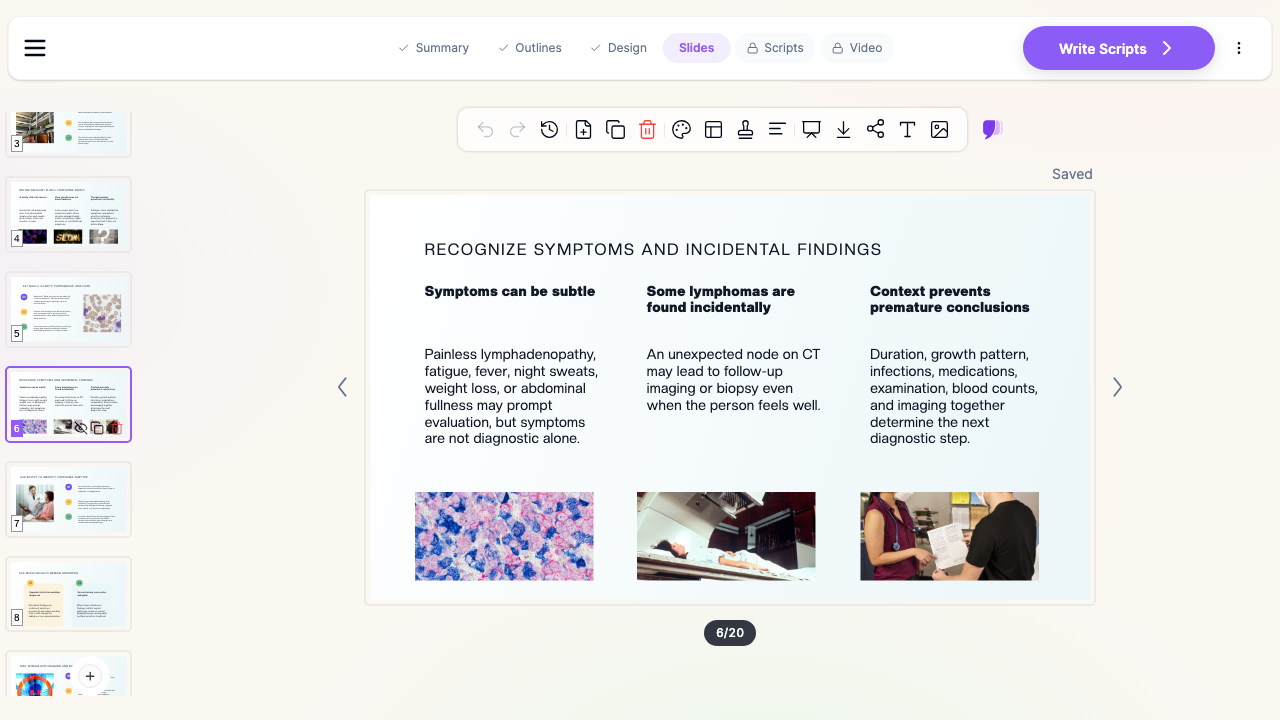

What Makes ChatSlide Powerful for Lymphoma Talks
Builds the subtype comparison tables the topic runs on
Follicular versus mantle cell versus marginal zone. Indolent versus aggressive. Cell of origin, typical presentation, markers, pace, and treatment intent side by side. ChatSlide assembles these as real tables rather than paragraphs, which is what makes a multi-entity talk followable from the back of a room.
Reads the trial PDF or guideline you are presenting
Upload a published trial, a guideline, or your existing slides and generate from them. The deck follows the paper's own design, endpoints, and numbers instead of a generic summary, which matters when someone will ask what the confidence interval was.
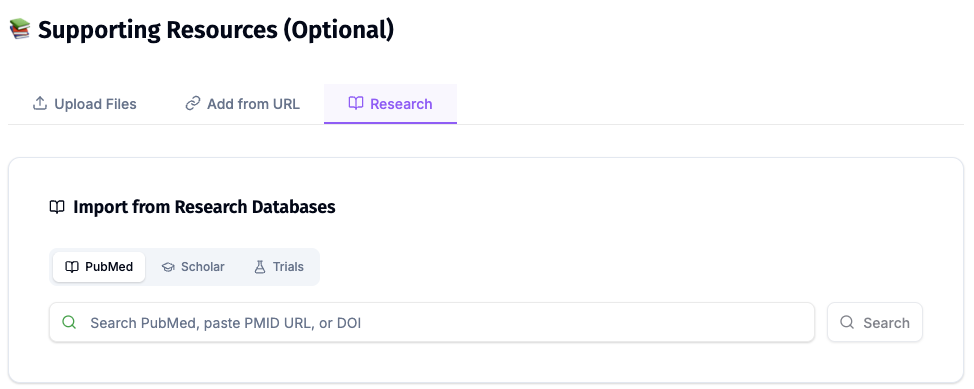
Searches PubMed and trial registries while you build
Pull the registrational trials into the deck by keyword, PMID, DOI, or NCT number, with citations attached. Useful for a field where the relapsed and refractory slide has to be re-checked every time you give the talk.
Charts from your own numbers
Paste published or institutional figures, such as response rates by line of therapy or progression-free survival by regimen, and ChatSlide turns them into chart slides. Use real numbers, labelled with their source and period.
Retargets one talk to a different audience
Ask for the same content "for hematology fellows" and then "for medically literate patients and caregivers," and you get two genuinely different decks: one keeps the marker panels and trial design, the other keeps what the diagnosis means, what watchful waiting is, and what to expect from each treatment.
Speaker notes per slide
Generate notes so an hour-long talk runs to time, or so it can be handed to a colleague or a fellow who did not build it.
How ChatSlide Builds Your Lymphoma Deck
- Start from a topic or a file. Type "Indolent B-cell lymphomas: follicular, mantle cell, marginal zone, diagnosis through relapsed disease, 30 slides" or upload the trial, guideline, or your existing slides.
- Set the audience and the length. Fellows, tumor board, referring physicians, nurses, or patients, plus the talk duration, in any of the supported languages.
- Review the outline first. The section structure comes back before the slides are written, so the argument gets fixed once instead of across 30 slides.
- Generate, then edit. Slides arrive with layouts, images, tables, and notes. Edit inline, regenerate a single slide, then export to PowerPoint, PDF, or Google Slides, or present from the browser.
Use Cases in Lymphoma
- Patient and caregiver education evening. An hour for a medically literate audience on what an indolent lymphoma is, why treatment may not start immediately, and what the options are. Challenge: plain language without flattening the evidence. Set the audience explicitly and the level changes, not just the vocabulary.
- Fellowship didactic on non-Hodgkin lymphoma. Classification, workup, staging, first-line and relapsed therapy across a teaching series that keeps the same structure week to week.
- Tumor board case presentation. One case, the pathology and imaging, the options, the recommendation. Generate a fixed-length deck and keep one question per slide.
- Journal club on a practice-changing trial. Upload the paper, keep the exact numbers, and add the "what did we know before" and "what does this add" slides.
- Nursing and pharmacy in-service on newer therapies. What CAR-T and bispecific antibody treatment involves operationally, and what toxicities the team needs to recognize.
- Cancer centers and hematology departments. Groups giving the same talks across sites can hold a shared template so every deck carries the same look. Contact us about team billing, SSO, and shared brand templates.
Lymphoma Presentation AI Tools Compared (2026)
| Capability | ChatSlide | Gamma | Tome | Beautiful.ai |
|---|---|---|---|---|
Upload a trial PDF and build from it | Yes | Limited | Limited | No |
PubMed / Google Scholar / trial search built in | Yes | No | No | No |
Subtype and treatment-line comparison tables | Yes | Partial | Partial | Partial |
Charts from pasted outcome data | Yes | Partial | Partial | Yes |
Retarget the same deck to another audience | Yes | Manual | Manual | Manual |
Speaker notes generated per slide | Yes | Partial | Partial | No |
PowerPoint and Google Slides export | Yes | Yes | Partial | Yes |
Time Comparison: Manual vs. AI-Assisted
| Task | Manual | With ChatSlide |
|---|---|---|
Outline a 30-slide lymphoma lecture | 1 to 2 hours | 2 minutes |
Draft slide content from a trial or guideline | 4 to 6 hours | Minutes |
Build subtype and treatment-line tables | 1 to 2 hours | Included |
Produce a patient-facing version of the same talk | 2 to 3 hours | One regeneration |
Write speaker notes | 1 to 2 hours | Included |
Direct Research Database Access
ChatSlide's Research tab connects to the databases physicians use daily:
- PubMed: Search by keyword, PMID, or DOI. Find the landmark trials, recent publications, and clinical guidelines relevant to your case. The AI reads abstracts and incorporates key findings into your slides with citations.
- Google Scholar: When your topic spans disciplines — say, the intersection of genetics and oncology — Scholar captures the broader academic literature that PubMed alone might miss.
- Clinical Trials (NCT): Presenting on a treatment where pivotal trials are ongoing? Search by NCT number or condition to pull trial design, endpoints, and status into your slides.
What a Strong Lymphoma Deck Includes
- A scope slide. Which entities the talk covers, which it does not, and whether it is about newly diagnosed or relapsed disease.
- The place in the family early. Where each subtype sits within non-Hodgkin lymphoma, before any treatment data appears.
- Diagnosis shown as a sequence. Biopsy, pathology and markers, imaging, marrow where indicated, staging. A workup slide should read as an order of operations.
- Indolent versus aggressive made explicit. The single most common source of audience confusion, and it deserves its own slide.
- Treatment by line, not by drug list. First line, then relapsed and refractory, with the decision points named.
- Evidence with its design attached. Trial name, population, endpoint, follow-up. A response rate without a population is not a finding.
- A newer-therapy slide that is honest about setting. Where T-cell redirecting approaches currently fit, and where they do not.
- A summary slide people photograph. In practice this is the slide that survives the talk.
Best Practices
Do
- Build the specialist version first, then regenerate the patient version from it so the facts stay identical.
- Name the trial, population, and follow-up next to every outcome number.
- Keep subtype and treatment-line content in tables, never in prose.
- Label your own institutional figures with the period they cover.
- Have a clinical lead review the final deck. The AI drafts, it does not sign off.
Don't
- Do not put patient names, record numbers, pathology reports, or identifiable images into slides or uploads.
- Do not present a regimen that conflicts with your institutional pathway or national guideline. The pathway is the source of truth.
- Do not reduce a specialist deck to a patient deck by deleting slides. Regenerate at the right level instead.
Note on patient data: ChatSlide's standard plans are not a HIPAA-covered service — keep PHI out of slide content and uploads. For hospital systems, group practices, and clinics that need a Business Associate Agreement, our Enterprise plan offers HIPAA-compliant deployment options — contact us to discuss BAA terms, SSO, and on-prem / private-cloud hosting.
Frequently Asked Questions
Can ChatSlide build a talk on a specific lymphoma subtype? Yes. Name the entity, the audience, and the length, and ask for the sections you want, such as classification, workup, first-line therapy, and relapsed disease.
Can it build from a published trial PDF? Yes. Upload the paper and generate from it. Ask it to keep the reported numbers exactly and to distinguish significant from non-significant results.
Can it make the same talk for patients instead of clinicians? Yes. Regenerate the same topic for patients and caregivers, and the level and emphasis change rather than just the wording.
Does it handle comparison tables across subtypes? Yes. Ask for a table and the entities, features, and treatment intent come back as a real table you can edit.
Can I add my own outcome data as charts? Yes. Paste your figures and ChatSlide builds chart slides from them. Use your own or published numbers and label the source.
Does it work in other languages? Yes. Choose the output language when you generate, which is useful when a teaching talk and its patient version run in different languages.
Can I export to PowerPoint? Yes. Export to PowerPoint, PDF, or Google Slides, or present directly from the browser.
Is it free? Yes, you can start free without a card. Paid plans add longer decks, more generations, and more export options.
Get Started
Make your lymphoma deck with ChatSlide: pick the subtype and the audience, paste the topic or upload the trial, and get a structured deck with tables, charts, citations, and notes in minutes. Start free at ChatSlide — no card required.
Related guides: oncology and hematology presentations, patient education presentations, journal club presentations, and medical grand rounds presentations.