
The Pitch Deck Problem
Every founder knows: a great pitch deck can make or break your fundraising round. Yet most founders spend 40-80 hours crafting their Series A deck — time that should go toward building the product.
The challenge is not just design. A strong pitch deck requires:
- A clear narrative arc from problem to solution to traction
- Data visualizations that tell your growth story
- Professional design that signals credibility
- Consistent formatting that doesn't distract from the message
Generic presentation tools give you templates. But templates don't understand your business model, your metrics, or your competitive landscape.

What Makes a Strong Investor Pitch Deck
Before diving into tools, here's what experienced investors expect:
The Standard Structure
- Title slide — Company name, one-line description, your name
- Problem — The pain point you solve, with evidence it matters
- Solution — Your product and how it addresses the problem
- Market size — TAM, SAM, SOM with credible sources
- Business model — How you make money
- Traction — Revenue, users, growth rate, key milestones
- Competition — Competitive landscape and your differentiation
- Team — Why your team is uniquely positioned
- Financials — Projections, unit economics, burn rate
- The Ask — How much you're raising and what you'll do with it
Common Mistakes
- Too many slides (keep it under 15)
- Walls of text instead of key metrics
- Generic market size numbers without bottom-up analysis
- No clear ask or use of funds
- Slides that don't tell a coherent story
Step-by-Step: Creating Your Pitch Deck with ChatSlide
1. Choose Your Input Method
ChatSlide gives you three ways to start:
Upload your business plan — If you have a business plan document (PDF, Word, or even a Google Doc exported as PDF), upload it directly. The AI reads your document, identifies key sections (problem, solution, market, financials), and structures them into pitch deck format.
Paste a URL — Link to your company website, a product demo page, or a YouTube pitch video. The AI extracts relevant content and builds slides from it.
Describe your startup — Type your company description, key metrics, and what you're raising. The AI generates a structured pitch deck from your input.
The upload option works best for founders who already have a business plan or detailed write-up. The AI doesn't just copy text — it identifies the most compelling data points and restructures them for investor consumption.
2. AI Generates Your Deck
The AI creates a professional pitch deck with:
- Structured narrative following the standard investor deck format
- Data visualizations generated from your actual numbers — revenue charts, growth curves, market size breakdowns
- Professional images that match your industry and topic
- Consistent design with proper hierarchy and visual balance
Generation takes under 60 seconds, even for complex decks with data charts.
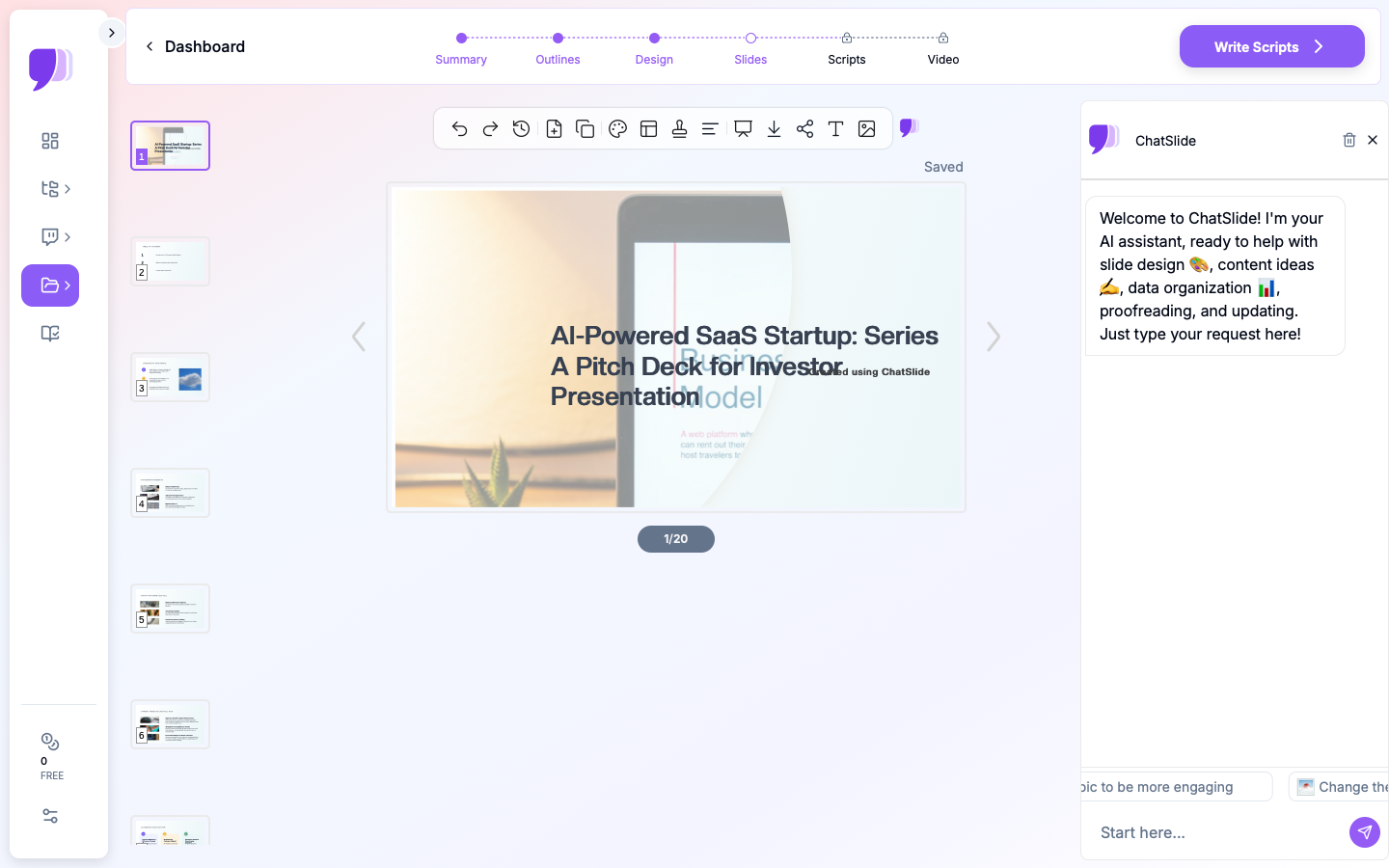
3. Refine with AI Editing Tools
This is where ChatSlide stands out. After the initial generation, you get access to powerful AI editing tools that let you refine every detail:
- Chat-based editing — "Make the traction slide more data-heavy" or "Add a competitive matrix table"
- Text regeneration — Rewrite any slide's content for a different tone or audience
- Batch editing — Apply changes across multiple slides at once (e.g., "Make all slides more concise")
- Manual editing — Fine-tune individual elements directly
These editing capabilities mean you're not stuck with the first draft. Iterate quickly until every slide tells the right story.
4. Export and Present
Download your deck as:
- PowerPoint (.pptx) — For offline presenting and sharing with investors
- PDF — For email attachments
- Video with narration — For async pitches and outreach
- Shareable link — For quick sharing without attachments
Tips for AI-Generated Pitch Decks
Do's
- Start with your strongest metrics — Upload a document that includes your real traction numbers. The AI creates more compelling charts when it has real data to work with.
- Specify your audience — Tell the AI whether this is for seed investors, Series A VCs, or angel investors. The tone and depth should match.
- Use the editing tools — Don't settle for the first generation. The chat-based editor is powerful — use it to iterate on specific slides.
- Keep it concise — If the AI generates too many slides, ask it to consolidate. Investors prefer 10-12 focused slides over 20 diluted ones.
Don'ts
- Don't include every feature — Focus on the 2-3 that matter most
- Don't use jargon without context — The AI writes clearly, but review for industry-specific terms that need explanation
- Don't skip the financials — Even early-stage decks need unit economics and a use-of-funds breakdown
- Don't forget to review — AI-generated content is a strong starting point, but always verify numbers and claims before presenting to investors
Tailoring Your Deck to the Stage
Not every fundraise is the same. The expectations, level of detail, and emphasis shift meaningfully depending on what stage you are raising at.
Pre-Seed and Seed
At the earliest stages, investors are betting on the team and the insight, not the numbers. Your deck should lead with the problem, demonstrate deep understanding of the customer, and explain why you are the right person to solve it. Traction slides might show waitlist signups, pilot users, or letters of intent rather than revenue curves. Keep the financials section light — a simple use-of-funds breakdown and a rough timeline to your next milestone is sufficient.
When using ChatSlide for a seed deck, start by describing your startup and the problem you are solving in plain language. The AI will generate a narrative-driven deck that you can then refine. Focus your editing time on the problem and solution slides — those carry the most weight at this stage.
Series A
Series A decks need to prove that your business model works and can scale. Investors want to see clear unit economics, a repeatable go-to-market motion, and evidence that the product has found product-market fit. This is where data charts become essential — month-over-month revenue growth, cohort retention curves, and customer acquisition cost trends.
Upload a document that includes your actual metrics. ChatSlide generates real data visualizations from your numbers, which is far more compelling than manually-built charts that often look inconsistent or amateurish.
Series B and Beyond
Later-stage decks shift toward operational sophistication. Investors expect detailed financial models, clear paths to profitability, and evidence of organizational maturity. Your competition slide should show not just who your competitors are, but how your moat has deepened over time. Include slides on team scaling, key hires, and operational milestones.
For these decks, the upload feature is particularly useful. Most Series B founders have extensive board decks and financial models already built. Upload those documents and let the AI distill them into a focused investor narrative.
Use Cases Beyond Series A
Accelerator Applications
Upload your application essay or business summary. ChatSlide converts it into a polished deck for demo day or selection committee presentations. Demo day decks deserve special attention — you typically have three to five minutes, which means every slide must earn its place. Use the AI editing tools to cut aggressively and ensure your narrative is tight.
Angel Investor Meetings
Describe your idea and early traction. Get a clean, professional deck in minutes — no design skills required. Angel meetings are often more conversational than VC pitches, so consider generating a shorter deck (six to eight slides) that serves as a visual anchor for the discussion rather than a formal presentation.
Internal Strategy Presentations
Upload a strategy document or quarterly report. The AI restructures it into an executive-ready presentation with data visualizations.
Grant Applications
Upload your grant proposal document. The AI extracts the research plan, budget, and impact sections into a presentation format suitable for review panels.
Board Updates
Quarterly board decks require a consistent format that covers key metrics, strategic priorities, and upcoming milestones. Upload your previous board deck or a narrative summary of the quarter, and ChatSlide generates a structured update that you can customize with your latest numbers.
Avoiding Common AI Pitfalls in Pitch Decks
AI-generated content is a powerful starting point, but it requires a thoughtful review process to ensure your deck is investor-ready.
Verify every number. If you uploaded a document with financial data, double-check that the AI pulled the right figures into the right charts. A misplaced decimal point in your revenue projection will destroy credibility faster than a bad design choice.
Remove generic language. AI tools sometimes default to broad statements like "large and growing market" or "unique value proposition." Replace these with specific, evidence-backed claims. Instead of "large market," write "enterprise cybersecurity spending reached $XX billion in 2025, growing at XX% annually." Use your own research.
Check the competitive positioning. AI-generated competition slides sometimes frame your positioning too favorably or miss key competitors that your target investors will know about. Review this slide carefully and ensure it reflects an honest, defensible view of the landscape.
Match the tone to your audience. A deck for a deep-tech VC should emphasize technical differentiation and IP. A deck for a consumer-focused fund should lead with user metrics and brand momentum. After generating your deck, use the chat-based editor to adjust the tone for your specific audience.
Why Founders Choose ChatSlide for Pitch Decks
- Three input modes — Upload documents, paste URLs, or type descriptions. Most tools only accept text prompts.
- Real data charts — Upload your metrics and get actual data visualizations, not generic placeholder graphics.
- Powerful editing — Chat-based, batch, and manual editing modes let you iterate fast.
- Multi-format output — Export as PPTX, PDF, video, or shareable link.
- Free to start — Create your first pitch deck without a credit card.
Get Started
Create your pitch deck with ChatSlide — Upload your business plan or describe your startup, and get an investor-ready presentation in under 60 seconds. Free to start.
ChatSlide is used by 290,000+ professionals to turn documents and ideas into presentations. Free tier available — no credit card required.