
Quick Answer: ChatSlide is the AI presentation maker vascular surgeons, residents and vascular teams use to build a vascular surgery deck (a PAD and limb-salvage lecture, a carotid revascularization trial update, an aortic aneurysm case, a vascular trauma talk for a surgical conference) in under two minutes. Upload your notes, the guideline or the trials you want to present and the slides are built from those files. It is used by teams at 750+ universities and by 300,000+ professionals, searches PubMed, Google Scholar and ClinicalTrials.gov from inside the editor, respects an exact slide count, and exports to PowerPoint, PDF, Google Slides or a narrated video. Free to start, no card required.
The Vascular Surgery Presentation Problem
Vascular surgery sits between three specialties that all present the same disease differently. Cardiology brings the risk-factor and medical-therapy view, interventional radiology brings the device and imaging view, and the surgeon has to show where open repair, endovascular treatment and best medical therapy each belong. A vascular talk that leaves out one of those views gets corrected from the floor.
The material is also unusually visual and unusually decision-heavy. Angiograms, duplex waveforms, toe pressures, CT angiography, conduit maps and runoff diagrams carry the argument, and every case turns on a branching decision: treat or watch, open or endovascular, which target, which conduit.
Then the same subject has to be rebuilt for very different rooms: a 30-minute conference talk on popliteal injuries for trauma surgeons, a resident teaching session on chronic limb-threatening ischemia, a trial-update slot on carotid revascularization, a multidisciplinary limb-salvage meeting. Each version is an evening of slide work after a full operating list.


What Makes ChatSlide Powerful for Vascular Surgery Decks
Your notes, guideline or trial papers are the source
Upload your teaching notes, the society guideline you follow, the trial publications you want to discuss or last year's slides. The deck is built from those files rather than from a generic summary of vascular disease, so the thresholds, classifications and decision points are the ones you teach.
The audience field sets the altitude
Write "vascular surgery residents" and the deck walks through assessment, staging and the revascularization decision. Write "national trauma surgery conference" and the same anatomy comes back as rapid diagnosis, exposure and operative steps. Write "primary care and podiatry referrers" and it becomes a when-to-refer talk. One field, one regeneration, same source material.
Exact slide count and section order respected
"Thirty to forty slides, blunt and penetrating mechanisms, diagnosis first, then operative management, then outcomes" is followed as written. Review and reorder the outline before a single slide is drawn.
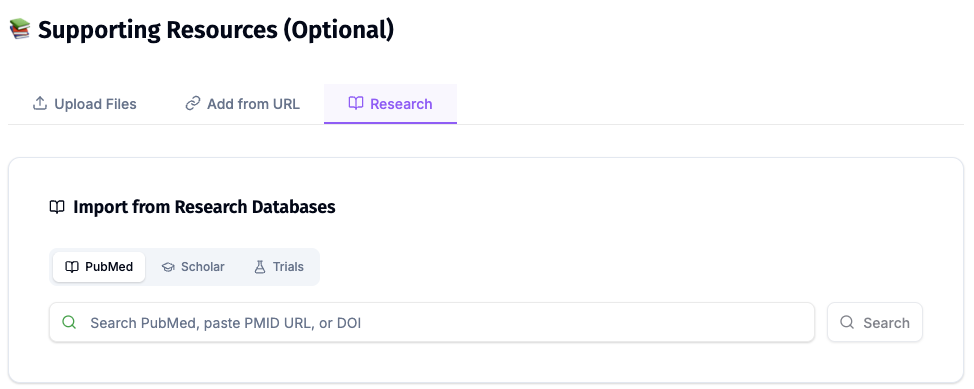
PubMed, Google Scholar and trial registry search inside the editor
Vascular surgery moves on trials. Pull the studies by keyword, PMID, DOI or NCT number from the Research tab and keep each citation attached to the slide that makes the claim, so the "which trial was that?" question is answered on screen.
Charts built from the numbers you supply
Upload a table of outcomes from the trials you chose, or your own unit's audit figures, and the chart is plotted from those numbers. ChatSlide does not invent the data behind a chart; it plots what you give it.
OCR reads scanned protocols and printed audit sheets
Departmental pathways, older consent leaflets and printed audit sheets are often scans. OCR reads them, so the text comes through as content you can build on.
Speaker notes and narrated video for teaching
Each slide gets speaker notes timed to your slot, and a finished deck exports as a narrated video, which suits rotating residents who miss the teaching session.
How ChatSlide Builds Your Vascular Surgery Deck
- Upload what you already have. Teaching notes, the guideline, trial papers, your unit's pathway, de-identified case summaries, in any combination.
- Say who it is for and how long you have. "30-minute talk for a national trauma surgery conference, popliteal artery and vein injuries, blunt and penetrating, how to diagnose rapidly, steps of operative management" is a usable instruction.
- Review the outline first. Confirm the sequence matches how you reason through the case before slides are generated.
- Generate, then verify. Slides, images and speaker notes come back together. Check every threshold, classification, operative step, trial result and citation against your sources, replace stock images with your own de-identified imaging where it matters, then export to PowerPoint, PDF, Google Slides or a narrated video.
Use Cases for Vascular Surgery Presentations
PAD and chronic limb-threatening ischemia teaching. Challenge: taking residents from claudication to tissue loss, through ABI, toe pressures, waveforms and imaging, to the revascularization decision. Build it from your notes and the guideline your unit follows. Saves 4–6 hours.
Open vs endovascular revascularization debate. Challenge: a balanced, timed argument for each strategy in a given anatomical segment, with the trials and the patient factors that tip the decision. Ask for a two-sided structure and put the evidence on each side.
Carotid revascularization trial update. Challenge: a late-breaking trial on asymptomatic or symptomatic carotid disease has to be explained against best medical therapy, endarterectomy and stenting in a short slot. Pull the trial and its predecessors by NCT number or PMID.
Aortic aneurysm case presentation. Challenge: imaging, sizing, the repair options and the follow-up plan for one case, presented to a multidisciplinary audience. Upload the de-identified case summary and build the decision slide by slide.
Vascular trauma talk for a surgical conference. Challenge: extremity arterial and venous injuries, hard and soft signs, rapid diagnosis, exposure, shunting, repair and fasciotomy, for trauma surgeons who see these injuries rarely. Specify the injury, the mechanisms and the slide count.
Limb-salvage multidisciplinary meeting. Challenge: surgery, podiatry, wound care, infectious disease and diabetes teams discussing the same patients. Build a standing deck format from your service's own pathway.
Venous disease and DVT education. Challenge: superficial venous treatment options or thrombosis prevention presented to referrers, nurses or patients at the right level. Same source, different audience field.
Vascular Surgery Presentation Tools Compared (2026)
| ChatSlide | Gamma | Tome | Beautiful.ai | |
|---|---|---|---|---|
Build the deck from uploaded notes, guideline or trial papers | Yes | Limited | Limited | Limited |
PubMed / Google Scholar / trial registry search built in | Yes | No | No | No |
OCR for scanned pathways and audit sheets | Yes | No | No | No |
Charts built from the outcome data you supply | Yes | Partial | No | Template charts |
Exact slide count and section order respected | Yes | Yes | Approximate | Approximate |
Audience level controls the altitude | Yes | Approximate | Approximate | Approximate |
Speaker notes for every slide | Yes | Basic | Basic | Basic |
Export to narrated video for missed teaching | Yes | No | No | No |
PowerPoint export that stays editable | Yes | Yes | Limited | Yes |
Interface languages | 30+ | Fewer | Fewer | Fewer |
Time Comparison: Manual vs. AI-Assisted
| Task | Manual | With ChatSlide |
|---|---|---|
Turn notes or a guideline into a teaching sequence | 2–3 h | 15 min |
Find, read and cite the trials for an evidence section | 2–4 h | 20 min |
Build assessment, anatomy and decision slides with images | 1–2 h | 10 min |
Rebuild the talk for a second audience (residents vs referrers) | 2–3 h | 5 min |
Draft speaker notes to the time slot | 1 h | 10 min |
Total | 8–13 h | ~60 min |
Direct Research Database Access
ChatSlide's Research tab connects to the databases physicians use daily:
- PubMed: Search by keyword, PMID, or DOI. Find the landmark trials, recent publications, and clinical guidelines relevant to your case. The AI reads abstracts and incorporates key findings into your slides with citations.
- Google Scholar: When your topic spans disciplines — say, the intersection of genetics and oncology — Scholar captures the broader academic literature that PubMed alone might miss.
- Clinical Trials (NCT): Presenting on a treatment where pivotal trials are ongoing? Search by NCT number or condition to pull trial design, endpoints, and status into your slides.
What a Strong Vascular Surgery Presentation Includes
A clinical question first. Which patient, which territory, which decision. "Should this 70-year-old with a non-healing toe ulcer have a bypass or an endovascular procedure?" holds a room better than a history of the specialty.
Assessment before treatment. Pulses, ABI and its limits in calcified vessels, toe pressures, waveforms, duplex and cross-sectional imaging, in the order your unit actually uses them.
The staging or classification you use, named. Limb threat, anatomical complexity and aneurysm size each have recognised classification systems. Name the one you use, show it, and apply it to the case rather than listing every system.
The decision as a branch, not a paragraph. Open, endovascular, hybrid or best medical therapy, and the patient, anatomy and conduit factors that move a case from one branch to another.
Trials with their comparator and population. Every trial slide states who was enrolled and what the treatment was compared with. A result in symptomatic patients is not a result in asymptomatic ones.
Operative steps that are teachable. For a trauma or technique talk: exposure, control, shunting or repair, and when fasciotomy is needed, in the order a surgeon would do them, with your own intraoperative images where you have consent to use them.
Surveillance and outcomes. What follow-up looks like and which outcomes matter to the patient: limb salvage, wound healing, walking distance, stroke-free survival.
References in the speaker notes or on the slide. Every threshold and every result traceable to a guideline or study the audience can look up.
Best Practices
Do:
- Upload your own notes, guideline and chosen trial papers rather than describing the topic in one line.
- State the audience precisely: vascular residents, trauma surgeons, interventional colleagues and referrers each need a different deck.
- Ask for the decision points as their own slides, separate from the background.
- Put the trial population and comparator on each evidence slide.
- Verify every threshold, classification, operative step, device statement and citation against your sources before presenting.
Don't:
- Do not let the AI supply a threshold, measurement, operative step or device indication your source did not state. Check every one.
- Do not present one trial as settling a question in a population it did not enrol.
- Do not use stock photographs in place of the imaging that carries the argument; replace them with your own de-identified angiograms, duplex or CT images.
- Do not put identifiable images, case details or records into a prompt or upload. Use de-identified or illustrative cases only.
- Do not reuse a teaching deck year after year without checking for guideline updates and new trial results.
Vascular Education Across a Department
Vascular units, trauma centres and residency programmes teach the same pathways to many groups: each resident intake, rotating trainees, referrers, ward and theatre staff. ChatSlide Enterprise adds SSO, centralized team billing, shared brand templates, and team collaboration on a single deck library, so the limb-salvage pathway taught in one hospital is the one taught across the network — contact us to set it up.
Note on patient data: ChatSlide's standard plans are not a HIPAA-covered service — keep PHI out of slide content and uploads. For hospital systems, group practices, and clinics that need a Business Associate Agreement, our Enterprise plan offers HIPAA-compliant deployment options — contact us to discuss BAA terms, SSO, and on-prem / private-cloud hosting.
Frequently Asked Questions
Can it build a 30–40 slide vascular trauma talk for a surgical conference? Yes. Give the injury, the mechanisms (blunt and penetrating), the length and the sections you want, such as rapid diagnosis then operative management. The slide count and order are respected, and you review the outline before slides are generated.
Can it present open and endovascular options fairly? Yes. Ask for a two-sided structure and upload the trials or guideline you rely on; the deck keeps each strategy in its own section with its evidence.
Can it find the vascular trials for me? The Research tab searches PubMed, Google Scholar and ClinicalTrials.gov by keyword, PMID, DOI or NCT number, and keeps the citation on the slide. Choosing which trials to present, and reading them, is still your job.
Does it check thresholds, operative steps or trial results for accuracy? No. It builds slides from what you upload and the sources you choose, and you remain the verifier. Read every number, step and citation against your source before presenting.
Can I use my own angiograms and CT images? Yes. Add your own de-identified images to any slide in the editor; that is usually the best replacement for a stock image on an imaging-heavy slide.
How is this different from your trauma surgery, interventional radiology and cardiac surgery guides? Trauma surgery covers the whole injured patient: resuscitation, damage control and chest or abdominal trauma. Interventional radiology covers image-guided procedures across the body. Cardiac surgery covers the heart and its valves. This page is vascular surgery specifically: peripheral arterial disease, limb salvage, carotid and aortic disease, venous disease and vascular injury. For a catheter-lab view see the interventional cardiology guide, for critiquing one trial in depth see the journal club guide, and for the general clinical deck see the medical presentation guide.
Is it free? Yes, free to start with no card required. Paid plans add higher limits and more export options.
What languages does it support? The interface runs in 30+ languages, and decks can be generated in the language your audience speaks.
Get Started
Upload your notes and the trials you want to present, say who is in the room and how many minutes you have, and let ChatSlide build the first full draft while you still have time to check it against your sources.
Make your vascular surgery presentation with ChatSlide → — free to start, no credit card required.