
Quick Answer: ChatSlide is an AI interventional radiology presentation maker for IR fellows, radiology residents, and vascular/interventional attendings. It turns lecture topics, procedure guidelines, trial abstracts, dosimetry data, and case notes into structured decks with procedure-step diagrams, indication/contraindication tables, complication grids, PubMed citations, speaker notes, and PowerPoint or Google Slides export. Trusted across 750+ universities and hospital training programs, ChatSlide can build an embolization lecture or a case-conference deck in under 2 minutes. Free to start, no card required.
The Interventional Radiology Deck Problem
IR teaching is hard to slide because it is procedural. A talk on transarterial radioembolization is not a list of facts; it is patient selection, the pre-treatment angiogram and mapping, dosimetry, the delivery itself, and the post-procedure follow-up, in order. The same is true for a TIPS talk, a uterine fibroid embolization lecture, a biliary drainage case, or a tumor-ablation session, each one a sequence of decisions where the imaging, the device, and the endpoint all matter.
The old workflow is slow because the reasoning is layered. You pull a society guideline from one source, a dosimetry table from a paper, a case timeline from your own PACS notes, and device specifications from a third place. Then you rebuild the same slides by hand: indication grid, procedure-step diagram, complication table, follow-up plan, and take-home points, for every topic.
ChatSlide keeps the clinical judgment with you, but removes the slide assembly work.
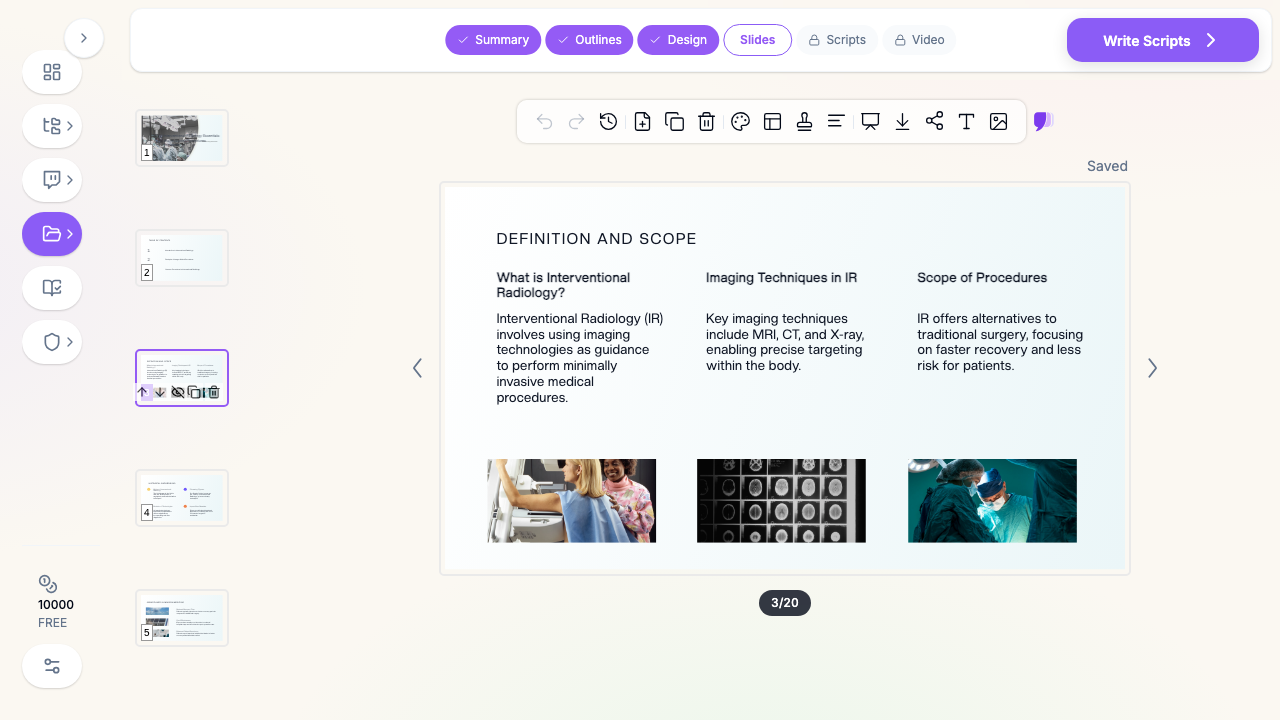

What Makes ChatSlide Powerful for Interventional Radiology
Turns topics into a procedure-first teaching arc
Start with a topic such as "Transarterial radioembolization with Y90: patient selection and dosimetry" or "TIPS: indications, technique, and complications." ChatSlide builds the deck around procedural reasoning: indications and contraindications, pre-procedure imaging and planning, the technique step by step, expected outcomes, complications, and post-procedure follow-up.
Reads guidelines and papers
Upload society guidelines, review articles, or position statements — SIR practice parameters, radioembolization consensus documents, ablation guidelines, PAD intervention pathways. ChatSlide extracts the recommendations, thresholds, and technical steps into editable slides. You can keep the deck practical for residents or deepen it for IR fellows and attendings.
Builds indication and complication tables
IR talks depend on grids that are easy to scan: indications versus contraindications, device or embolic-agent comparisons, complication rates by procedure, and follow-up schedules. ChatSlide helps assemble those comparisons so the decision logic is visible instead of buried in paragraph text.
Handles charts and outcome data
Paste de-identified outcome or dosimetry data — response rates after embolization, patency after intervention, activity calculations for radioembolization — and ChatSlide can turn them into visual slides. This is especially useful for case conferences and journal club where the numbers carry the teaching point.
OCR for tables and scanned material
If your source is a scanned guideline table, a screenshot of a dosimetry worksheet, or an old teaching PDF, ChatSlide's OCR can read the text and numbers so you can edit the content rather than paste a blurry image.
Speaker notes for mixed audiences
The same deck can serve different rooms. For residents, the notes can explain why a mapping angiogram precedes Y90 delivery. For fellows, they can add the nuance of dose partitioning or non-target embolization risk. For a referring-physician audience, they can keep it to the practical referral and follow-up points.
19 AI editing tools
Shorten a lecture to a 15-minute case conference, expand a technique slide, rewrite for medical students, add speaker notes, change the visual style, or turn a dense device-comparison table into a cleaner grid without rebuilding the deck.
How ChatSlide Builds Your Interventional Radiology Deck
1. Name the topic and audience. A precise prompt works best: "IR fellowship lecture on uterine fibroid embolization for radiology residents" or "Case conference on biliary drainage for the IR service."
2. Bring your sources. Upload guideline PDFs, de-identified case notes, PubMed papers, or a dosimetry sheet. Keep patient identifiers out of standard-plan uploads, and use aggregate or fictionalized data for teaching cases.
3. Generate the outline. ChatSlide proposes the flow: indications, pre-procedure imaging and planning, technique, outcomes, complications, follow-up, and take-home points. You can edit the sections before generating slides.
4. Generate, refine, and export. Add procedure images, insert charts, and adjust the level for your audience, then export to PowerPoint or Google Slides, or present directly.
Direct Research Database Access
ChatSlide's Research tab connects to the databases physicians use daily:
- PubMed: Search by keyword, PMID, or DOI. Find the landmark trials, recent publications, and clinical guidelines relevant to your case. The AI reads abstracts and incorporates key findings into your slides with citations.
- Google Scholar: When your topic spans disciplines — say, the intersection of genetics and oncology — Scholar captures the broader academic literature that PubMed alone might miss.
- Clinical Trials (NCT): Presenting on a treatment where pivotal trials are ongoing? Search by NCT number or condition to pull trial design, endpoints, and status into your slides.

Use Cases for IR Teams and Departments
- IR fellowship didactics. Build a recurring lecture series — embolization, ablation, vascular access, drainage — with a consistent structure fellows can rely on. Time saved: hours per lecture.
- Case conferences and M&M. Turn a de-identified case into a structured teaching deck with imaging, timeline, and decision points, ready the morning of the conference.
- Board review. Assemble high-yield decks for CAQ or core-exam prep organized by procedure category, with quick-recall complication and indication grids.
- Referring-physician education. Explain what IR offers — minimally invasive options, recovery advantage, appropriate referrals — in a deck aimed at a non-IR audience.
- Journal club. Drop in a trial abstract and generate a critical-appraisal deck with the design, endpoints, and results laid out for discussion.
Interventional Radiology AI Tools Compared (2026)
| Capability | ChatSlide | Gamma | Tome | Beautiful.ai |
|---|---|---|---|---|
PubMed / Scholar / NCT import | Yes | No | No | No |
Procedure-step and indication tables | Yes | Partial | Partial | Partial |
Reads guideline PDFs into slides | Yes | Partial | No | No |
Charts from pasted outcome data | Yes | Partial | No | Partial |
Speaker notes for mixed audiences | Yes | Partial | Partial | Partial |
PowerPoint / Google Slides export | Yes | Partial | Partial | Partial |
Time Comparison: Manual vs. AI-Assisted
| Task | Manual | With ChatSlide |
|---|---|---|
Outline a procedure lecture | 1-2 hours | Minutes |
Build indication/complication tables | 1 hour | Minutes |
Turn outcome data into charts | 45 min | Minutes |
Find and cite supporting papers | 1-2 hours | Minutes |
Write speaker notes | 1 hour | Minutes |
What a Strong Interventional Radiology Presentation Includes
- Clear indications and contraindications up front, so the audience knows when the procedure applies.
- A step-by-step technique arc with the key imaging and device decisions at each stage.
- Honest complication data with rates and management, not just best-case outcomes.
- A follow-up plan that closes the loop on the procedure.
- Take-home points that a resident can carry out of the room.
Best Practices
Do:
- Lead with patient selection — most IR errors are selection errors, not technical ones.
- Use real imaging where you can (de-identified), because IR is a visual specialty.
- Keep complication slides honest and specific.
Don't:
- Bury the endpoint. State what a successful procedure looks like early.
- Paste PHI into standard-plan uploads (see the note below).
- Over-pack technique slides; one decision per slide reads better.
Note on patient data: ChatSlide's standard plans are not a HIPAA-covered service — keep PHI out of slide content and uploads. For hospital systems, group practices, and clinics that need a Business Associate Agreement, our Enterprise plan offers HIPAA-compliant deployment options — contact us to discuss BAA terms, SSO, and on-prem / private-cloud hosting.
Frequently Asked Questions
Can ChatSlide build an IR fellowship lecture from a topic? Yes. Give it a topic and audience and it drafts a procedure-first outline — indications, technique, outcomes, complications, follow-up — that you edit before generating slides.
Does it cite sources? Yes. The Research tab pulls from PubMed, Google Scholar, and ClinicalTrials.gov, and the AI incorporates findings with citations.
Can I use my own case? Yes, but de-identify it. Keep PHI out of standard-plan uploads and use aggregate or fictionalized data for teaching.
What can I export to? PowerPoint and Google Slides, or present directly from ChatSlide.
Is it free? Yes, free to start with no card required. Paid tiers add more generation capacity and features.
Does it work for board review? Yes. Build category-organized high-yield decks with quick-recall indication and complication grids.
Can my whole IR service use it? Yes. For teams, the Enterprise plan adds SSO, centralized billing, shared brand templates, and collaboration — contact us.
Get Started
Make your interventional radiology presentation with ChatSlide. Name the topic, bring your sources, and get a structured, citable deck in minutes. Free to start, no card required — try it now.