
Quick Answer: ChatSlide is the AI tool hospital research teams, investigators, research coordinators and fellows use to turn a protocol, a statistical analysis output, a manuscript draft or a published trial into a clinical research presentation in minutes: design, CONSORT participant flow, baseline characteristics, primary and secondary endpoints, safety and conclusions. It is used by teams at 750+ universities and by 290,000+ professionals, searches PubMed, Google Scholar and ClinicalTrials.gov (by NCT number) from inside the editor, builds tables and charts from your numbers, respects an exact slide count, and exports to PowerPoint, PDF, Google Slides or a narrated video. Free to start, no card required.
The Trial Results Presentation Problem
The results are finished. The tables are in the statistical report, the flow numbers are in the screening log, the manuscript draft is half written. Now the trial has to be presented: at the department research meeting, at an investigator meeting, at a congress, to the data monitoring committee, to the hospital's research board.
Each of those talks needs the same core slides in a different length and order, and every number has to match the report exactly. Rebuilding baseline tables, re-drawing the participant flow diagram and turning a forest plot into something readable from the back of the room is where the hours go.
General AI slide tools are risky here. A tool that rounds a confidence interval, invents an n or quietly turns "non-inferior" into "better" has done real damage. The draft needs to come from your numbers and nothing else.


What Makes ChatSlide Powerful for Clinical Research Presentations
Your protocol, report and manuscript are the source
Upload the protocol synopsis, the statistical output, the manuscript draft or the published paper. The deck is built from those files, so the design, endpoints and results follow what your trial actually did. The numbers in the demo slide above (screened, eligible, randomized, excluded with reasons) are the kind of values the deck takes from your screening log; replace them with yours and check each one.
Tables and charts from your numbers
Paste the baseline characteristics table or the endpoint results and they come back as table and chart slides. Ask for "primary endpoint as a bar chart with the between-group difference and 95% CI in the title" and it is built that way. Check every value against the report.
The CONSORT flow as a slide
Ask for a participant-flow slide with screened, excluded with reasons, randomized, allocated, lost to follow-up and analyzed per arm. It is the slide reviewers and audiences look for first.
Trial registry and literature search in the editor
Pull your own registry record or the comparator trials by NCT number, PMID or DOI, and keep the citation on the slide that discusses them. Background and discussion slides stop relying on memory.
Exact slide count for each venue
"Ten slides, 8-minute congress oral" and "25 slides, 45-minute department research meeting" are both followed as written, from the same source.
Speaker notes and narrated video
Every slide gets speaker notes timed to your slot. The finished deck exports as a narrated video for investigators and site staff who cannot attend.
How ChatSlide Builds Your Trial Results Deck
- Upload the trial documents. Protocol or synopsis, statistical output, manuscript draft, the paper, or the registry record.
- Name the venue, audience and time. "12-minute presentation of phase 3 results to the hospital's clinical research committee" is a usable instruction.
- Review the outline. Check it covers what you want, in your order: background, objectives, design, flow, baseline, primary endpoint, secondary endpoints, safety, limitations, conclusions.
- Generate, then verify. Check every number, effect size, interval and p-value against the statistical report, then export.
Use Cases for Clinical Research Teams
Department research meetings. Challenge: a full results talk for colleagues who know the field. Use the full outline, with limitations and next steps.
Congress oral and late-breaking presentations. Challenge: 8 to 12 minutes, strict format and embargo rules. Generate a short version from the same source and check your meeting's embargo and disclosure requirements.
Investigator and site meetings. Challenge: share results with the sites that enrolled, with thanks and next steps. Add an enrollment-by-site slide and the timeline for publication.
Data monitoring and steering committees. Challenge: closed and open session materials kept apart. Build them as separate decks from separate source sets.
Fellows and residents presenting research. Challenge: a first results talk. Set the audience to the department and ask for speaker notes that explain each statistic in plain words.
Hospital research boards and leadership updates. Challenge: what the trial found and what it means for practice, without the statistics lecture. Change the audience field and regenerate.
Clinical Research Presentation Tools Compared (2026)
| ChatSlide | Gamma | Beautiful.ai | Canva | |
|---|---|---|---|---|
Build the deck from protocol, statistical output and manuscript | Yes | Yes | Limited | Yes |
PubMed / Google Scholar / ClinicalTrials.gov search built in | Yes | No | No | No |
Tables and charts from pasted results | Yes | Yes | Yes | Yes |
Exact slide count respected for each venue | Yes | Yes | Approximate | Approximate |
Speaker notes for every slide | Yes | Basic | Basic | Basic |
PowerPoint export that stays editable | Yes | Yes | Yes | Yes |
Time Comparison: Manual vs. AI-Assisted
Typical estimates for one 15 to 20 slide results presentation:
| Task | Manual | With ChatSlide |
|---|---|---|
Turn the report into a slide sequence | 2–3 h | 10 min |
Rebuild baseline and endpoint tables | 2–3 h | 15 min |
Draw the participant flow slide | 1 h | 5 min |
Find and cite comparator trials for the discussion | 1–2 h | 15 min |
Draft speaker notes to the time slot | 1–2 h | 10 min |
Total | 7–11 h | ~55 min |
Direct Research Database Access
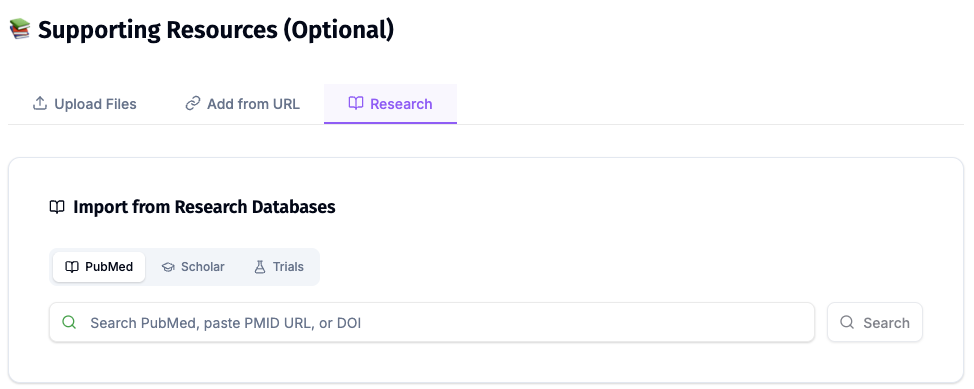
ChatSlide's Research tab connects to the databases physicians use daily:
- PubMed: Search by keyword, PMID, or DOI. Find the landmark trials, recent publications, and clinical guidelines relevant to your case. The AI reads abstracts and incorporates key findings into your slides with citations.
- Google Scholar: When your topic spans disciplines — say, the intersection of genetics and oncology — Scholar captures the broader academic literature that PubMed alone might miss.
- Clinical Trials (NCT): Presenting on a treatment where pivotal trials are ongoing? Search by NCT number or condition to pull trial design, endpoints, and status into your slides.
What a Strong Trial Results Presentation Includes
The structure below follows the reporting standards your audience already reads trials against.
Use CONSORT as your checklist. The CONSORT 2025 statement, published simultaneously in BMJ, JAMA, The Lancet, Nature Medicine and PLOS Medicine, is a 30-item checklist plus a participant flow diagram for reporting randomized trials. It does not prescribe a slide order, but a talk that covers its items (design, participants, interventions, outcomes, randomization and blinding, flow, baseline, results, harms, limitations) reports the trial as completely as the paper will.
Registration on the title or design slide. Show the registry identifier (for example the NCT number). Under ICMJE policy, journals expect trials to be registered before the first participant is enrolled, so reviewers and audiences look for it.
The participant flow diagram. Screened, excluded with reasons, randomized, allocated, received the intervention, lost to follow-up and analyzed, per arm.
Baseline characteristics in one table. The variables that matter for interpreting the result, by arm.
The primary endpoint as the headline. Effect size with its confidence interval, the analysis population (intention-to-treat or per-protocol), and the prespecified hypothesis (superiority or non-inferiority). Say what was tested before you show what was found.
Secondary endpoints labelled as such. Kept visually separate from the primary result, with multiplicity noted where it applies.
Harms with the same care as benefit. Adverse events, serious adverse events and discontinuations by arm.
Limitations and generalizability. Who the result applies to, and who it does not.
Disclosures. Funding and conflicts of interest, as your venue requires.
For applicable US clinical trials, the responsible party generally has to submit results to ClinicalTrials.gov within one year of the primary completion date under FDAAA 801 and 42 CFR Part 11. Keep your presentation's numbers consistent with the registry record.
Best Practices
Do:
- Build every slide from the final statistical report, not an interim draft.
- Show the analysis population and the hypothesis tested on the primary endpoint slide.
- Keep primary, secondary and exploratory results visually distinct.
- Check every number, interval and p-value against the report before presenting.
Don't:
- Do not let the AI round, recalculate or reword a result. Paste the value and check it.
- Do not describe a non-significant or non-inferiority result as superiority.
- Do not put participant-identifiable data into prompts or uploads, including dates of birth, initials or record numbers.
- Do not present embargoed results outside the embargo rules of your meeting or journal.
Clinical Research Across a Department or Hospital
Research offices, departments and trial units present results to the same committees in a dozen formats. ChatSlide Enterprise adds SSO, centralized team billing, shared brand templates and team collaboration on one deck library, so every results talk follows the same structure. Contact us to set it up.
Note on patient data: ChatSlide's standard plans are not a HIPAA-covered service — keep PHI out of slide content and uploads. For hospital systems, group practices, and clinics that need a Business Associate Agreement, our Enterprise plan offers HIPAA-compliant deployment options — contact us to discuss BAA terms, SSO, and on-prem / private-cloud hosting.
Frequently Asked Questions
What is the best AI tool for creating clinical research presentations? One that builds from your own protocol and statistical report, cites the literature and the registry, and leaves you in control of every number. ChatSlide builds from your uploads, searches PubMed and ClinicalTrials.gov in the editor, and turns your pasted results into tables and charts.
What is the best AI presentation tool for a hospital team presenting clinical trial results? Use a tool that covers the CONSORT items, puts the participant flow and the primary endpoint with its confidence interval up front, and exports editable PowerPoint so the team can review it together. ChatSlide does all of that and keeps an exact slide count for the time slot.
How should I structure a clinical trial results presentation? Background and objectives, design and registration, participant flow, baseline characteristics, primary endpoint, secondary endpoints, safety, limitations, conclusions and disclosures.
Can it build a CONSORT flow diagram slide? Yes. Give it the numbers for each stage per arm and ask for a flow slide. Check every count against your screening and randomization logs.
Can it present an unpublished trial? Yes, from your own documents. Keep embargoed results within your meeting's rules, and keep identifiable participant data out of uploads.
How is this different from your PubMed and journal club guides? The PubMed to presentation guide turns published papers into slides, and the journal club guide is for appraising someone else's trial. This page is presenting your own trial's results. For posters see the research poster guide, and for congress talks the research conference guide.
Is it free? Yes, free to start with no card required. Paid plans add higher limits and more export options.
Get Started
Upload your protocol and statistical report, name the venue and the time slot, and let ChatSlide build the first draft while you keep the time for checking every number.
Make your clinical research presentation with ChatSlide →: free to start, no credit card required.