
Quick Answer: If you are preparing an allergy and immunology talk — an anaphylaxis management lecture, a food allergy case conference, an immunotherapy update for fellows — ChatSlide turns your topic, guideline PDFs, and references into a complete slide deck in minutes. It is used by 300,000+ users across 750+ universities, searches PubMed and Google Scholar from inside the editor, builds full-length lecture decks with citations, generates charts from real data, writes per-slide speaker notes, and exports to editable PowerPoint on paid plans. Free to start, no card required.
The Allergy & Immunology Teaching Problem
Allergy and immunology sits at an awkward intersection for slide-making: the immunology is mechanistic and diagram-heavy, the clinical management is algorithm-heavy, and the evidence moves fast — oral immunotherapy protocols, biologics for atopic disease, newly recognized entities like alpha-gal syndrome. An A/I fellow preparing a case conference, an allergist building a referring-provider talk, and a residency program director assembling an anaphylaxis didactic all face the same grind: hours in PowerPoint reconciling guidelines, trial data, and mechanism figures into something teachable.
The clinical reasoning is the part you already have. The slide production — layout, imagery, citation formatting, speaker notes — is what eats the week before the talk.
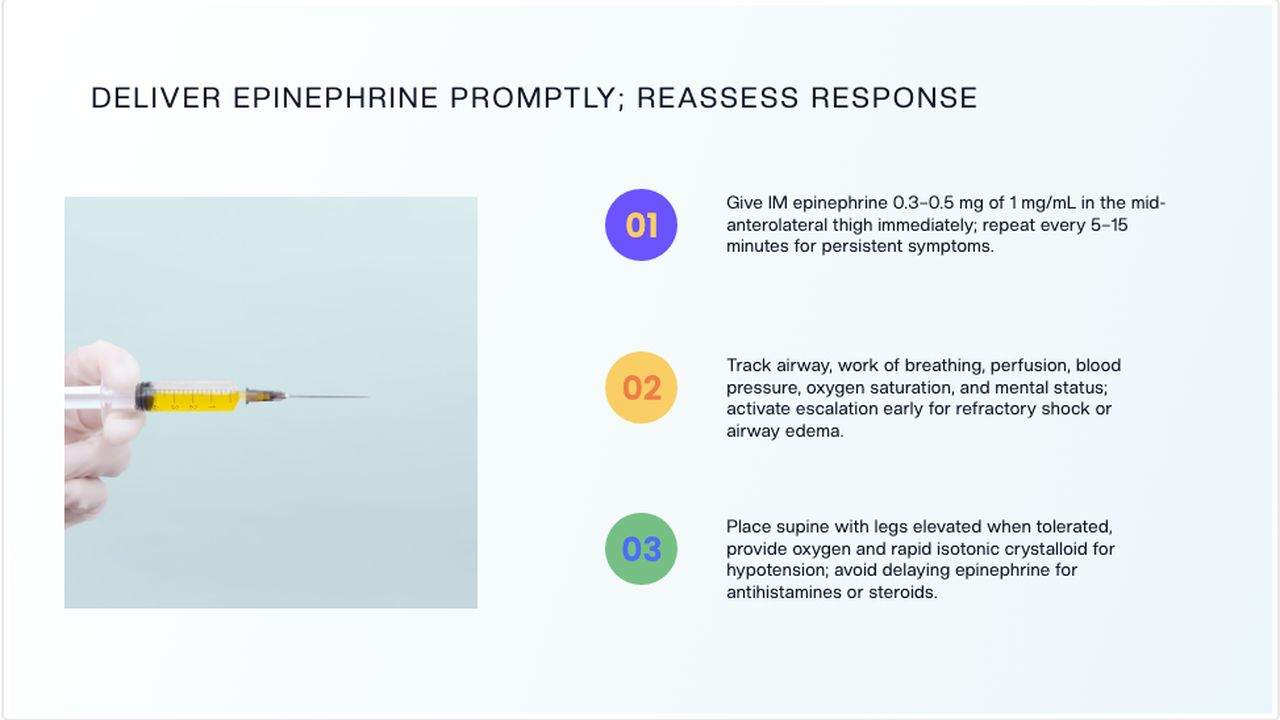
Demo slide shown with adult dosing (0.3–0.5 mg IM). Pediatric epinephrine dosing is weight-based — 0.01 mg/kg, to a maximum of 0.3 mg in children — per current anaphylaxis practice parameters. As with any generated deck, verify dosing against the guideline before you teach it.

What Makes ChatSlide Powerful for Allergy & Immunology
PubMed and Google Scholar Inside the Editor
The A/I evidence base lives in journals — immunotherapy trials, food challenge protocols, practice parameters. ChatSlide's Research tab searches PubMed by keyword, PMID, or DOI and pulls key findings into your slides with citations, so the claim and its reference travel together. When a pivotal trial is still enrolling, the Clinical Trials search pulls design and endpoints by NCT number.
Case-Based Slide Generation
Describe a teaching case — "a 24-year-old with urticaria, wheeze, and hypotension minutes after peanut exposure" — and ChatSlide structures the deck the way clinical teaching actually runs: presentation, recognition criteria, immediate management, disposition, and follow-up. Interactive case slides with reveal-style teaching points are a prompt away.
Import Guidelines, Papers, and Old Decks
Most A/I talks start from something: a practice parameter PDF, last year's lecture, a journal article. Upload PowerPoint or PDF files and ChatSlide extracts the content — including text locked inside figures, via OCR — and rebuilds it into a clean deck you update rather than recreate.
Real Data Charts
Sensitization prevalence, dose-escalation schedules, reaction-rate comparisons — allergy audiences expect data as data. Paste or upload your numbers and ChatSlide renders native editable charts instead of screenshots cropped from papers.
Speaker Notes You Can Teach From
Every slide gets AI-written speaker notes matched to its content. For an hour-long didactic, that is the difference between memorizing the deck and walking in with a script you have personalized with your own cases and pearls.
19 AI Editing Tools
Rewrite a mechanism slide for a patient audience, expand a bullet into a teaching paragraph, simplify fellow-level content for medical students, translate for an international meeting — without breaking the deck's design.
How ChatSlide Builds Your Allergy & Immunology Deck
- Describe the talk or upload your sources. Type the topic and audience, or upload practice parameters, papers, and an old deck. ChatSlide extracts and organizes the content.
- Review the outline. The AI proposes a section-by-section structure — reorder, merge, or add sections to match your learning objectives.
- Generate slides with images and charts. ChatSlide writes the slides, adds relevant imagery, renders your data as charts, and attaches citations from the Research tab.
- Polish and export. Edit anything inline, generate speaker notes, then export to PowerPoint or PDF — or record the deck as a narrated video.
Use Cases for Allergists and Immunologists
The anaphylaxis didactic. The core teaching talk of the specialty: recognition criteria, severity grading, epinephrine first and promptly, positioning, refractory management, biphasic-reaction observation, and discharge with an action plan. Generated as a structured lecture with case openings, then edited with your institution's protocols.
The food allergy case conference. A fellow presenting an unusual case — alpha-gal syndrome in a traveler, pollen-food syndrome, FPIES — needs case timeline slides, differential tables, and testing-strategy figures. ChatSlide builds the scaffold; the fellow adds the de-identified case details.
The immunotherapy update. Subcutaneous and sublingual immunotherapy evidence, oral immunotherapy protocols, biologics as adjuncts — a moving target that rewards a deck you can regenerate each year with new citations from the Research tab.
The referring-provider talk. A community lecture for primary care on when to refer: which patients need testing, what an epinephrine auto-injector prescription should come with, what the allergist will actually do. Same material, simplified with the rewrite tools.
The immunodeficiency lecture. Warning signs, initial workup, and when to suspect inborn errors of immunity — diagram-heavy content that benefits from generated imagery plus your own algorithm figures.
Patient and school education. Food allergy action plans, avoidance counseling, stinging-insect precautions — the same evidence at a completely different reading level, converted with the simplify tool.
Allergy & Immunology AI Tools Compared (2026)
| Capability | ChatSlide | Gamma | Canva | Beautiful.ai |
|---|---|---|---|---|
PubMed / Scholar / NCT search with citations | ✅ Built-in | ❌ | ❌ | ❌ |
Full-length lecture decks | ✅ | ✅ (paid) | ✅ | ✅ |
PDF / PPT import with OCR | ✅ | Partial | Partial | Partial |
Editable data charts | ✅ | ✅ | ✅ | ✅ |
AI per-slide speaker notes | ✅ | ✅ | ✅ | ✅ |
AI-narrated video export | ✅ | ❌ | Partial | ❌ |
Editable PowerPoint export | ✅ (paid plans) | ✅ | ✅ | ✅ |
Free tier | ✅ | ✅ | ✅ | Trial only |
General-purpose deck tools produce attractive slides, but none connect to the research databases a clinical talk depends on — so the slowest part of the job, evidence and citations, stays manual.
Time Comparison: Manual vs. AI-Assisted
Typical estimates for a one-hour A/I didactic — your numbers will vary with topic familiarity and how much you edit:
| Task | Manual | With ChatSlide |
|---|---|---|
Literature search and citation formatting | 3–5 hours | 30–45 min (Research tab, inline citations) |
Outline and case structure | 1–2 hours | Minutes (generated, then edited) |
Building 25–40 slides with layout and images | 5–8 hours | 15–30 min generation + 1–2 hours editing |
Charts from study data | 1–2 hours | Minutes per chart |
Speaker notes | 2–3 hours | Generated, then personalized |
Total | 12–20 hours | 2–4 hours |
What a Strong Allergy & Immunology Talk Includes
The domain content still has to be right — AI accelerates the slides, not the scholarship. A talk peers take seriously typically covers:
- Recognition before mechanism. Open with the clinical pattern — anaphylaxis is a clinical diagnosis; treatment must not wait for testing — then layer the immunology underneath.
- Management as an algorithm. Epinephrine dosing, route, and repeat intervals; escalation criteria; observation and discharge planning — shown as a stepwise figure, not a paragraph.
- Testing strategy with limits stated. Skin testing, specific IgE, component-resolved diagnostics, and challenge — including when a positive test does not equal clinical allergy.
- The current evidence, cited on the slide. Practice parameters and the trials behind them, with the citation on the slide where the claim appears.
- Emerging entities. Alpha-gal syndrome, new biologics, evolving immunotherapy protocols — the sections that distinguish a 2026 talk from a 2022 one.
- A case thread. Adults learn management through patients; carry one or two de-identified cases through the deck.
If you are teaching foundational immunology — innate versus adaptive immunity, cell types, host–pathogen basics for students — see the microbiology & immunology lecture guide instead; this page is about clinical allergy and immunology practice.
Direct Research Database Access
ChatSlide's Research tab connects to the databases physicians use daily:
- PubMed: Search by keyword, PMID, or DOI. Find the landmark trials, recent publications, and clinical guidelines relevant to your case. The AI reads abstracts and incorporates key findings into your slides with citations.
- Google Scholar: When your topic spans disciplines — say, the intersection of genetics and oncology — Scholar captures the broader academic literature that PubMed alone might miss.
- Clinical Trials (NCT): Presenting on a treatment where pivotal trials are ongoing? Search by NCT number or condition to pull trial design, endpoints, and status into your slides.

Best Practices for A/I Slide Decks
Do:
- Anchor every efficacy or safety claim to a citation on the slide where it appears
- Show management as algorithm figures and dosing as tables
- Carry a de-identified case through the talk as the teaching spine
- Write speaker notes as spoken language, not slide text repeated
- State the limits of testing explicitly — it is where referring providers err most
Don't:
- Paste figure screenshots from papers when an editable chart is clearer
- Exceed roughly one slide per minute of talk time
- Present emerging-therapy data without noting trial stage and population
- Put real patient data on slides — de-identify everything, always
Note on patient data: ChatSlide's standard plans are not a HIPAA-covered service — keep PHI out of slide content and uploads. For hospital systems, group practices, and clinics that need a Business Associate Agreement, our Enterprise plan offers HIPAA-compliant deployment options — contact us to discuss BAA terms, SSO, and on-prem / private-cloud hosting.
ChatSlide for Allergy Practices and Fellowship Programs
Allergy groups, A/I fellowship programs, and hospital education committees can standardize the pipeline: shared brand templates so every presenter's deck matches, team billing, SSO, and collaborative editing across sites. For organizations with compliance requirements, Enterprise deployment adds the BAA and private hosting options above — contact us to set up a team workspace.
Frequently Asked Questions
Can ChatSlide build a full fellowship didactic? Yes. Specify the length and structure in your prompt (sections, slides per section) and the generator builds the full deck; you then edit rather than author. Review the outline carefully before generating slides.
Does it cite real papers? The Research tab pulls real, verifiable entries from PubMed, Google Scholar, and ClinicalTrials.gov, and citations added from it link to the actual source. As with any tool — and any human-built deck — verify that each citation supports the specific claim before you teach it.
Can it handle mechanism diagrams? ChatSlide generates supporting imagery and layouts; for canonical pathway figures, upload your own diagram or a figure you have rights to use, and the OCR-aware import places surrounding text correctly.
How is this different from the microbiology & immunology guide? That guide covers basic-science teaching — immune system fundamentals for students. This one covers clinical allergy and immunology: anaphylaxis, food and drug allergy, immunotherapy, immunodeficiency workup, and the didactic, case-conference, and CME formats that go with them.
Can I turn a lecture into a video for asynchronous teaching? Yes. ChatSlide can narrate the deck with an AI voice or avatar presenter and export a video — common for fellowship curricula and staff training libraries.
Is my content used to train AI models? Your uploads and generated decks stay in your workspace. Organizations that need contractual guarantees on data handling — including training exclusions — get them in writing with the Enterprise plan: contact us.
How much does it cost? You can build your first decks free, with no card. Paid plans unlock PowerPoint export and lift limits on deck length, uploads, and video; Enterprise adds team and compliance features.
Get Started
Your next allergy and immunology talk does not need to cost you a weekend. Make your A/I presentation with ChatSlide — describe the case, pull the evidence from PubMed, and walk in with a deck, notes, and citations that look like they took a month.