
Quick Answer: ChatSlide is the AI presentation maker clinicians use to turn a published clinical practice guideline — an ESC, AHA, NICE, WHO or specialty society document — into a ready teaching deck in under two minutes. Upload the guideline PDF itself and the slides are built from that document rather than from generic knowledge, so the recommendations on the slide are the ones in the file. It is used by teams at 750+ universities and by 280,000+ professionals, searches PubMed, Google Scholar and ClinicalTrials.gov from inside the editor, respects an exact slide count and section order, and exports to PowerPoint, PDF, Google Slides or a narrated video. Free to start, no card required.
The Guideline Presentation Problem
A new guideline lands as a 90-to-200-page PDF with an executive summary, dozens of recommendation tables, a class-of-recommendation and level-of-evidence scheme, and a "what's new since the last edition" section buried near the front. Somebody in the department then has to present it — at grand rounds, at a society congress, at a Tuesday teaching session, to a room that has not read it.
The work is not intellectual, it is mechanical. Finding every recommendation that changed. Reproducing the recommendation tables without mangling the class and level labels. Deciding which of 140 statements belong in a 30-slide talk. Keeping the wording faithful, because a guideline paraphrased loosely is a guideline misquoted. That is an evening of copy-paste, and it is the reason the talk usually gets built the night before.
And the audience shifts. The same guideline has to be presented to specialists one week, to residents the next, and to nurses or pharmacists the week after. Each version is the same source document pitched at a different altitude, and each one currently gets rebuilt from scratch.


What Makes ChatSlide Powerful for Guideline Decks
The guideline document is the source, not the prompt
Upload the PDF and the deck is built from that file. This is the single most important setting for guideline work: the difference between a deck that reproduces what the document says and a deck that reproduces what a language model remembers about the topic. For a 2026 guideline that supersedes a 2021 one, that difference is the whole talk.
OCR reads scanned and image-heavy guideline PDFs
Society PDFs are often image-rendered, with recommendation tables that are pictures rather than text. OCR reads them, so the tables come through as content you can put on a slide instead of a screenshot you have to crop.
Exact slide count and section order are instructions, not suggestions
"Thirty slides, in this order: what changed, classification, diagnosis, pharmacological therapy, devices and procedures, follow-up, implementation" is honoured as given. Review the outline before a single slide is drawn and move a section while moving it is still free.
The audience field sets the altitude
Write "cardiologists and cardiology fellows" and the deck argues at specialist level. Write "internal medicine residents and ward nurses" and the same guideline comes back as what to do on the ward. One field, one regeneration, same source document.
PubMed, Google Scholar and trial registry search inside the editor
A guideline recommendation is only as persuasive as the trial behind it. Pull the pivotal trial by PMID or DOI from the Research tab, keep the citation attached to the slide, and let the "why this changed" slide carry its evidence.
Charts built from data you upload
If you are presenting local implementation alongside the guideline — uptake of a recommended therapy in your own service, say — upload your spreadsheet and the chart is built from your numbers. ChatSlide does not invent the data behind a chart; it plots what you give it.
Speaker notes written against the clock
Each slide gets notes you can read aloud, which is what keeps a guideline talk from spending forty minutes on diagnosis and thirty seconds on the recommendations people came for.
How ChatSlide Builds Your Guideline Deck
- Upload the guideline. The full PDF, the executive summary, the pocket version, your previous edition's deck — any combination. OCR handles scanned files.
- Say what the talk is for. Topic, audience, slide count, and which part to expand. "Elaborate on the endoscopic section and keep every recommendation" is a usable instruction.
- Review the outline first. Confirm the section order matches the guideline's own structure, or deliberately diverge from it, before slides are generated.
- Generate, then verify. Slides, tables, charts and speaker notes come back together. Check each recommendation against the source document, edit in place, then export to PowerPoint, PDF, Google Slides or a narrated video.
Use Cases for Guideline Presentations
"What changed" departmental update. Challenge: a new edition drops and the department needs the delta, not the whole document. Upload both editions and ask for a comparison-structured deck. Saves roughly 5–8 hours.
Society congress or symposium talk. Challenge: a fixed slot at a congress, a specific chapter to cover, and a room of specialists who will notice a misquoted class of recommendation. Build from the chapter, keep citations on the slide. Saves 4–6 hours.
Resident and fellow teaching. Challenge: the same guideline, every intake, pitched lower. Keep one project and regenerate at the teaching audience level each year.
Guideline implementation and audit. Challenge: persuading a committee that local practice has drifted from the recommendation. Combine the guideline's own statements with your service's audit spreadsheet in one deck, with the chart built from your data.
Multidisciplinary rollout. Challenge: pharmacy, nursing and medical staff all need the same update at different depths. One project, three audience settings, plus a narrated video export for people who miss the session.
Non-English delivery of an English guideline. Challenge: the document is in English, the room is not. Generate the deck in the language your audience speaks from the same uploaded source.
Guideline Presentation Tools Compared (2026)
| ChatSlide | Gamma | Tome | Beautiful.ai | |
|---|---|---|---|---|
Build the deck from an uploaded guideline PDF | Yes | Limited | Limited | Limited |
OCR for scanned / image-rendered guideline pages | Yes | No | No | No |
PubMed / Google Scholar / trial registry search built in | Yes | No | No | No |
Charts built from your own uploaded data | Yes | Partial | No | Template charts |
Exact slide count and section order respected | Yes | Approximate | Approximate | Approximate |
Audience level controls the altitude | Yes | Approximate | Approximate | Approximate |
Timed speaker notes | Yes | Basic | Basic | Basic |
Export to narrated video | Yes | No | No | No |
PowerPoint export that stays editable | Yes | Yes | Limited | Yes |
Interface languages | 30+ | Fewer | Fewer | Fewer |
Time Comparison: Manual vs. AI-Assisted
| Task | Manual | With ChatSlide |
|---|---|---|
Read the guideline and pull the changed recommendations | 3–4 h | 20 min |
Rebuild the recommendation tables as slides | 2–3 h | 15 min |
Structure a 30-slide talk from a 150-page document | 2–3 h | 5 min |
Find and format the supporting trials | 1–2 h | 15 min |
Draft speaker notes to the time limit | 1–2 h | 10 min |
Total | 9–14 h | ~65 min |
Direct Research Database Access
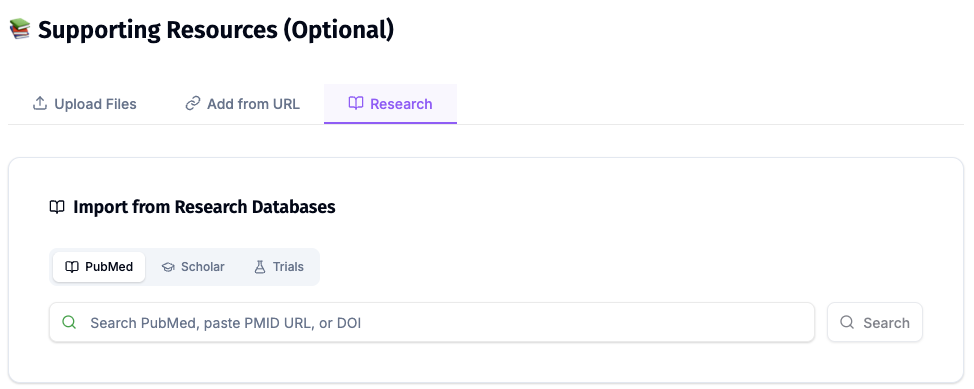
ChatSlide's Research tab connects to the databases physicians use daily:
- PubMed: Search by keyword, PMID, or DOI. Find the landmark trials, recent publications, and clinical guidelines relevant to your case. The AI reads abstracts and incorporates key findings into your slides with citations.
- Google Scholar: When your topic spans disciplines — say, the intersection of genetics and oncology — Scholar captures the broader academic literature that PubMed alone might miss.
- Clinical Trials (NCT): Presenting on a treatment where pivotal trials are ongoing? Search by NCT number or condition to pull trial design, endpoints, and status into your slides.
What a Strong Guideline Presentation Includes
A "what changed" slide before anything else. A room that already knows the old guideline wants the delta first. Background belongs later, or nowhere.
Recommendations quoted, not paraphrased. Reproduce the statement, then comment on it in your own words on the next line. A loosely reworded recommendation is the most common way a guideline talk misleads.
The class and level scheme shown once, explicitly. Every society uses its own labels. One slide defining the scheme makes the next twenty readable.
Recommendation tables that stay tables. The grid is the content. A recommendation flattened into prose loses the strength signal that makes it actionable.
The evidence behind the headline change. One trial, named, with its population and comparator. This is where a specialist audience decides whether to believe the talk.
Explicit scope limits. Who the guideline covers, who it excludes, and where it is silent. The silence is often the clinically interesting part.
A local implementation slide. What your service does now, what the guideline asks for, and the gap. Without it the talk is a reading, not a change.
The citation on the slide, including the edition and year. Guidelines supersede each other; a slide that does not say which edition it came from will be wrong eventually.
Best Practices
Do:
- Upload the guideline document itself rather than describing it in the prompt.
- Ask explicitly for every recommendation in a section when completeness matters more than brevity.
- Verify each recommendation, class and level on the slide against the source document before presenting.
- Name the edition and year on the title slide and in the footer.
- Keep one project per guideline and regenerate it for each audience instead of maintaining separate decks.
Don't:
- Do not let the AI supply a recommendation, threshold or number the document did not state. Check every one against the source.
- Do not present a draft or consensus statement as a ratified guideline. Say which it is.
- Do not strip the class and level labels to make a table fit — shorten the text instead.
- Do not paste patient identifiers, medical record numbers or clinical notes into a prompt or upload when illustrating a recommendation with a case.
- Do not present a guideline from one region as universal when local policy or drug availability differs. Say which jurisdiction you are describing.
Guideline Rollouts for Departments and Health Services
A new guideline is a departmental event, not a personal one — the same deck is wanted by the service's education lead, the residency program, pharmacy and often several sites at once. ChatSlide Enterprise adds SSO, centralized team billing, shared brand templates so every version leaves the service looking the same, and team collaboration on a single deck library — contact us to set it up.
Note on patient data: ChatSlide's standard plans are not a HIPAA-covered service — keep PHI out of slide content and uploads. For hospital systems, group practices, and clinics that need a Business Associate Agreement, our Enterprise plan offers HIPAA-compliant deployment options — contact us to discuss BAA terms, SSO, and on-prem / private-cloud hosting.
Frequently Asked Questions
Can it build the deck from the guideline PDF rather than from general knowledge? Yes, and for guideline work it should. Upload the document and the slides are generated from that file, which is what keeps the recommendations on the slide faithful to the edition you are presenting.
Will it keep every recommendation in a section if I ask? Ask for it explicitly — "include all recommendations from the endoscopy section" — and set a slide count that can hold them. Review the outline before generation to confirm nothing was condensed away, and verify the final slides against the document.
Can it handle a scanned guideline where the tables are images? Yes. OCR reads scanned and image-rendered PDFs, so table content comes through as text you can lay out rather than as a cropped screenshot.
Can I present the same guideline to specialists and to residents? Yes. Change the audience field and regenerate from the same uploaded source. The altitude changes; the source document does not.
Does it check my numbers against the guideline? No. It builds slides from what you upload, and you remain the verifier. Read each recommendation, class and level on the slide against the source before you present it.
How is this different from your journal club and specialty guides? Journal club is the critical appraisal of one paper, and medical grand rounds is the general hospital teaching format. This page is the specific job of turning a published practice guideline into a deck — recommendation tables, class and level schemes, and what changed between editions. For the disease content itself, see the specialty guides such as cardiology or gastroenterology, and for guideline-driven nursing practice see evidence-based practice.
Can I turn the update into a video for staff who miss the session? Yes. The same project exports as a narrated video, which suits an asynchronous departmental rollout better than slides alone.
Is it free? Yes, free to start with no card required. Paid plans add higher limits and more export options.
What languages does it support? The interface runs in 30+ languages, and decks can be generated in the language your audience speaks even when the guideline is published in English.
Get Started
Upload the guideline, name the audience, set the slide count your session allows, and let ChatSlide build the first full draft while you still have the evening to check it against the document.
Make your guideline presentation with ChatSlide → — free to start, no credit card required.